


***UPDATE 2 - April 2019 So right after I added the update below, I started having an issue where all of the android phones in my house will randomly loose data connection (not all at the same time) to the router (they still see it as the wifi symbol is still on but the LTE symbol will also light up). This loss normally is short lived but VERY annoying as it interrupts any internet activity on the phone. Sometimes however, we have to turn the wifi on the phone off and back on to get data back. I am not sure yet if it is the phones (All Samsung Galaxy S devices 5 through 9) or the router but I do not seem to have the same issues at work on my S8 so I am thinking it may be the router. I will update when I know more or if anyone reading this knows something let me know. I have tried resetting the phones to original settings with no change.***
*** UPDATE I have been using the RT-ACRH17 for about a YEAR now and so far so good. I have only expierenced one drop out of wifi that I can attribute to the router rather than my ISP (Comcast). I have my phone connected to the 5 GHz band and it has great signal even on the second floor (router is in the basement) so signal strength is good. Haven't made any settings changes recently so don't know if Asus fixed the reboot issue but I do know that the firmware has self updated. Don't know when it happens until i go into the user interface and it has a new firmware listed. Still no dd-wrt support but otherwise a great router! ***
First a quick summary, The good: The wifi speed and coverage is excellent. Features for the price rocks (this unit has the hardware of an AC1900 router). Now for the no so good: Setup was sub-par at best, but how often are you changing you router settings anyway? No ddwrt support (at least not yet). Only one USB port (but it is USB 3.0).
So I bought this router to replace an aging Linksys unit (EA3500, I know I know). I ALMOST gave up on this router and sent it back as the setup process was HORRIBLE. EVERY change required a system reboot that took AT LEAST a minute! Change the wifi channel on the 2.4 GHz band = reboot, change the SSID for the 5 GHz band = reboot, etc (yes even the change you want to ask about too). I did some reading on line and found that some people found that a BIOS update fixed this and made the reboots faster, however, I updated the BIOS and still have this issue with nearly every change there does not appear to be a pattern now of what requires a reboot and what does not. I hope ASUS fixes this SOON but really I don't change my settings often so not that big of an issue.
Once I got it setup, I noted that coverage area and signal strength were approximately the same as the EA3500 to maybe slightly better throughout my house. The BIG difference comes in the link speeds I am seeing. Previously I was seeing max internet speeds in the area of 30 to 50 Mbps (I have 60 Mbps internet) on the first and second floor of my house (the router is in the basement) depending on the room you are in. With the ASUS I now get 50 to 60 Mbps speeds throughout the entire house and 5 to 20 Mbps in my yard.
I have connected a 2TB USB 2.0 HD to the USB port on the router and it works great as a media server although a bit slow (but this is the fault of the HD enclosure as it is only USB 2.0. In fact ALL of my streaming devices (I have 9 in the house between my wife and the kids) see the HD more readily (I have to wait for each device to "FIND" the server if it is asleep but not the drive connected to this router) than the dedicated media server I have connected to my NAS. I am considering purchasing a USB 3.0 enclosure and shutting down the media server entirely.
Speaking of the nine streaming devices I have in my house, at any given time I can have six or eight devices streaming (Two to four laptops, two Rokus, two to four cell phones, and up to four tablets). I have had up to 16 devices connected to my network either gaming or streaming media at one time (I have two daughters and they BOTH had friends over last weekend along with my wife and I). At no time did I experience any trouble with my WiFi disconnecting although at times I did notice slow downs to around 15 to 20 Mbps.
The four port switch on the rear does provide full gigabit bandwidth to all four devices connected and the modem so no concerns here. As some reviewers have noted, all of the lights for the router are are on the top front of the unit with no LEDs next to the switch ports. This is not an issue with me but may be for some.
The processor at the heart of this router is a quad-core ARM Cortex A7 by Qualcomm (IPQ4019) running at 717 MHz. The specs on the Qualcomm site note that this SoC is a 2x2 MIMO chip with ASUS claiming the RT_ACRH17 as 3x3. I have not tested this so do not know which is correct. But I can tell you that I have never seen the four CPU cores at over 50% even with all the streaming this past weekend! Flash is a comfortable 128 MB with 256 MB RAM so good enough for future third party BIOS (Hopefully).
My biggest concern with this router is that at least so far, there is NO ddwrt support of the device. Currently, as this is a new device and ASUS is still actively supporting it, this is a minor issue as the OEM firmware has decent features. However, once this unit is no longer supported by ASUS this may become a significant issue as old router firmware is very unsecure.
I will update as I use this router more but feel free to ask me questions and I will try to answer them.
When you spend $90 for a router (instead of $20 for the typical one these days), you expect more, and indeed this one gives more. I bought it as a VPN router since ASUS is one of the few brands that supports both VPN Client and Server modes out of the box (OpenVPN as well as older protocols such as PPTP and L2TP that are not much used these days).
Other differences from the cheaper routers:
1. Faster dual CPU. It really does make a difference especially when you're using VPN or have more than a couple of connections going. (A cheap router I downloaded Tomato firmware onto for VPN was CPU-limited to only about 1/4 of the top speed I could get out of this ASUS router, which is definitely noticeable.)
2. Dual band 2.4 and 5.8 GHz and the ability to have multiple guest networks on each of those bands (I think you can get as many as 8 different SSIDs out of this one router if you really wanted to (though why you would is another question).
3. Dual WAN support (if you really can't be down or need higher bandwidth, you can subscribe to 2 different ISPs and have the router automatically load share between the two).
4. USB 3.0 AND USB 2.0 interfaces for hard drive and printer respectively, though also supports Mobile 3G/4G dongles, with built-in software to share the above via the network.
5. A very complete user interface.
6. For nerd types, a nice Android or iOS App that lets you do some basic configuration and monitoring of the router from your smartphone.
There are a couple of negatives:
- Documentation is very sparse. I was looking for a VPN router and even though ASUS has a very good selection, you'd never guess that from browsing their website, where it's hardly even mentioned as a feature except incidentally (you certainly can't search for routers that support it).
- The so-called "full manual" that comes on the CD is very barebones, covering perhaps 20% of the functionality of the modem (the QuickStart Guide is even sparser). So the only way to know about and use the advanced features is to (a) guess that they exist before you buy the modem (b) check out all the options on the web interface once you have the modem and (c) already know what all the features mean and what they do.
- The web interface is buggy. The "live" performance screen does not update and even worse if you click on it, it will log you off and you will have to log on again to the router. The VPN Client tab is similarly buggy and will often cause the web interface to hang completely requiring the router to be rebooted. And this was after I updated the firmware to the latest version. Once you set it up, though, it seems to be stable.
- Minor quibble but who on earth decided to put tiny dark grey lettering against a black background with indecipherable icons to indicate what the indicate lights mean?! You need a flashlight and a magnifying glass (and some imagination to translate the icons into text). Why not just "Internet" "LAN" "WAN" "WiFi" etc., in nice white lettering against the dark background??
I bought this in hopes of improving my network stability after adding a bunch of smart home devices. I was using an Apple Airport Express dual-band wireless-N router, which was dropping connections with the 20+ wifi devices I now had connected. I was not expecting an increase in internet speed, because my Comcast connection had always been pretty weak. I pay for 100 Mb/sec, but rarely get above 30. However, I was totally surprised and delighted that when I installed this, not only did all my devices connect to it stably, but I am actually getting 130Mb/sec from Comcast! I always thought it was Comcast's fault my speeds were down, but it turns out it was my router. The setup was very easy, the only part that sucked was reconnecting all of my smart plugs, echo dots, etc.. to the new network. I've only had it for a day so far, but I am blown away by the range, customization options and speed of this router. It is cheaper than the apple router I replaced, and far superior in every way.
Most of the consumer grade wifi routers out there have software issues in my experience. Generally they'll fire up and work ok for a period of time then the problems start. My latest round of router upgrades happened because a Netgear Nighthawk router suddenly started to drop all 2.4ghz connections in the house (all google hubs, printers, etc). The ONLY way to get them to reconnect was to reboot the router--even though the SSID was still being broadcast. Initially it would happen once a week or so, then it became a daily issue. Having experienced this sort of random failures in the past I knew it was time for a replacement.
I bought a TP-Link A9 and that too worked for a few days before it also started dropping 2.4ghz connections. I thought--what are the odds two different routers would exhibit similar behavior. The only difference was with the TP-Link, the connections would come back. I started to suspect radio interference--but we have very few neighbors and they're not close. Even so, I disabled automatic channel selection and started manually selecting channels. No dice, same issue through channels 1, 6, 11. I returned the TP-Link and bought this Asus.
Heaven finally smiled on me. This Asus router is rock solid stable--SO FAR. My 2.4ghz devices don't drop. My 5ghz devices don't drop. Even though the router has a scheduled reboot option where you can select what time and what days to automatically reboot (which by the way, does fix many of the lousy programming errors in the firmware for these consumer devices), the Asus just doesn't need it. Initially I just enabled a nightly reboot, but since have backed it down to weekly and may disable it all together.
It's as fast as any other AC1900 router I've tested. It easily saturates my downstream/upstream bandwidth. The configuration software is fine although the dark theme is obviously targeted toward gamers. I'd like a nice clean, sanitary white skin but this is strictly an aesthetics issue and has nothing to do with functionality. The TPLink actually had an attractive interface. The Asus is just kitschy.
I gave it 4 stars instead of 5 because the mobile app is more focused on appearance and stats than ease of configuration. It does have some cool stats capabilities though. The web interface is functional but has an odd arrangement and seems to target a certain demographic. The are knit pics on appearances though. The hardware and network software appear to be top shelf and reliable which is what I want above all else. As of this writing, the Asus delivers on that front. I would absolutely recommend based on my experience to-date.
Our house is a mid century modern with a huge staircase. All of our previous routers couldn't reach the other side of the house no matter where we put it. We previously had a linksys n600 and a netgear n900, neither of which would reach all the rooms in the house, regardless of orientation. This thing is definitely overkill and much more complicated than our last two, I'm still trying to figure out all of the features, but it's an absolute monster when it comes to distance. It's orientated in the entry way next to the staircase. We had opted for range extenders with our old setup and quickly ditched them after getting this. It's even powerful enough to reach our detached garage on the opposite side of our property and I can use my bluetooth headset anywhere on our property. I like it quite a bit and it's exceeded my expectations I just wish it was more user friendly and ui was organized better.

Feature Product
- Concurrent Dual-band (2. 4 + 5 GHz) AC1700 wireless router with the latest 802. 11ac MU-MIMO (4T4R) technology for data transfer speeds up to 1700 Mbps
- Quad-core processor with 256MB ram optimizes network traffic and connectivity speeds from the USB 3. 0 and 4x Gigabit LAN ports
- Mu-Mimo (3x3) delivers full speed for multiple devices by connecting multiple MU-MIMO-compatible clients at each device's maximum Wi-Fi speed simultaneously
- AiRadar Beamforming technology with 4 fixed antennas for stronger wireless coverage
- Manage your network with the ASUS router app - setup your network, manage usage and parental controls, even get instant notifications about important network-based events
Description
ASUS RT-ACRH17 concurrent dual Band AC1700 Wi-Fi wireless router Up to 1700 Mbps, with Gigabit LAN ports, USB 3. 0 and AiRadar beamforming technology upgrade your home network and get more from your internet service with the RT-ACRH17 wireless router by ASUS. With Dual-Band wireless speeds 2. 4G at 400 Mbps, 5G and 256QAM technology at 1300 Mbps, a quad-core processor, four Gigabit LAN ports, AiRadar – TX beamforming support, and easy to use management app, your home network will be faster and more secure than ever.
This is hard to rate, it comes with a manual that perhaps I could have understood in my younger years? But it's mostly over my head anymore. When you login to the router, it's overwhelming, just admit it everybody, to much for the sake of options! And it's everywhere on every page of the seemingly endless pages of options. I miss my Linksys, that actually made sense!
Not saying there is anything bad or wrong with this router as it seems to do it's job very well, but only to say it's so complicated and lacking a streamlined architecture of previous makes and models I've used that, well, it make me feel like an idiot! out of the box this thing worked, but I could not login via the instructions. It took an Asus rep to help me resolve the issue. This thing is like an Nvidia driver, too many options but it works when you have it set right! Unlike the Nvidia driver, this thing has crap for help or descriptions. You mouse over a thing in the Nvidia driver and you see a definition of the thing and why you may or may not want to use it. This router needs a whole lot of that and it is severely lacking!
Click manual at the bottom of a page, goto Asus.com, click utility at the bottom of any page and, well, goto Asus.com. Those two things do not work, at all! And I still just need a mouse over a thing to tell me all about a thing! Look, this thing works plain and simple, but it's not for the average techy individual, it's for super techy! My tablet went from 54 Mbs with my old Linksys to 250 Mbs with this, although it was 350 initially and that lasted for a day or so then dropped to 250. No amount of re-stets ever got it back. Ahh, I'm at odds with this router. Good range, it routs just fine, but too damn complicated and dare I say overly so.?!
Do you need a great router but don't want to pay the price of some of the other big name routers at $200+? This is definitely a router that should be in the running for you. I got this router because as most of us know, the modem/router combo that you get from your ISP is usually sub-par at best. They offer little to no security and they sure don't have a very good range on them. I have gigabit internet and wanted to make sure I had a good enough router that my wireless devices that can utilize a 5G band could take full advantage of my internet speed. This one perfectly fit that bill. I actually have it down in my basement on the other side of the house from where my office is because I am hard-lined in at my office and yet I still get a very good signal in my office. With the ease of use being that technically all you have to do is plug it in, connect to the supplied SSID and password, I would definitely say this is easy to use. I do of course recommend changing that SSID/password to something other than what is on the supplied paperwork. Overall, I am more than happy with this purchase, it's definitely left me with a smile on my face.
Setup was very easy. As soon as I plugged it in, it automatically launches the browser to set up the router. The whole process probably took about 5 minutes. Having dual band is a plus. We have 10+ devices in our home and it was able to handle it with ease. The only downside that I found was that the range was not what I was expecting. We bought this to replace a netgear N300 router hoping to upgrade to an AC router. With the netgear router. I was able to have full signal throughout the house and in the yard. This router however failed to maintain full signal in the farthest corner of the house, which the old netgear router can do successfully.
The simple 3 Step Setup didn’t work. The URL specified routed to the Asus web site not the router. I called Asus tech support which was absolutely useless, but the problem was easily addressed with a Google search. (just use an cat5 cable and the 192.168.50.1 address) The router interface is a bit sloppy and INCREDIBLY tedious to work with. Pretty much every little setting is on a different page and requires you to ”apply” the setting before moving on. Each “apply” disconnects you from wifi and reboots the router which seems to take forever. (Probably 2 min +)
However, the WiFi works, and it’s FAST! Excellent signal, stronger signal strength than a Linksys EA7300 which I also tried but returned. I’m running 2 Android phones, 2 laptop computers, 2 Roku HD Video players and a XBOX at full speed.
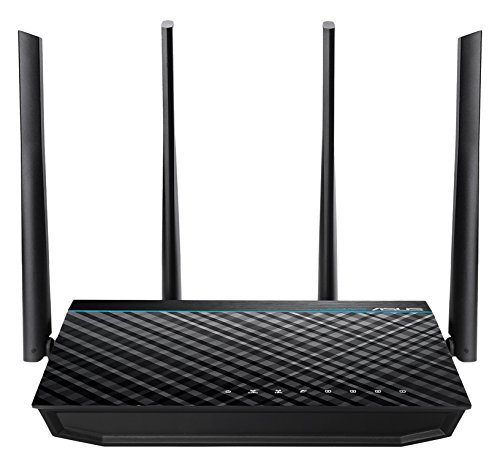
"I don't care if it scares away some users," engr23 (not her real name) told me, "That is my review headline." And it wasn't like I could change her mind, so I listened to her review of the Wi-Fi router she described as "engineer friendly." While the device arrives configured for a competent user to deploy, there is a level of fine-tuning available for technicians that engr23 found "refreshing." "You can really screw this thing up," she said, "It has that level of control," then added, "which is what I want from a switch." I wouldn't correct her by saying "router" though technically because of the port level of control, this unit is above a switch for network device classification, but I knew what she meant. Most Wi-Fi appliances by the common brand names are actually switches and for engineers and technicians who understand this small distinction in product labeling, you will appreciate this Asus Wi-Fi Router. She cabled into it, logged in, and drafted through a staggering number of configuration pages. "There are at least a hundred settings," she stated confidently, "that you can use - or ignore." Four pages deep, I had to admit, for many of these configuration changes, I would need to do a little homework, but I liked what I saw. For security reasons, engr23 vetoed most of my ideas for configuration utility screen shots but she was adamant about posting her "simple" illustrative graphic of the router, so of course I did. The key to keeping this device "healthy" is elevating it above a flat surface so that the vents, which are only on the bottom, can freely circulate out the CPU heat. She explained, "I wouldn't go so far as to label that a design flaw, just lift it up two inches." You can see in the graphic that the unit is resting on top of an obsolete 35mm camera lens as a base. It was good working with someone who was solution oriented - it was good working with engr23.

0 comments:
Post a Comment