


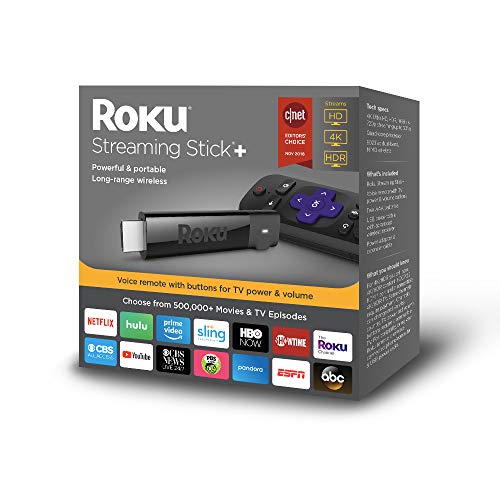
I've been a Roku user for years,including several different models. Roku has recently released The Roku Channel,which has hundreds of free movies.It is ad supported.And now Locast app gives you free local broadcast stations CBS,NBC,FOX,ABC and PBS.Locast now offers local TV network broadcasts for New York,Boston,Chicago,Houston,Dallas,Denver areas and plans to add many more cities.This means many folks will no longer need antennas to watch local networks for free. Roku has just about every app you can imagine (YouTube/Pandora/Netflix/Amazon/Hulu/HBO Now) and thousands of more apps in many different categories.This Roku Streaming Stick PLUS does have more advanced WiFi antenna than the regular Streaming Stick.Here are some points to consider when deciding on which model of Roku to buy:
1)If you need to connect by WiFi in a room far away from your WiFi router,I would recommend the Roku Streaming Stick PLUS or Roku Ultra.
2)If you have a 4K TV,I would recommend the Roku Ultra or Roku Streaming Stick PLUS.The Premiere 2018 model also plays 4K.
3)To search for content using your voice,go with either the Streaming Stick,Streaming Stick PLUS or Ultra.All 3 of these models also have a remote that can control the power and volume on a TV.There is also a Roku app for Android & iPhone/iPad that lets you use your smartphone/tablet to control any Roku device and use your phone/tablet on-screen keyboard for searches.
4)If you want a wired ethernet connection,go with the Roku Ultra.
5)If you want to connect to an old TV with RCA/Composite audio/video jacks,you will need the Express PLUS
6)The Express & Premiere 2018 models have a remote where it has to be pointed at the device,unlike the other Roku models.
7)If you are only going to buy one Roku device,I would recommend the Roku Ultra.The Ultra has many unique features that the other Roku models don't such as:
-Gaming buttons to play video games
-Remote finder to find a lost remote control
-Ethernet port for a wired connection
-Micro SD card slot
-USB Port
-Night listening mode (this lowers the volume of loud,explosive sounds and raises the volume of soft sounds like whispers.Very useful!)
-Headphone jack on the remote for listening without disturbing others
For those who have not used a Roku before,here are some tips that might be helpful:
1)There is no monthly fee to use a Roku.There are many free channels/apps with free movies,music and TV programs and some people use Roku only for the free channels and do not pay any fees.
You do NOT have to enter credit card info if you only wish to view free content and you can always add credit card info to your account later for paid channels/apps.If you plan on viewing free content only,I suggest setting up a Roku account before you activate the device.When you reach the page to enter credit card info,some browsers will show a "Skip,I'll add later" option at the bottom.If you do not see this option,simply log out of your account,then log back in.You may have to then enter a different activation code for your device if you skip entering credit card info during device set up,but you do NOT have to enter credit card info if you only want to view free content.
2)Some of the most popular free channels/apps are: YouTube,Pandora radio,The Roku Channel,Pluto TV,Tubi TV,Crackle,CBS News,NBC News,ABC,PBS, PBS KIds and many more.You can also find a free live stream of FOX News on YouTube by searching "Fox News Live" on YouTube.
3)Some of the most popular paid channels/apps are Netflix,Hulu,Amazon video,HBO Now,Vudu,Sling TV,Spectrum TV and Direct TV Now.
4)If you are looking for a bundle of channels of live TV to replace cable TV,check out Sling TV,YouTube TV,Spectrum TV,Direct TV Now,Hulu,Pluto TV and Playstation Vue.All of these are paid services except for Pluto TV,which is free.
5)To find and add new channels on Roku,just press the Home button on the remote control,scroll down and select "Streaming Channels".There you will find thousands of channels/apps in many different categories and many of them are free.
My one gripe about Roku (and other streaming devices) is the lack of a fully functional web browser and I hope Roku will include web browsing on models in the near future.I have been surfing the web on the big screen for years and find it ridiculous when an internet connected TV device does not allow you to surf the internet and forces one to switch to yet another internet connected device to do so.
I am aware of the screen mirroring function from smartphone/PC/tablet but find that a poor excuse to not include a web browser.Many people who type a lot of messages and/or emails like myself prefer typing on a wireless keyboard rather than a phone/tablet/remote control.
Bottom Line:You can now get a Roku device to replace your cable TV box & service or to replace an antenna for free local network TV.And of course you can create your own custom TV experience that simply is not possible with cable or antenna TV.
I'm a long-time Roku user, having purchased devices from every generation throughout Roku's evolution. I've had the very original Roku N1100, Roku 2 XD, Roku 2 XS, Roku 3 (2013 version), Roku 4, a TCL Roku TV, Roku Ultra (2016 version)...and now this Stick +. While I've only had it for a couple of days now, this might be the best Roku I've seen from a value perspective.
My house is a Roku house. We have 5 televisions but don't have a cable or satellite subscription.. One of the TV's is a Roku TV and the other 4 all have a Roku attached to them. Literally everything we watch is delivered via the Roku. Our OTA material is delivered from a Tablo DVR to our Rokus. Our local media is served up via a Plex server to the Rokus. We also have PS Vue, Netflix, Amazon video, etc. etc. Bottom line, we use Roku a lot, and I'm very familiar with them. I wouldn't consider myself to be a Roku "fan boy", though. While most of the Roku's I've had have been great...there have been some clunkers. The Roku 2XS was a turd that never got any better. The Roku 4 was a turd at the start, but gradually got better with each subsequent firmware update. Unfortunately, the cooling fan in one of my Roku 4s (The 4 was the only Roku model to ever have one) has begun to make the dreaded "grinding" noise in recent weeks, so I decided to try replace it with a stick+.
I've generally been leery about all of the "stick" form-factor devices. They've generally lagged behind the more traditional "box" form-factor devices as far as specs go. The Stick+, with its quad-core processor, HEVC support, and 4K capabilities convinced me that the gap may have finally been closed.
So, after a couple of days with the Stick+...here are my thoughts on this device
- It's snappy and smooth. It's maybe not quite as quick as my Roku Ultras...but it's every bit as fast as the Roku 4.
- The new remote is great.The ability to control the TV's power and volume without a second remote or a universal remote is loooong overdue.
- Excellent wireless reception. I had two walls between the Stick+ and my router, but was easily streaming 16mbps local media through Plex.
- Powering via the TV's USB isn't optimal. Assuming your TV stops providing power to the USB when turned-off, the Stick+ will have to go through the boot-up sequence and then connect to your wireless before you can do anything with it each time you turn on your TV. This can take ~30 seconds. I highly recommend plugging it directly into an outlet using the provided adapter.
So, this is a great Roku device. It doesn't have the same bells-and-whistles that my Roku Ultra's have...but then again, I also paid nearly twice as much for those. This Stick+ is much cheaper, provides basically the same UI/playback performance, and also has a remote that will make having to juggle your Roku and TV remotes a thing of the past. That's why I say, absent some deal-breaker that I haven't encountered yet, this is the best dollar-for-dollar Roku yet.
I purchased the Streaming Stick+ after having repeated difficulties and problems with the Amazon Fire TV Stick. The difference in quality between these two products is astounding. While the Fire TV Stick required constant reboots and had consistently poor network performance, the Roku has been flawless and completely without problems. The addition of 4K support is a huge bonus. I'm especially impressed with the connectivity. My room, where I'm using the device, is on a different floor, on the other side of the house from our router, but I've never had an issue with connectivity or performance.
The menu/interface is a little outdated, but I'd gladly sacrifice a flashy menu for good performance. It's astounding to me what a bad product the Fire TV Stick was now that I've switched to Roku. I enjoy the wide selection of channels as well - every streaming service seems to be available through Roku. The voice functionality on the remote works well, and I like that I can turn my TV on and off with the Roku remote as well as adjust the volume. All in all it's an awesome product.
Original title was: Perfect streaming stick with poor supporting (but mandatory) accessories… however, see updates below
I have bought three units. Two were installed successfully and are working great (with small adjustments described below)!
The third one needed to be sent back to Amazon for replacement due to the poor quality and design of its unique power / antenna cable (you can’t find this cable anywhere and it cannot be bought separately). It easily snapped when installed on one of my wall-mounted televisions.
In addition, I have a 65-Inch 4K Ultra HD television (Sony XBR-65X900A, a model from 2013) and my single 4K UHD HDCP 2.2 port is placed on the television’s back in an area that cannot fit this stick (due to its size and shape). I needed to add a small flexible extending cord to connect it. Finally, I also got an error message (from Roku) on that same television saying it is not getting enough power from the television’s USB port ... so I had to use the power adaptor that comes with this product. However, the power extender is also a very short cable ...
Bottom line, once you get it installed and running (after one week of viewing) the product is great. The sound and picture quality are amazing. I loved the Roku user interface and speedy response. Its only Achilles’ heel is related to its poor proprietary power / antenna cable.
UPDATE (November 10, 2017): Amazon quickly replaced the damaged cable and I was contacted by Roku. Roku team provided me with all the help I have needed (well, it should be on its way to me, so I will keep you updated once I'll get it). Thanks a lot Amazon and Roku!
UPDATE (November 19, 2017): Today I have opened the door to my beloved FedEx delivery guy and look what I have got from Roku! The three (3) HDMI extenders (as promised) and an additional (and totally new) Roku Streaming Stick+ - all for FREE. Just as a reward for writing this review and adding my comments to it. To remind you, my original review had only four (4) stars (due to the issue with the product's accessory, as described above) – however, now I have updated it to five (5) stars. Because in my book - caring for customers and addressing their needs (and beyond) and making customers feel cared and important – it what makes a company (and its products) prefect. We all know, there are no real perfect products out there. For every product out there, we can always apply our hopes and wishful thinking ("I wish they have added that feature to it", “I wish the screen was bigger”, "I wish they have used that my preferred CPU " and so forth). But a company with a great product and a perfect customer care, how many can you find out there?
So, once again - Thank You Roku so much! I really like your product and now admires your service!
The Roku Streaming Stick+ is simply awesome. It's super easy to set up, it's powered by your TV, and the signal booster that is built in to the USB cable ensures a strong wireless connection. This thing attaches entirely to the backside of your TV and is completely out of sight once it's installed. I bought this for use with a bedroom TV because I didn't want any unnecessary electronics cluttering up the room, and I couldn't be happier.

Feature Product
- Powerful and portable streaming stick with an included advanced wireless receiver that gives you 4x the range and a stronger signal for smooth streaming
- Picture quality that's optimized for your TV with crisp details and rich color in HD/4K/HDR
- Voice remote with buttons for TV power and volume
- 500,000+ movies and TV episodes, with voice search across 1,000+ top channels Plus, catch hit movies, popular shows and more with no subscription or fees on The Roku Channel
- Tons of streaming services available From movies and series on Netflix, Prime Video, HBO NOW and SHOWTIME to cable alternatives like Sling TV or YouTube TV to live sports and news on CBS News, ABC News and ESPN
Description
Exceptional wireless. Stunning picture quality. Start watching your favorites quickly and enjoy a smooth streaming experience. Whether you’re streaming in your home, hotel or even in the backyard, the advanced wireless receiver gives you 4x the range and a stronger signal for streaming. This means you can stream in places that are ordinarily too far from the router. Stream in brilliant 4K, HDR and HD. Experience the visual rush of 4K and vibrant HDR picture quality with the new powerful and portable streaming Stick Plus . plus, no more juggling remotes. Our new voice remote with buttons for TV Power and volume control makes it easy to control both your TV and streaming Stick Plus . Enjoy 500, 000 Plus movies and TV episodes across thousands of free or paid channels. You can even search by voice across top channels by actor, show and more. TV Compatibility-HD TVs – Up to 1080p (1920 x 1080) with up-scaling from 720p. 4K UHD TVs – Up to 2160p at 60fps (3840 × 2160) with up-scaling from 720p and 1080p. TV must have an HDMI input that supports HDCP 2.2. 4K UHD HDR TVs – Supports HDR10. TV must have an HDMI input that supports HDCP 2.2
Spectrum's move to all-digital was my breaking point with my ever-increasing cable bill. I have six televisions, only two of which were using boxes, and this change would mean that I would have to rent an additional four. I have two Apple TV boxes and one Amazon Firestick, and can say that this is much speedier and more reliable than either of them. I've been trying it out for about a week now, and am confident in dropping Spectrum at the end of this billing cycle.
By the way - I see that some reviewers have complaints about customer service trying to charge them for setting up the Roku, or for adding or dropping channels, or for troubleshooting. This is a scam perpetrated by someone with nothing at all to do with Roku. An outside entity was able to create a fake Roku site that topped the list when googling "Roku." The phone number you would call if you pulled it from this website was fake and, again, had nothing to do with Roku. Roku was the main victim in this scheme, it's cost them negative feedback all over the internet. Just DON'T google Roku and call any number you find at the site until this is straightened out. Look for a number on the documentation sent with your device. If anyone at the other end of the call tries to charge you for any of these things, you haven't reached the legitimate Roku support guys.
What an incredible little piece of equipment! Because the wifi pickup is in the wire that connects to the power, it balances on top of my TV, and because of that, I get my wifi through 3 walls of the house (wood frame house). The picture quality is, can I say, better than Cable? yes. The selection of endless movies, documentaries. I can scroll down through types of things I want to see. I am only paying for my PBS Passport station through a donation that amounts to $5/month that allows me into an amazing array of viewing. I get my local TV channel every evening for news. If I miss the news time, I can see it again at 9, 10pm, whenever. We don't watch too much on broadcast tv, can't stand the 40 minutes of commercials sometimes and 20 minutes of show. After checking out the Roku experience for 4 weeks, we are going to cancel all TV with Comcast. We do need them for internet, but we can use 55 mbps from them and it will accommodate all streaming. I think we will save $100 to 140/month!! So easy to use. The remote turns the TV on and off, one simple remote. Nice.
I bought this to replace a cable box which wasn't being used, so I could return the box. I have Charter Spectrum which is supported by Roku. I received my Roku + yesterday and hooked it up to my living room TV to test it out.
Setting It up was easy. I have it plugged into my HDMI on the TV and you have a choice of powering it through a USB port on your TV, or using the included wall plug which you plug the USB end into then plug it into an outlet, which I did.
Roku takes you step by step setting it up and you do have to put in a credit card, I used PayPal. That's only if you want to watch something that's not free.
I loaded the spectrum app, logged into spectrum with my username and password and have all my channels. Live and on demand. I also love the fact that when I use the Spectrum guide with the app, it only shows the channels I'm signed up for, unlike the guide on my DVR box which makes you scroll through all the channels.
The remote control has a voice button that you hold down and say what you are looking for, and it takes you to the Roku app with all the results. To test it out I searched Clint Eastwood and so many movies showed up, but most of them needed to be paid for.
I was also very impressed with all the movies and shows that Roku offers. Not all are free, but I set up a pin to prevent any unauthorized charges.
I can't comment on the range of the wifi yet, but will update once I do.
When I read the directions, there was something about using it with a 4k and there's a free adapter they will send, incase something doesn't fit. I went right onto Roku site and ordered it just to have in case I ever need it.
I love this so much, I'm seriously considering getting rid of my DVR service and box on my living room TV to save more money.
Read this review if you care about if your ISP limits data use.
A little background I am a long time cord cutter, used different devices over the years. Decided to switch due to new service only works on Roku. We use Comcast and have 1TB monthly data limit before fees hit. I also monitor using my routers traffic analyzer to see what is sucking up all my data. After using the Roku Streaming Stick+ for a few days noticed a spike in data use at AM hours and isolated the usage to my new Roku.
This version of Roku has a power button to control your TV's power (very handy) Also the Roku can be powered via TV USB or external power supply if your TV's USB ports are too weak. My Roku is plugged into a power supply.
**Heres the rub** So by force of habit when I finish watching TV I have been hitting the power button, TV goes off as expected, but the Roku continues to stream the streaming service I was accessing. (disclaimer only tested Prime and PSVUE so far) My router confirmed the damn thing streamed all night long (all night....all night long, dancin in the streets) with the TV off. Also confirmed by just turning the TV off and back on, what ever is being watched is still rolling.
**the solution** To date I can't find a setting to time-out based on the Roku nor a method to automatically switch to standby when the TV shuts off without replacing a power strip. So my solution to date is MAKE SURE TO HIT THE HOME BUTTON BEFORE POWERING DOWN THE TV.
Other than wasting my internet data it seems like a solid device will post an update if another solution presents itself.
I purchased this streaming stick because I was having trouble streaming content to my Sony Blu Ray player (Netflix and Amazon Prime). It was so painful to try to watch streaming content and I was searching the internet to find some sort of solution. I wondered if my internet provider was not giving me enough data speed and I also wondered if my wireless router was getting too old, etc. Enter the Roku Streaming Stick+! Now, I can stream anything and no problem. I was absolutely shocked on how good my streaming is now. I went with the plus model due to the fact that it claimed to have a better wireless reception than the regular streaming stick. I don't know if I really needed the plus or if Roku is just that good, but I can report streaming content is not a problem anymore. Now the Sony only play DVDs and BluRay discs. Definitely recommend this. The only thing negative to report is you cannot surf the internet with this or at least I haven't found a way to do that. I have Firefox on my Android phone and on Roku and I can't seem to get that to work at all either. I'm not worried about that because I usually don't surf the internet on my TV but it would have been nice to be able to stream shows from the websites of major networks like CBS (can't stream the free content you can stream on your laptop).

0 comments:
Post a Comment