


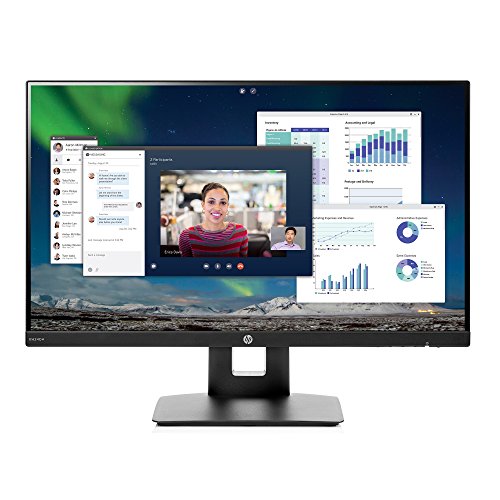
This laptop sits at just over 4 stars while some of the other similarly priced and comparable monitors from Spectre, Lenovo, and other brands hover around 4.5 stars. This gave me pause, but after looking through many of the 1-3 star reviews it was clear that the majority had harshly penalized the monitor due to its reportedly lackluster audio performance. My laptop has surprisingly decent sound so I could essentially care less about the monitor's speakers. Now if my laptop didn't sound good then I would have simply connected my laptop to my Bluetooth speaker, my old PC speakers, my blue tooth headphones, or hell even my surround sound if I felt so inclined. Those reviews are overly demanding imo.
First Impression: Time spent from opening the box to having the monitor up and running was under 5 minutes. Well designed packaging and easy to put together - no screwdriver required. Came with both a HDMI and an Aux cord... ok cool I appreciate that but whatever. First glance of the monitor on my 38" x 24" desk and I'm satisfied with its footprint. The screen bezels are tiny which looks good and helps manage size. Another plus is how the base extends behind the screen as opposed to extruding in front which would take up valuable real estate in front of the monitor. The monitor and my laptop share the desk very well, and there is even generous room for an open notebook directly in front of the monitor. I'm glad that I went with a 23.8" monitor over something like a 20-22" as that last 1-3 inches makes a noticeable difference in screen size. The design and style of the product is very sleek and it looks great on my desk. It definitely doesn't advertise its modest price tag with its expensive and luxury appearance.
Early performance: When I connected my laptop (a lightly upgraded Lenovo T440P Thinkpad, maybe a $400 laptop) via HDMI to the monitor I was met with a large snowy-owl staring at me (one of the photos that Windows cycles through before/during log-in). The picture was bright, edges were sharp, and the snow-white feathers of the owl looked like a true pure white. The contrast between the white of the owl, its dark eyes and the brown of the tree was great and everything looked realistic and accurate. After logging in I went into the Windows display settings and made a few simple adjustments on how I wanted the laptop to display to the monitor, it was very easy and intuitive to do.
First thing I did was browse some HD Youtube videos (a Lord of the Rings fight scene, and Planet Earth) and I was immediately impressed. The screen kept up with the intense action/pace of the LotR fight without any lagging frames or stuttering. Planet Earth's tropical videos looked bright and accurately colorful while the following cave video was properly dark and intense with moments of brightness. Here the speed of some of the small critters gave the monitor a little bit of blurring, especially when the color of the animal was similar to the color of the background. I then switched over to Netflix, browsed a bit, and decided on Planet Earth again since the show has so many amazing spectacles to view. Everything looked just as great and in some cases even a little bit better. The speed of the animals didn't seem to blur as with youtube (note: I didn't watch the exact same video so this is highly anecdotal.) When it came to reading text and more general browsing of the web I was pleased. Letters had sharp corners, and the additional amount of text that fits on the screen vs my 14" laptop made for less scrolling.
Happy with the video playback I rotated the monitor (set monitor to top height, grasp edges of screen, and twist it to the right) to portrait. The rotation felt smooth and solid. Boy does it make for a long screen, but I'm confident I will use it when working with long lists of data, programming, using Excel, etc. I am glad I will have the option.
Weaknesses: As mentioned before the sound is definitely weak. The volume is low, audio sounds pretty "shallow", and there just isn't much to report there. In my mostly quiet apartment I could hear and understand the audio from the monitor, but it admittedly wasn't long before I reverted back to my laptop sound. Nonetheless having an at least usable audio option as a back-up is better than nothing. I will generally award more points to any item that exceeds the expectations of its main function than I will penalize a product for including an average to below-average "extra" that is not vital to performance. If my computer chair gave me a back massage I would be very pleasantly surprised, but if it had a lumpy seat, didn't spin smoothly, and was stuck at a certain height I wouldn't be so pleased. I'll choose the chair that I can be comfortable in for hours, spins effortlessly and noiselessly, and adjusts height easily.
I can't speak to using the monitor for gaming and whether it can handle that demand as I don't have the gaming tech knowledge, the gaming experience, or even a game to test it with.
Final Pros: Sleek aesthetic/design, stand rotates landscape-to-portrait, tiny bezels, good brightness, dark blacks, efficient footprint, simple and
smooth tilt/height adjustments
Final Cons: Weak speakers, minor blurring at times of very fast moving video.
I highly recommend it!
I ordered this monitor because I wanted to make a makeshift area for my powerful, but old laptop. When I took it out of the box, I was impressed by the size of the screen. It's quite wide and sturdy so you have no fear of it wobbling around. So on to the testing. The hdmi and vga are good for selection. I use hdmi and turned it on. The images are gorgeous. The IPS definitely makes the FHD shine thru and thru. Images are vivid, movies are amazing, and you have plenty of room to see all of your windows. Everything was great....till I switched the sound from my laptop to the monitor. They REALLY dropped the ball there. I have to put the sound up on the monitor AND my laptop to even hear anything! I barely have to turn up the sound on my laptop to hear it so I don't know if they put all their money into the screen or decided the speakers were a last minute decision. SO if you plan on using this monitor with a tower pc, please have external speakers as your default because the monitor speakers are mediocre. So for those looking for a replacement monitor, a low price IPS screen, or a productivity/work/some gaming screen, I can suggest this to you. Those looking for a monitor with minimum fuss to it, I can sortof recommend it to you because it's easy to setup. But I strongly advise you to have external speakers in order to enjoy any sound while being hooked up to this monitor.
The thing to remember with this product is you get what you pay for. I am a second year finance major, and I was looking for an additional monitor to use with my laptop. All I would need it for is spreadsheets, word processing, and internet use, so I didn't need a brand new 4k 34in ultra wide whatever. I just needed a simple cheap monitor that would get the job done, and this did exactly that. No, it doesn't have the best resolution, and no it doesn't have the best color correctness. But you can't compare a $120 monitor to a $1300 monitor. For a college student or home office this in my mind is the best monitor you can get for the money, and I fully intend to get a second one.
This monitor is a great deal for the price and size. I use these for my office and cannot comment on performance for detailed graphics, etc -- for common work tasks, even HD video, these do a great job just as you'd expect. I love that the bezel around the monitor is very thin so if you use mulitple monitors, you can get them very close together. I am not using the provided stand as I have these on a swing-arm mount but I'm very happy with these monitors. Just make note - these do not have a Display Port input , only HDMI and VGA. I needed a Display Port to HDMI adapting cable which is a very cheap cost and I'm so pleased with this purchase!
Sweet monitor. I needed a new 24" monitor with an HDMI connector. Researched the hell out of monitors, got it narrowed down to a few great deals. Then realized that the great deals I selected didn't have height/swivel adjustments, which I wanted. Best deals with adjustable stands came down to this item and Acer VG245H (which has tilt adjustment but not height). So this seemed the most bang for the buck. It's sleek, crystal clear, and bezel is ridiculously thin. Picture looked terrible on arrival, way way way too bright-- like a TV in "showroom" mode. Had to fuss with the picture adjustments a good deal to get it to look like other monitors and get it out "eye burning" mode. I had to turn the brightness down from 80%, which is how it was set on arrival, to about 20%. I sure wish there had been some readily-accessible instructions on how to adjust the picture for optimal viewing instead of relying on trial and error. But no useful instructions were included, nor could I find anything online. I'm not talking about color calibration for professional photography or anything like that, just basic instructions appropriate for someone doing word processing, web surfing etc. So docking 1 star for that. Include decent instructions for adjusting the screen- or have it pre-set for normal home/office use-- and I'd give 5 stars

Feature Product
- Monitor: 23.8-inch diagonal Full HD (1920x1080) micro-edge IPS; An ultra-wide viewing experience provides for seamless multi-monitor set-ups
- Resolution and aspect ratio: Full HD and 16:9; 2 million pixels for crystal-clear visuals and vibrant image quality. Brightness: 250 cd/m2, Supports 100 mm standard VESA pattern mount
- Response time and refresh rate: 5ms and 60Hz; Get a smooth picture that looks crisp and fluid without motion blur. Dimensions(W x D x H) - 54.06 x 18.43 x 40.03 cm (with stand). 54.06 x 50 x 32.25 cm (without stand)
- Ports: HDMI, VGA, and HDCP support help you stay connected. Response time : 14 ms on/off (typical). 7 ms gray to gray with overdrive
- Audio: integrated speakers; Get great audio built right in from the integrated speakers.Display Colors:16.7 Million
- Environmental features: Mercury-free LED backlighting, Arsenic-free monitor glass, and the low-voltage halogen design promote energy efficiency
Description
Experience a striking view from all angles on the virtually borderless HP VH240a 23.8-inch display incorporating an ergonomic stand, built-in speakers and ultra-slim design at a competitively low price point.
This monitor is exactly what I was searching for, and exceeded my expectations! To be fair, I was upgrading from a dinky little 18-inch monitor with not a lot of preference options, but nonetheless this one is amazing. The slim edges are perfect to grab another and have a near-seamless dual display. The height/tilt adjustment is easy as pie, and I look forward to being able to work at my desk while standing (without the help of expensive desk platforms). I'm also impressed by the quality of the screen and the 6 different viewing modes, which includes custom adjustments! I use my screen for gaming, movie watching, and photo-editing/graphic design, and I'd say that it is well-designed for all of them! When I say 10/10 would recommend, it's not for the sake of using a meme or being ironic, I truly mean it!
Was on the look out for larger monitor for my home office and for casual browsing and editing pictures. And did not want to pay more than $150. My requirements were full HD, 24-27 inch+, IPS panel for better viewing angles (instead of TN panel) and full height/tilt adjustments so my wife could adjust and easily use instead of having to adjust heights with books. I got the is for 109 (normal price is 129). At this price point this is such a great value and checked all the boxes for me. Screen quality was perfect for my needs and color reproduction was very decent. Build quality is very good and the stand feels sturdy and easy to adjust. Getting height adjustments and full HD+IPS panel at this price point feels like an excellent buy. Speakers are pretty tinny but that was not a consideration for me. (Make sure you increase the speaker volume to 100% through the monitor menu first and then control with computer volume control after that). Very happy with this purchase, highly recommend at this price.
Audio and picture aren't of any high quality, but it can rotate between portrait and landscape without purchasing a $30 mount.
Only good for a simple work setup,
If you read all the reviews for this monitor you will see the two biggest negatives people hold against it are the sound quality from the in-built speakers and durability. I bought it with no intention of using the in-built speakers. I've never seen a monitor with built-in speakers that sounded good, and this one is no exception. Setting the source to HDMI through the clunky menu interface helps, but not that much. Don't buy this monitor for the sound.
I've had the monitor in place for a couple of weeks now so I can't comment on the durability. The material quality is very good and the picture is superb. In fact, I had to dim the settings from the default because it was so bright. Time will tell, though, on whether the monitor will last well beyond it's warranty period. It should, but reading the reviews this may be a gamble. I suspect the negative reviews for durability may be related to a 'lot' or specific time window for manufacture. Of course, make sure the monitor is plugged into a surge suppressor. Usually, low power consumption monitors do not have the problems cited in the reviews. These problems may be related to the external transformer on the power line feeding the monitor. Time will tell.
Overall, if you accept that you really should use your computer speakers, or other external speakers if sound is important to you, and accept the gamble that the negative reviews about durability were an anomaly, you will be happy with this product as it does have an excellent picture quality. It comes with a stand that can be adjusted vertically and by tilting it back-and-forth. The surrounding edge for the screen is super thin yet the quality of materials make the monitor feel sturdy. The screen can also be adjusted to present both a horizontal and vertical aspect if you need a 'long' view of things.
this is what i exactly expected.
*pros*: 1. super easy install&setup +it's lightweight; 2. super easy menu (i saw complaints on that, i never unpacked instructions booklet from it's sealed bag so never read it, figured out everything in a minute, even less; there is an option to turn off power led -- that's pretty cool if you work in dark environment and don't want a light except from your screen); 3. height adjustment (+tilt and, of course, pivot may also be useful for somebody); 4. built-in speakers are not that bad (you just need to go to menu and increase volume), anyway they look more like a bonus for this monitor that a real part of a price; 5. it has hdmi in package
to *cons*ider: 1. colors are poor, the only advantage of this ips is view angle; 2. it's slow (i mean it wakes up about 10 seconds); 3. it's fullhd; 4. it has great stand, if you are looking for monitor for your stand or arm, you'll better look something in the same price range, simpler leg and better picture quality (i think this is perfect monitor for office, it almost fits for enjoyment and it's definitely not for picture/video editing tasks)

0 comments:
Post a Comment