


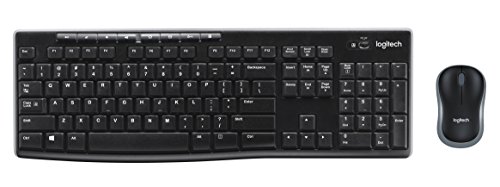
If you’re looking for a good wireless keyboard and mouse combo, then the Logitech MK270 is a great option. The keyboard is very responsive and feels great to use, and the mouse is a great addition as well with its amazing DPI. All of these pros combined with the insane battery life of this keyboard and mouse makes for a very high-quality product.
While it’s not the best buy for someone who’s looking to extensively game on it, it’s a very versatile mobile mouse and keyboard that more than makes up for its downfalls with an insanely affordable price. If you’re looking for a deal, then you won’t find a better one then the Logitech MK270.
Portable and Plug and Play
At just over a pound, the Logitech MK270 Wireless Combo includes a keyboard and mouse that incorporates the same reliable 2.4 GHz connectivity that eliminates delays, dropouts, and interference with a 30-foot range of motion. What comes in the box is a full-size spill-resistant keyboard, a carry around mouse, a Logitech’s Unifying receiver, batteries for mouse and keyboard, and the user documentation. Both devices are plug ‘n play (on Mac, Windows, and Chrome OS), so you can simply plug the low-profile receiver into a free USB port and you’ll be wirelessly typing and navigating in no time.
Long Battery Life
Both keyboard and mouse are powered by batteries so you can go for months without the hassle of changing batteries. The Logitech MK270 Wireless Combo connects to your PC using Logitech’s device-networking receiver that allows you to sync your keyboard and up to five additional compatible peripherals at once. The computer instantly recognizes both devices using the Unifying receiver without any software installation and allows you to perform basic typing tasks with reliable wireless connectivity.
Great For Workstations
I use a 17 inch Dell workstation, so my laptop isn’t exactly the type of gadget to keep on the lap. I was having trouble with all the extensive typing required for my job, so I decided to spend some money on a wireless keyboard. I spent some time researching for a value for money combo and after viewing reviews on MK270 Wireless Keyboard, I decided to go in for a quality brand like Logitech because typing is very important in my job and I didn’t want any low-quality product that would eventually give up on me one day.
Build Quality
rsz_102603568_02_222430d3-9249-4b2f-8e26-a8baa12b0dc9
For a full-size desktop keyboard, the MK270 is pretty decent, and it feels light and sturdy in the hands. The keyboard design is spill proof and has multiple drain holes. The keys themselves are low-profile, and it feels good enough to type reasonably fast. After a few days, I was able to get my preferred words per minute without any trouble because the keys have great travel time between keystrokes and they are very quiet and comfortable. The keyboard contains all the standard keys along with a row of eight designated hotkeys at the top edge of the keyboard frame, which gives you one-touch access to your media applications, calculator, internet functions, and PC shutdown. I usually handle most of my devices very roughly, and with all the extensive typing any keyboard suffers serious abuse in my hands. But so far, the keyboard is doing well and providing a decent response.
Logitech MK270’s Mouse
rsz_02603568_01_fe5fa250-ae0e-418b-899e-53985bdbce7d
The mouse also provides a decent experience and is a fantastic spare when you need one most. It’s lightweight and very accurate for a wireless mouse. It has an ON/OFF switch on the back side and the battery compartment, which uses 1 AA battery, also contains a section to keep your receiver in case you’re not using it. The mouse comes with an invisible optic laser that means you can’t see the light, which is a bit uncomfortable but it helps to save some battery. But overall, the mouse feels good in the hands and it does the job well, and that’s about it.
If you’re trying to game with the mk270, then this mouse be a little lacking in features. If you’re looking for something to game with, then check out my good cheap gaming mice list.
Other Things I Liked About The MK270
What I really liked about MK270 is that it comes with Advanced Encryption Standard (AES) 128-Bit Encryption that guarantees all your private keystrokes protection from evil-doers, which I think is a very good feature because the wireless devices can be easily hacked by experienced hackers nowadays. The company also provides an extra software for button customization for both Windows and Chrome OS but unfortunately not for Mac users.
The company also provides an extra software for button customization for both Windows and Chrome OS but unfortunately not for Mac users. The software is not required for basic functionality but depending on your personal setup, you might want to visit the website for SetPoint that lets you customize F-keys, hotkeys, and even mouse buttons. For such a low price, the MK270 offers a sturdy wireless keyboard that provides an accurate full-sized typing and a decent mouse experience, without the lag and cheap plastic afflicting most wireless keyboards.
Logitech MK270 For Gaming
I know a lot of my readers are gamers, so I think it’s important to talk about how the Logitech MK270 combo performs when gaming. If I had to give a quick summary, I’d say that it’s good for people who’re going to be playing action games with little to no macros needed. If you’re looking for something with a significant amount extra buttons to key bind your abilities too, then you’ll be very disappointed with the MK270.
This combo shines, when you’re looking for a wireless plug and play mouse and keyboard that’s more spacious than your current setup. If you have a desktop, I wouldn’t recommend this for gaming, but If you have a laptop, this could be a great alternative to just using the laptop’s cramped trackpad and keyboard.
I have kids that dont like to keep thier hands off of things that are not meant for them to play with. (I.E. dads wireless keyboard) I went with a cheaper model so when they inevitably stomp on it, drop it, or spill something on it I wont be too heartbroken. Setup was easy... Plug in the usb dongle, remove the little tags from the surprise included batteries, turn them on and your set!! (On windows 10 at least). Very next day your son deciceds to drive his 1970s model Tonka dumptruck over the keyboard a few times, THEN proceeds to DROP said Tonka on top when he realizes hes been caught. Bet your envisioning keys everywhere, cracked plastic and death to my fancy new wireless keyboard huh? Nope!! 1 little scratch of the paint on the Win key! Not a stuck or broken key everything works flawlessly. Now dont go buying this thinking its indestructable, Can pretty much assure you it has a weakness, they all do, my kids just havent found it yet! Surprising little tidbit I read on the box and not in the description; the keyboard batteries last up to 36 months and the mouse goes for 18. If I get 6 months outta the (not advertised) included batteries Ill be a happy camper. My old set was lucky to get a month!! Anyhow everything with this set has surpassed my expectations by leaps and bounds. Its light, comfortable, and works fantastically from my couch (12 or so feet from the pc). Im not a power user or super gamer so did not need all the programable buttons and whatnot some of the more costly models include. But I am a cordcutter and my PC is mostly used for tv and movies. The volume keys are awesome for that. And i do like the other function keys. So for the price and features this is a deal and a half to me. Should this one get destroyed by my children I will definately reorder the same.
This is my second MK270 keyboard-mouse combo; I use them with a laptop computer because I prefer a "desktop" keyboard and mouse when I travel. Why did I buy a second combo? I lost the battery-compartment covers to both keyboard and mouse during my travels, and this is my main reason for subtracting one star. (A tip: tape the covers in place before you pack these for a trip.)
The full-size keyboard (including number-pad) is of the membrane variety with rubber domes under the keycaps; this is the type that is common with all desktop computers sold these days. The key travel is delightfully longer and more positive-feeling than on my laptop's keyboard, and my first MK270 still works beautifully after three years of daily use -- except the batteries now fall out when I'm traveling. :) The keycaps are sculpted, much like those on better mechanical keyboards, and the markings (letters, numbers, special characters) show no sign of fading or wearing away. I think I'll keep this keyboard around as a spare for use on my two desktop computers, or maybe as a keycap-donor. While it isn't quite as comfortable as a good mechanical keyboard, it's close enough that I can switch back and forth without problems.
The mouse uses an optical (but not laser) sensor, which is certainly more than adequate for general use. It's also slightly smaller than the average mouse, which makes it easier to fit into a pocket in my laptop case -- but not so small that using it becomes a problem for my average-size-male hands.
Battery life with both components is pretty good. Even though I almost never remember to turn them off, the batteries (2 AAA alkalines for the keyboard, 1 AA alkaline for the mouse) generally last far longer than I would have expected. I usually replace all three every nine to twelve months whether they need it or not.
The USB receiver for both components is tiny; I usually leave it plugged in, and the laptop will still fit into a reasonably snug-fitting case or sleeve. But there is a storage compartment in the mouse -- a nice touch on Logitech's part.
The combo does not come with a driver disk, and you should not need one for basic operation under either Windows or Linux. But software to access the additional feature-keys at the top of the keyboard is available for download from Logitech.
This combo would not my first choice for someone who programs or pounds out long documents on a daily basis -- for that I prefer a (wired) mechanical keyboard and trackball connected to a more powerful desktop computer. Nor do I expect it would be a great choice for a serious gamer. But for casual or occasional use, it's certainly more than adequate, including a keyboard-feel that is close enough to an electric typewriter to please most users. And for the price, I consider it a genuine bargain. Logitech sells a lot of these, and I see them in big-box stores all the time, so others must agree that it's a pretty good deal.
If you are a casual computer user, or if you actually prefer the rubber-dome membrane keyswitches, I think you'll like this Logitech keyboard-mouse combo. in the bargain you'll eliminate a couple of cables running across your desk, and free up one USB port on your computer.
The keyboard works well (I like its layout, key size, key travel, and feel), but I don't like the feel of the M185 mouse that comes with it as much as I do the M325 mouse. However... for the price, this is a GREAT combo that is a better option than purchasing the K270 "Unifying" keyboard (which feels very different from this one, and on which I cannot type on reliably) and your favorite mouse separately.
Unfortunately, when you purchase this combo set, neither device is "Unifying". Both devices have to be used with the USB stub that comes with them, so you cannot "mix and match" these with other keyboards or mice.
I got these for my new laptop, as I've been told the touch-pad was too touchy and the keys too flat. Both installed within seconds and have worked flawlessly. Can't say I'm surprised. It's Logitech. I assume, when the eventual robot wars come that will wipe out all of mankind, the robots will be made by Logitech. From what I know, the only true way to defeat a Logitech product is to drop it into the toilet.
Note to the government; start building giant toilets.
But as far as wireless keyboards and mouses go, top notch Logitech. I'm fully ready to accept you as my new robot overlords.

Feature Product
- WORK FOR LONGER WITH LONG BATTERY LIFE Basic AA and AAA batteries are included with the keyboard and mouse
- KEYBOARD AND MOUSE COMBO The Logitech MK270 Wireless Keyboard and Mouse Combo includes a full size keyboard and a precision mouse so you can work comfortably away from your computer
- EASY STORAGE The MK270 includes a plug and forget receiver that cleverly stores inside your mouse for safekeeping. The USB toggle is located in the storage compartment of the mouse.
- DROP OUT CONNECTIVITY. The 2.4GHz signal ensures you have a strong and reliable connection, so you will never have to suffer through dropouts
- PROGRAMMABLE HOTKEYS TO BOOST PRODUCTIVITY Automatically access frequently used applications by programming them to the 8 available hotkeys
Description
The stylish Logitech MK270 Wireless Keyboard and Mouse Combo is perfect for the home office or workplace. Ditch the touchpad for this full-size keyboard and mouse. Easily connect using Logitech's plug-and-forget receiver—just plug it into the USB port, and you're ready to work. There's no lengthy installation procedure to slow you down. When you're on the move, the receiver stores comfortably inside the mouse. Both the keyboard and mouse included in the MK270 combo use wireless 2.4GHz connectivity to provide seamless, interruption-free use. Use the keyboard within a 10 m range without dropouts or keyboard lag. All of your information is securely transmitted to your computer using 128-bit AES encryption. Work for longer with the MK270's long battery life. The keyboard can be used for up to 24 months, and the mouse for 12 months, without replacing batteries. The Logitech MK270 keyboard includes 8 hotkeys that are programmable to your most-used applications to boost your productivity.
This is a standard sized keyboard not a mini one. The keys are nice and responsive.
The additional keys on the top are convenient for my use. I especially like the "Caps On"
warning light on the top right of the keyboard.
The mouse is light, responsive and and very comfortable.
Set up is nothing. Plug in the nano device and in seconds he keyboard and mouse are connected
WARNING: I feel stupid bringing this up but apparently others have had the same problem.
The nano device is somehow hidden in the packing. I could not find it and was on the verge of returning
the whole thing. My wife came in and rattled the box - out flew the nano connector. I still have no idea where
it was hidden. So keep looking if you can't find it. The end result is worth the search.
For the price - you will be hard pressed to find a keyboard/mouse set that is not only functional, but also comfortable, responsive, and well made. The plastic isn't cheap, the keyboard is fast with great spacing and layout of the keys. The top is lined with accessory buttons - Volume, navigation shortcuts, and my favorite because I'm nerdy, a quick button to open the Calculator! Battery life is normal - it's been running for a few months on the included battery.
The mouse is the standard logitech mouse - it's comfortable and also well made.
Both run off a single usb dongle - so just one thing to plug into the computer to connect both the keyboard and mouse - which is great for a laptop! Amazon, best buy, office depot and staples all go back and forth with the best price, but this thing is easily found for under $20 from any of them and will serve you well.
When I got that other one I tried getting help with it but all I got was a like for the manufacture with like 50 different down load files i had to read and figure out how it worked. Was way too complicated and just gave up on it. Was a waste of my time and money.
My HP All-in-One keyboard crapped out. Rather than replace it with the same thing that had failed after such a short time, I looked around for an alternative. I wasn't willing to pay $30-$80 for a keyboard and mouse.
I had tried a bluetooth mouse for my laptop and absolutely hated it, because it would hesitate and skip constantly. I'm an impatient sort that does a lot of work at the computer and don't appreciate lagging controls so knew I wanted the wireless USB.
While I had wanted a backlit keyboard, the price is what convinced me to try this one. Plus Logitech has proven to be a solid brand in my past experience.
I purchased two, one for my laptop and one for the All-in-One. Good choice!
The mouse is very responsive, no lagging whatsoever. Fits my hand nicely.
The keyboard is very comfortable. It's close enough to my crapped out HP keyboard that id doesn't feel different. It's full sized, with the numerical pad (essential for alt codes) and very responsive. It has volume control buttons as well as a couple extra niceties such as a pc power button, home, email and calculator shortcut. I especially like that the power button is on the top. Easy access to save battery.
Set up was a snap. Pull the paper battery barriers, plug in the USB connector... done! It really doesn't get any easier than that.
Very happy with the purchase, and glad I got two.
I just received the keyboard and mouse combo and I love it. I already had a mouse so I didn't need the mouse that was included but the keyboard is very nice. All I had to do was plug the USB dongle into my desktop and it started working. There was no drivers to install and all the hotkey's worked without having to program the keys. The feel of this keyboard is nice and it seems very durable. I wished I got it earlier bc the one I had before had a stupid cord sticking out in the middle of the keyboard and was annoying. Now, I have to make sure that no one steals this keyboard from my office. There is a lock on my door so I don't think anyone will steal it but I have my concerns. Anyways, the keyboard feels nice and at the price point, I really can't complain. Everything works well and although it's a cheap keyboard it works and the keys feel nice. I have no complaints about this keyboard but I have to get used to using something new again. It's the first wireless keyboard I've ever had and it seems to be working just fine. I do a lot of typing at work so I'm glad I got this keyboard and I'm thinking of buying another one for my home computer.
After 2 weeks- This keyboard is holding up really well. I have it connected to my MS Surface Dock and the mouse and the keyboard works perfectly but since I have the Surface Pro I use the Surface Arch Mouse. The keyboard works well with all window's devices and the shortcuts work without having to programming it in the settings. I have a perfect setup at home. 3 monitors and a wireless keyboard and mouse. Couldn't be better. I like how this keyboard types and the feedback that you get from typing on this keyboard. For the price, I ended up buying 3 of them. One for me at work, one for my wife and one for my work desktop setup.

0 comments:
Post a Comment