


#EDIT3: TFTCentral re-tested this monitor on the new firmware and saw that the input delay is now on par with the "G" model, which is almost zero: https://www.twitter.com/TFTCentral/status/1097489924633313280
#EDIT2: There's a firmware update available for this monitor! I finally managed to hook up the included USB cable (it's way too short to reach my PC normally) and installed LG's "OnScreen Control" tool from their web site, and it told me there's a firmware update. The monitor came with v3.0.0, and after updating it went to 3.0.1. So far, the only thing I noticed was that the VRR range (Variable refresh rate range/FreeSync range) was changed from 55-144Hz to 48-144Hz. The second thing I noticed was when I forced a game to run at 90 fps, it was occasionally jittery before, but the new firmware seems to have fixed that. No change with white background imbalance unfortunately :(
When updating the firmware, do NOT use an USB 3.0 extension cable: the update cuts out in the middle and fails, forcing you to unplug and replug the monitor. Only use a single cable to connect to it. The update also took a lot longer than I expected: took about 40-50 minutes to complete.
#EDIT: I started noticing some screen uniformity issues, particularly with color imbalance: staring at the screen head-on, if I have a white background or two windows open with predominantly white content, I can clearly see that the left side of the display is more neutral white while the right side appears beige/yellow-ish. Attached two photos. Not sure what's going on here...
Since NVIDIA has let the floodgate open (starting with 417.71 drivers), FreeSync displays are now "G-SYNC compatible" and works equally as good, with the benefit of being able to now use it with FreeSync on *ANY* branded GPU (AMD, NVIDIA, and maybe even Intel in 2020)
I upgraded to this LG monitor from the well-known Acer Predator X34 G-SYNC monitor that capped out at up to 100 Hz. Yes, 60 Hz -> 100 Hz was night and day. And so is 100 Hz -> 144 Hz. Don't let anyone fool you otherwise! I'm using it with a Founders Edition RTX 2080 Ti.
The setup experience was very straight forward: install the stand, hook up Displayport, power cable, and turn it on. Then, go into the monitor's OSD and enable "Faster" response times (overdrive), as well enable "FreeSync". Then, go into the NVIDIA Control Panel and enable "G-SYNC compatible" and "Enable settings for the selected display model". Now it'll work 100% identical to a G-SYNC monitor with an expensive $300+ G-SYNC module, only without that extra cost and module. Remember to set your in-game FPS limiter to 142 to prevent the game from hitting 144 fps and causing input lag.
The price premium for the *only* 144Hz 1440p Ultrawide on the market is obviously quite high, when you can get a 100 Hz one (with either FreeSync or G-SYNC) for about half the cost. But if you can stomach the cost, the experience is worth it.
Will update the review if anything changes. But otherwise, I highly recommend it to anyone who wants an Ultrawide and have 1440p and 144 Hz AND universal Adaptive Sync!
Bonus feature: You *CAN* use the HDR feature on this monitor WITH G-SYNC enabled. Even in games like Battlefield V. If you don't want to use HDR, you can still benefit from the panel's wide color gamut: you can enable 10-bit color output in the NVIDIA control panel.
I got a perfectly working Monitor! Read some of the other reviews on google and a few have noted that they get dead pixels and red or green lines across the screen but lets be real n think about it. Only those who get a bad screen take to the internet and post their experiences and everyone whos looking to get one just sees those reviews. The truth is Most people who get a working product dont tend to make reviews theyll just use it and never think to mention to the community how awesome a product is.
On to the review. I'm no monitor geek or know much about monitors, All I wanted was for the screen tearing to stop and to have smooth gameplay above 60fps without vsync on. Welp folks, we have a winner. I'm coming from the Samsung CF791 1440p Ultrawide 100hz and since my framerates were well above 100fps I did get some screen tearing and wasnt as smooth. With this monitor at 144hz everything is Milk! The IPS is GORGEOUS! I thought the samsung Quantum dots was nice but this... THIS is where the pixels are born! Colors pop and the HDR is also a HUGE bonus even though its not HDR10 WHO CARES! I opted for the 144hz Freesync over the 120hz Gsync model because it doesnt matter if you have 144hz monitor and over 144hz fps in game. I get no screen tear and everything looks buttery smooth. Not to mention $200 less.
Cons: Not really a CON for me but it will be for those who play First Person Shooter games. The input lag is 14ms according to my research. And I did research it because coming from a 4ms lag on my Samsung monitor I did notice something "different" when I was wiggling my open windows around but just BARELY. I don't notice it unless I actually do TRY to notice it but there is an every so slight delay in input lag. Again, I only noticed it when I first set it to 144hz and tested the response. But it my everyday use and RPG game play, I don't notice a damn thing. I'm sure you MIGHT notice the lag if you're a competitive gamer. But yea, that's the ONLY thing I thought is really worth mentioning.
My new monitor arrived yesterday in great condition. I was dreading plugging it in for the first time because of the "panel lottery" that people talk about, especially in regard to high resolution IPS monitors. I fired up my machine and lo and behold no dead pixels at all that I was able to detect. Pixel perfect!
Very little back-light bleed with a minimal amount at the corners. Seems to be predominantly the lower left.
I was unable to set the refresh rate above 100hz, but I imagine that has to do with my graphics card supporting only displayport v1.2 when it really needs v1.4. I will investigate this further.
The colors are amazing to my eyes with great whites and blacks. The monitor was set too bright from the factory for my tastes, but that was quickly and easily remedied.
I know that pixels can go dead in the first few weeks of use, but so far this is terrific.
I will add to this review in a couple of weeks.
I've always said to never go cheap on the peripherals you interact with - monitors, keyboard & mouse need to be great. This monitor falls in that great category. Obviously it's a bigger monitor than most, but you don't truly realize how big and awesome it is until you get it set up on your desk. I was going to toy around with HDR, but really haven't found the need to do it because the colors on the Nano IPS panel are absolutely excellent. There is some IPS glow on all four corners. The photo I took makes it look worse than it actually is. I only really ever notice it when I'm watching a full screen video in 16:9 and I have the black bars on either side. There is a little glow, but it doesn't bother me really at all. This version of the monitor does not have the RGB shenanigans on the back like the g-sync version, but I'd never turn it on anyways. The only con so far is the stuff I learned after I bought it. I did my fair share of due diligence trying to pull up reviews and such, but I recommend you download the manual and give it a read before you make your purchase... I didn't think to do that. If your GPU has display port 1.2, then you will be capped at 100hz. You also can't use the 1ms motion blur feature either. However, I read in the manual that you can't use freesync and motion blur together anyways. It would have been nice to know. My Fury gpu wouldn't push 144 fps at this resolution anyways so maybe the 1.2 is a push. All I know is I'll need display port 1.4 from a 1080ti, rtx or Radeon vii for another $600 or so thank you very much.
I've only had it a few days, and played a few games with this monitor so here are my initial impressions.
First, I came from a 32" LG 4k monitor, so the lack of vertical resolution, especially for tasks like viewing images and videos takes getting used to as they don't fill the entire display on an ultra wide. To be honest I would have preferred the 38" LG monitor with it's 3840 x 1600 resolution for general day to day tasks, but that model is only 75hz refresh rate, and I wanted 144hz. I am driving it with a Sapphire RX Vega 64 liquid cooled GPU.
The monitor arrived in a huge cardboard box, I thought it was a new stove at first ; ). It was well packaged, and there is a piece of Styrofoam in the packaging that you use to support the monitor while you attach the stand and cables etc. It includes cables, you'll want to use displayport if you have an AMD GPU.
I adjusted the settings loosely based off the tftcentral review of the monitor, and included with the monitor was a calibration spec sheet. Turning it on and placing it on my desk it is huge, but after a few days you start to get used to it, and the curve of the monitor. I played some DOOM and it looked glorious, it is definitely smoother than 4k 60hz. Same with Wolfenstein 2 and some CoD Black Ops etc.
There are no dead pixels, it is really bright, I turned it down to 40% for my room. Overall Windows and internet browsing is fine, it's almost better to web browse in a window, and you can have other windows open next to it, there is so much screen real estate. I'll be honest, going from 60hz to 144hz in Windows I'm not seeing any "ahaa" differences in smoothness or fluidity of the mouse, but not noticing any lag in games or Windows either.
I'll try to edit this after a few months of use. Currently I feel this is the best ultra wide monitor you can buy if you want 3440 x 1440 and high refresh. There have been 200hz monitors announced for a long time that have not been actually produced for sale yet, who knows if those will ever happen.
Pros: 144hz Freesync 2, HDR400, accurate color, connectivity, joystick control, super thin bezel, vesa mount, no noticeable backlight bleed *yet.
Cons: I'd rather see more vertical real estate, could be HDR1000, some review sites claim input lag in fast FPS shooters, I don't notice any though.

Feature Product
- 34" WQHD (3440 x 1440) Nano IPS Ultra Wide Display
- VESA Displayed 400
- Radeon Free Sync 2 Technology with 144Hz
- 4-Side Virtually Borderless Design
- Height/Swivel/Tilt Adjustable Stand
- 144 hertz
Description
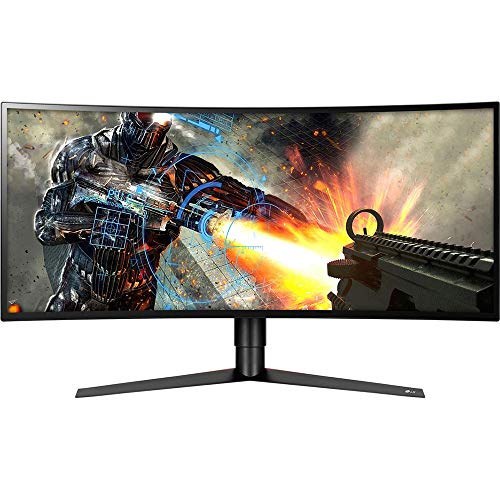
From the manufacturer LG UltraGear Gaming Monitors 34GK950F LG UltraGear is the powerful gaming display gear with high performance features to take gaming to take your gaming to the next level. Graphics-intensive games will amaze on the QHD 34GK950F, thanks to AMD Radeon FreeSync 2 technology plus a 144Hz refresh rate. It also supports high dynamic range content at 400 nits brightness with broad DCI-P3 98% color support. For even greater immersion, the curved 34GK950F now features a sleek four-side virtually borderless design. 34GK950F Key Features 34GK950F-B UltraGear Gaming Monitor Features Nano IPS with VESA DisplayHDR 400 More accurate color and a broader contrast ratio combine to deliver truly high-end picture quality. Makes bright and dark portions of the image even more so, while Nano IPS controls color better, covering 98% of the DCI-P3 color space, the film industry standard. 34" 21:9 UltraWide QHD For Gaming The 3440 X 1440 UltraWide UltraGear QHD display with outstanding clarity to ensure precise gaming. The monitor's pixel area is about 1.8 times larger than an UltraWide Full HD 21:9 monitor, and about 2.4 times larger than a Full HD 16:9 monitor. AMD Radeon FreeSync 2 AMD Radeon FreeSync 2 enables smoother motion and less stuttering in demanding games. Now it's a plug-and-play solution for high dynamic range (HDR) content as well. This monitor supplies the low-latency, high-brightness pixels, superior black levels and the wide color gamut that bring HDR games to life. 144HZ - 1ms Motion Blur Reduction Experience smoother, clearer action during the most demanding games. The 144Hz refresh rate combined with a 1ms Motion Blur Reduction offer critical accuracy and precision while reducing blur and ghosting when it matters most. Custom Gaming Environment Optimize the display of different games. Players can also adjust for personal preferences, including crosshair shapes, brightness, aspect ratio and more. Advanced Gaming Features Minimize input lag with Dynamic Action Sync so you can catch every single moment in real-time. LG's Black Stabilizer helps make dark scenes bright so it's easier to find the competition. By placing the striking point in the center of the display, Crosshair helps enhance accuracy in first-person shooter games. Ergonomic Design Immersive Gaming Ambiance The ultra-thin bezel on this streamlined display offers a virtually borderless visual experience without distraction from the precise, gorgeous image. The monitor also enables more comfortable viewing with versatile screen tilt, height and swivel adjustments. LG Ultra Gear is the powerful gaming display gear with high performance features to take gaming to take your gaming to the next level. Maximum Immersion. The 3440 X 1440 Ultra Wide QHD display with outstanding clarity to ensure precise gaming. The monitor's pixel area is about 1.8 times larger than an Ultra Wide Full HD 21:9 monitor, and about 2.4 times larger than a Full HD 16:9 monitor. AMD Radeon Free Sync 2. AMD Radeon Free Sync 2 enables smoother motion and less stuttering in demanding games. Now it's a plug-and-play solution for high dynamic range (HDR) content as well. This monitor supplies the low-latency, high-brightness pixels, superior black levels and the wide color gamut that bring HDR games to life.
I am upgrading from an LG 34UC97 60hz,IPS panel. I have used the new LG 34GK950F-B for about 100 hours so far and have the following pro’s and cons:
PRO’s
-The 400 nit brightness panel might not be of much use for HDR but my god the brightness vs my old 34” IPS panel is stunning.
-I was prepared to be underwhelmed with the NANO IPS panel as I already had a very good IPS panel. My god was I wrong, the colors are incredible. Not quite as good as my OLED or QLED tv’s but stellar vs a TN, VA or standard IPS panel. This alone was worth the upgrade. (Used a Color Munki Elite to adjust color)
-The menu is greatly improved from my lg 34uc97
-The monitor is a LOT lighter than my 34uc97
-Even without using Freesync 2 as I haven’t managed to get a Radeon VII yet, the 144 hz panel is a night and day difference. No more screen tearing with Assassins Creed Odyssey!
-I bought it new for $850.00 USD, at that price it’s a fantastic monitor IMO as it blows away the competition that all sit at around $800.00 USD
-I find myself not wearing my blue light filter glasses when on this monitor late at night. There is just something about the panel that is better for late night gaming.
CON’s
-The HDR is literally useless, If HDR is a big deal for you there are FAR better monitors. None that have the other stats this one has overall but All the reviews that say HDR 400 is worthless are correct.
-Unlike what some reviewers are claiming this monitor (at least mine) is NOT supporting Adaptive Sync via my Gtx 1080
-I don’t like that the cable ports fire straight out the back. It creates an eventual droop for the heavy headed display port cables
-The power brick is HUGE… not a big deal but depending on your setup it might need to be velcrod on your desk or something.
Gaming-As with my LG 34uc97 gaming on a 34” UW 21:9 curved monitor is a joy. Games with saturated or hyper color pallets look absolutely breathtaking on the Nano IPS panel (WOW, RIFT, Overwatch, SWTOR, Mass Effect Andromeda, Fortnite, Disney movies) Games with a more realistic color palette ( Assassins Creed Origins& Odyssey, Witcher 3, ESO, Battlefield, Hellblade: Senuas Sacrifice etc) are less impacted by the Nano IPS but the brightness and crispness the panel offers still improves the playing experience. There is no other ultra wide curve with the overall stats this one has. I made a spreadsheet comparing ALL of them including the 49” ones and none of them have all the tech this one has.
I have been a computer nerd since owning a 486 SX 25 MHz PC in 1993. I couldn’t afford the DX processor and who needed floating point done in hardware back then? The best “monitor” I probably ever bought was a Viewsonic 23” CRT which did way better than 1080p, weighed close to 80 lbs and this was in 1997 when I was using Voodoo and Voodoo 2 video cards. Refresh rates weren’t even a thing. Only resolution mattered. I have just bought run of the mill monitors until 3 years ago when I bought an Acer G257HU 1440p 60 Hz. Didn’t even know it was “IPS” just went for the 25” and 1440p. Well let me say things have changed in the past year as I started learning more about monitor technology. This LG 34GK950f-b is facking AWESOME!! I’ve been looking at Alienware, ASUS, Acer and BenQ and I am GRATEFUL this LG did a flash sale for $799. I don’t see any BLB, ghosting, tearing, etc. G-Sync is enabled. I calibrated the monitor tonight using HCFR and a ColorMunki Display spectrophotometer. Grey scale is amazing, RBG is good. A tiny amount light on the red but only the slightest off (dE of 5.9). Green and blue are great. Gamma is great. 6500K dead on. I can’t get it any better as LG doesn’t give you the controls like on a TV. I don’t know if there is a monitor lottery with this particular setup but if there is I f-ing won!!
Update: Red was not heavy but slightly light. Blue was the heavy color. Also pictures now of Greyscale, RGB, near black-near white, luminance, gamma, CIE using DCI-P3 standard, and color temp.
Here are my settings: brightness 25, contrast 45, gamma mode 2, color temp custom, R 52, G 52, B 47 all set under Gamer 1 profile. If I turn on Windows HDR and WCG then it uses Gamer 2 and sets the brightness to 100 and contrast to 70 and it does look amazing turned on although very bright and probably not great for the eyes long term.
Won Monitor Lotter, NO dead pixels or ips glow in corners. White screen uniform. Perfect monitor. Running G-Sync on this Freesync monitor with no problems. Using Nvidia 1080 with latest driver update (driver 419.17 released 2/22/2019). Also updated 1080 firmware using Nvidia firmware update tool. With the firmware update, Nvidia 1080 display port is 1.4 fully compatible and works with 34GK950F-B display port 1.4 with no problem. Color and resolution in 34 inch wide screen while in game is fantastic. Using Fraps, have clocked FPS to 144, but varies due to the limitation of my GPU not the Monitor. Only problem was Amazon shipped me the wrong monitor (LG 32GK650F) the first time around, which they corrected with next day shipping with the correct monitor. Was pissed when I got the wrong monitor, but they corrected the problem Must give Amazon Customer Service Credit. Would only buy large ticket Item like this if it is being fullfield by amazon and backed by the Amazon return policy.
Updated monitor firmware to version 3.01 using LG Onscreen Control Software with USB cable connected along with DP 1.4 cable. Downloaded the latest version of Onscreen Control Software from LG website. Version on CD sent with monitor is older version.
If you can afford it, get it. It’s awesome. I use a 2080ti and the freesync is compatible with g sync, although I had to update the monitor driver before it would work. Colors are spectacular and comming from a 1440p 144hz monitor the resolution seemed noticeably better. I certainly recommend this to anyone looking to upgrade, for nvidia and Radeon users alike.
The monitor itself, looks amazing. I can confirm this thing definitely runs at 144hz but for some reason I could not get the NVIDIA Display Panel to play ball, going through Windows display settings I was able to achieve this.
Ordered this all the way from Japan (Directly from Amazon.com) so this monitor and had a very long trip to cover and obviously some slight wear and tear would happen along the way. Monitor arrived mostly in good condition apart from some minor scratches on the surface and some masking tape hard-stuck to the bottom left. I managed to get most of the scratches out and rub off the glue residue from the tape. From that I had a slight referb feeling but Amazon say its new so thats what matters!
No dead pixels!!! I ran a variety of monitor tests and can say this definitely passed all aspects of basic color representation (eyeballed not tested with monitor calibrator), lack of light bleed, gamma, and refresh rate. I could see a slight change along with the display angle but nothing unusual. I used UFO Test and EIZO Monitor test at full screen on my browser to do all this. I did see noticeable ghosting on EIZO Monitor test when I did the refresh rate test albeit smooth but this may be the test itself, as UFO was perfectly fine. Also no other features were enabled at the time during the testing.
I have yet to run additional tests so hopefully can update later. On the whole great monitor.
0 comments:
Post a Comment