


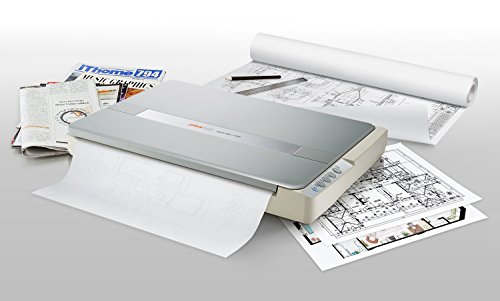
In terms of function this is a pretty basic scanner. You can get one for one-fifth the price that is comparable in every respect -- EXCEPT that its scan area is only half as big. This seems to be the least expensive large-area flatbed scanner out there by a considerable margin, and it will serve very well for most purposes.
In general I'm a bit wary about color fidelity on LED scanners, but it doesn't seem to be much of a problem with this one. I'm uploading two scans of a standard IT-8.7/IS-12641 color calibration target. One was made with basic scanning s/w and the other with VueScan. (No prizes for guessing which is which.) What this tells me is that the OS1180 is entirely adequate for any but the very most demanding of reflective-media scanning tasks. But if you want high-quality scans you have to have high-quality software. And you won't find it growing on trees or lying in the street. That to say that you need to figure the price of VueScan or some comparable package (if there is any) into the total cost if you want quality scans of high-quality materials.
The scanner comes with a CD containing the manual in PDF form, the driver, a copy of ABBYY FineReader 12 Sprint, and miscellaneous scanner utility s/w. There is a new driver (actually two, one for Mac and one for PC) on the Plustek Web site, which is supposed to provide improved color scans. (The scans I'm posting are made with it.) Installation from the CD went pretty smoothly on my Win 10 PC. But with the new driver it took me a lot of tries to get it to install without stirring up Norton Security.
Neither the old driver nor the new has been entirely stable. At random times the scanner stops working properly in any of a variety of ways. It's necessary to close the driver and re-start the scanner, which usually does the trick. It's not a major problem but it happens often enough to be pretty annoying.
One of the big uses for a large scanner is to scan books, two pages at a time. The ABBYY FineReader 12 Sprint that ships with the scanner is probably the best of the "lite" OCR apps and works well for double-page scanning. Although bundled with the OS1180 it will work with other scanners as well, if you have any.
In theory the scanner has four "built-in" scanning functions, actuated by buttons: scan, e-mail, OCR and PDF. I've had no luck with them; they produce some scanner activity followed by a "generic error" pop-up message. It's probably possible to get them to function if you work hard enough with the software, but I haven't bothered.
Installation of software only took a few minutes. I have an Acer intel core 15 with windows 10. Abbyy Finereader 12 Spint made a quick access folder on my desktop so I just click it open to start the software. The scanner is lightweight but takes a lot of desk space and needs to be by both an outlet and your computer. Once the power is on it’s a lift flap to put item to be scanned on the flatbed. You can remove the hinges if needed and they go back in easily.
The software feels ancient with limited options such as only 300 dpi or 600dpi. There’s not a lot of adjustment except brightness. There is either black and white, grey, or color.
You get the choice of previewing before scanning which is nice and you can place multiple pages into one scan (but you have to place them each on the flatbed individually). You can scan to make a pdf, an image pdf, an image file (mine makes jpegs), word, etc.
I’m using this for my scrapbooks which are 12 by 12. I’m making digital files in a pdf format and have made some into jpegs. You lose some of the quality but they look decent. The files start getting pretty large so I’ll probably need a hard drive for back up and storage.
I’ve uploaded some of the massive jpegs to Shutterfly. I’ll update on how the prints look considering this is def like taking a picture of a picture the uploading and then printing so we shall see how that looks.
Overall I’m happy with the quality and ease of use. It does sound similar to a fax machine at times when it’s scanning. Def not a silent machine. I love the size and capability and everyone in my family is already begging to use it. I’m happy with the price point as well since I priced out a company to scan my scrapbooks and it was 2.99$ a page plus other fees. Ten years of scrapbooks would cost a small fortune so this has saved me a ton. Plus I prefer to have the control even though it’s a time investment.
I’ll update with any issues or concerns as I continue to use the Plustwj OpticAlim 1180 scanner. Questions welcomed.
I was surprised that since this scanner is listed as being for both PC and Mac, that the only included disc is for Windows. On PlusTek's website, I downloaded the Mac software for the OpticSlim 1180 scanner, which turned out to be a required driver for Mac, bundled with a user application called MacAction. You don't necessarily have to use MacAction, but you do have to run the installer anyway, in order to get the scanner driver installed, which only happens concurrently with the installation of MacAction. The MacAction user interface felt like running test software that hadn't been finished, but I found that an alternative called VueScan has a much more detailed, polished, and intuitive layout -- however there is a one-time license cost if you decide that you are going to use VueScan. The VueScan support technician helped me figure out that my 6-year-old iMac needs a 32-bit version of the VueScan installer instead of the 64-bit version. It works beautifully, and I've since run the first incremental upgrade that came out afterward, and it still works perfectly. I scan a lot of printed items such as magazines, which require a good Descreen option. I found that selecting 600 DPI in VusScan yields gorgeous Descreened results, and of course the scan can be saved afterward in Photoshop or other editing software if I need a final resolution other than 600 DPI. If you decide not to use MacAction, you may be annoyed that it added itself to autostart on your Mac every time that you power on, restart, or logon. To remove that autostart, click on System Preferences (the gear icon on the Dock) and then click on Users & Groups. Click the Login Items tab near the top of the dialogue box, and then you can click to highlight the startup item and click the minus sign to remove it. I think that PlusTek would get a ton of more sales and positive reviews from Mac owners if they could make a licensing arrangement with VueScan and include a Mac installer disc with their scanners.
An excellent scanner for the price. I am an architect and use it to scan mostly black and white drawings I do by hand which I scan and then work over in Photoshop or import into 3D modeling software. This scanner works great in that process.
The 12x17 format lets me create a fairly decent size original (usually I keep it to 11x17 to make sure everything is scanned)- much better for my work flow than an 8x10 format would have been.The software was a pain but my next door IT Tech solved it.
Color is not critical for me - (after reading other reviews of this product I scanned a watercolor original and it came out a bit dark- I upped the resolution to 600 dpi tweaked the brightness up and rescanned as a png and a black line appeared in the image..hmm)
a 400 dpi png color scan worked fine for my purposes -( screen shot image attached 12x 16 original )
I won't give it a 5 star review because my test with photos didn't go well. I scanned a photo of a barn (400 dpi .png) and the detail on the shadow side dropped out ( screen shot image attached 4x6 original) - could be a setting fix, I don't know, but I don't want to be overly enthusiastic and mislead others who have different needs.
Windows 10, Buyer beware! This scanner is great if you don’t have Windows 10....something in the windows 10 causes it to not recognize the scanner after you first install it. I uninstalled and reinstalled it everyday I owed it which was 4 days, I spent hours on the phone with Plustek, they were fantastic but the technician explained the problem with Windows 10 was something no one could figure out! Wish I had read a review like this one before I bought it. I’m ready to toss my Windows 10 laptop too! I need a Mac! It’s going back to Amazon tomorrow...so sad

Feature Product
- ✔WE SCAN SIZES - A3 11.69""x 17" Large Format Scanning
- ✔NO MORE WAITING - LED Light Source, Save Energy, No Warm Up
- ✔HASSLE-FREE OPERATION - Pre Set Function One-Touch Button for Your Quick Use.
- ✔POWERFUL SOFTWARE BUNDLE - Enhanced OCR Accuracy with ABBYY FineReader 12, and DocAction for File Sharing
- ✔SCAN MODE - 48 bit Color /16 bit Gray-Scale for Scan Art, Documents and Other Items
Description
The tabloid size 11.69" x 17" OpticSlim 1180 Scanner from Plustek allows users to scan art, photographs, scrapbooks, newspapers, documents, and more. It features an optical resolution of 1200 dpi and has a color scan speed of 15 seconds and a grayscale speed of 9 seconds.
Also, it has an internal color depth of 48-bit for accurate color reproduction.
Large Format Scanning
Scanning of A3 tabloid size documents and graphics up to 1200 dpi make this scanner ideal for art, scrap-booking, photo scanning and genealogy!
Easy to use
Four one-touch buttons for performing pre-set jobs enables users to quickly:
- scan
- OCR
- create PDF files
The OpticSlim 1180's LED light source provides stable illumination that doesn't change from scan to scan or over the life of the scanner. This results in higher quality images and no warm-up time is needed.
Software
Bundled with simple-to-use image processing and document management tools, fast and secure PDF conversion, image organizer with thumbnail viewer and accurate OCR software.
I knew the scanner was going to be large, that's why I purchased it. But when you have been dealing with standard sized paper scanners for as long as I have and then get this- wow!
It also picks up color amazingly. Most scanners I've worked with don't pick up pinks very well. This did great! I still have to do a little tweaking in photoshop, but nowhere near as much.
I recently purchase this large scaled scanner to scan old oversized scrapbook pages. I installed the Mac apt and made sure I had the latest version by going to the web site. I had a little trouble getting the scans to show up on my desktop so I called the technical support and spoke to Bubbles ! She was great. She was quite polite and patient and got everything worked out in a few minute. I was very impressed with her help. I have only scanned a few pages but everything seem to be of great quality and especially what I was looking for. If you are in need of a large format scanner for general use ,then this should do the trick. If you need a more professional scanner for high detail work, like art work, then maybe another scanner will be need. But be prepared for it to be much more expensive.
I am using this scanner connected to a Mac Mini and am enjoying it immensely. Initially, after downloading the latest Mac drivers from the Plustek website, about 50% of the time the scan would come up black. Sometimes I had to restart to regain a scanner connection. Then yesterday after a restart, a window popped up wanting me to install Similar Photo something-or-other software. This bit of Windows software, which I consider malware, installed itself onto the Mac and was interfering. Hopefully it has now been all deleted-successful scanning percentage has climbed to about 98%, which is fine for my work.
I haven't used it a great deal but I finally decided to try & get it set-up on the computer. I, myself am not great with this stuff ... At all but I got with the tech support & that guy was great. He was patient & walked me through step by step. Huge shout out to Nelson. I just assumed my setting up of this thing would include some ranting & raving, cursing at it, as is usually the case with my familiarizing myself with new technologies but with Nelson's help I was able to avoid all the rage & frustration all together. Thank you 🙏
You can't beat the price for scanning large documents. We have infrequent need to scan large documents, so this really fit the bill.
Be sure to follow the simple installation instructions. Install the drivers before plugging in or you might run into an issue with the OS reporting that too much power used by a USB device. With drivers installed everything works fine.
Scanning is fast and simple.

0 comments:
Post a Comment