


Why we didn't switch sooner years ago... I'm late to the party... well, better late than never!
We've been paying $30+ a month ($360/year) to AT&T for basic bare minimum home landline service (their other plans cost more), which we weren't even using at all (just receiving bunch of telemarketing spam calls even though I signed up for the Do NOT call list).
Well, it's just still nice to have a backup "home number/phone" or when making appointments, etc. and like many, since we're attached to our home number for over decades, it just wasn't something we wanted to easily give up. (especially avoiding hassle of updating to companies of a new number)
I was unsure at first if I should go with this OBI or the Ooma. I did some research and I'm really glad I went with this OBI. It's a no brainer for me.
With the Ooma, you will still end up having to pay a few dollars a month on local and State taxes.
With the OBI, it's zero. Not to mention, the Ooma unit cost twice as much/takes up more space.
Ooma also charges $9.99/month for their "premium features" like call blocking or using an app to make calls, which is silly - it's free with Google/OBi.
I also checked out Ooma's international calling rates and they aren't as good as Google's.
Also Ooma charges $40 to port your old phone number.
With OBi, Google charges $20 to port your old number.
However, there is one annoying catch:
Google doesn't allow porting landline numbers, so you have to go through a bit of redundant obstacle if you want to keep your cherished old landline number; you have to first port your landline number to a mobile carrier such as T-Mobile (it was very smooth with them, which is what I've used; this part is free, but it takes a day to process), AT&T, Verizon, etc. -- to make Google think the number now belongs to a wireless service, which Google will then accept, AND THEN once that's completed, you would then request a port with Google ($20 fee).
In order to accomplish this, you will need a "dummy" phone and buy a prepaid SIM card (from one of the wireless carriers) and use that temporary number for the porting process.
If you don't care about keeping your old home number then you don't have to go through any of that hassle; just make a google account and use whatever number Google gives you.
This may be all confusing in the beginning, especially if you've never used Google Voice before. What this OBI device is basically allows assigning different VOIP (Voice over Internet Protocol) services on it, so you can then connect your old "brick" phones to it; Google Voice just happens to be the main preferred choice.
Google Voice is not an actual carrier/phone service - what Google Voice does is just forward numbers to you, like a secretary. It's quite amazing and cool what it can do. Now I can even send text message with my home number. It can email me missed calls/show me a transcript of the voicemail/easily listen to them... so much more convenient than using the old built-in answering machine to listen to messages or dialing to hear voicemail. I even get caller ID now. AT&T landline charged so much for these "premium features"... yet all this and way more is free now with OBi/Google.
To make international calls, the minimum amount to load in your account is $10. I like that Google Voice charges no connection fee for international calls, whereas Skype does.
You can also download their Google Voice "Hangout Dialer" (not to be confused with the Hangout app itself - they are two completely different apps) and you can make calls with a tablet! Unlike with Ooma, they charge you $10/month for this feature that Google provides for free!
By default, Google has "Screen Calls" turned on, which won't directly connect the caller through (until they say their name), so you'll want to disable that. I did notice that I was receiving more spam calls when I signed up with Google; I'm not sure if that is a coincidence or not, but there is also a option in Google to block known spam calls. It's also very easy to block numbers.
I wish Google would just allow uploading audio files as a voicemail, but you can only set it up with your own call/voice.
Ooma is probably suited for beginners and people who don't want to deal with customization/hassle of porting. If you want to save more money, like more customization/already love Google Voice, then the OBi is an easy choice.
Many internet service providers also started bundling home phone service, prices ranging from $10-$30/month -- but it's the same VOIP, so it's better to get one of these devices instead.
This OBi device will be useless without internet and a router - or if you don't even own a "brick" phone to connect this to; or if you want to get rid of "brick phones" entirely and modernize your whole home all together with just using tablets/WIFI only smartphone, or PC to make calls, then you don't even need this product and can just sign up for Google and use Hangouts Dialer app for that (granted you don't need 911 emergency services, since Google Voice does not support 911 calls; if you do, you need this Obi/connect a brick phone/add/sign-up/pay monthly fee for just the 911 emergency service). However, if you're a senior or just like the old fashion way of using your home "brick phones", this OBi device allows you to use that and cut your bill. If you want to save money in the long run, it does require a bit of your time and money upfront. In the end, it's definitely worth it. It feels great having one less bill to worry about.
Pros:
- Cutting the bill!
- No more landline, but still allows you to use your old "brick" home phones. (granted you have internet)
- More features than what you'd get with landline services that's a rip off costing more (this gets you cheap international calls, call forwarding, caller ID, threeway calling, transcript voicemails, text messaging, etc)
- Small and easy to setup
- Better than the Ooma
Cons:
- It relies on Internet/router, so if either of those fail on you, you won't be able to place calls. (Not a big deal)
- 911 emergency service is not included and you must add that/pay a small fee/month for that. (Not a big deal)
- If you're not so much a techy person, it may require some thinking time.
- Porting your old landline number is a bit messy/redundant requiring you to port twice.
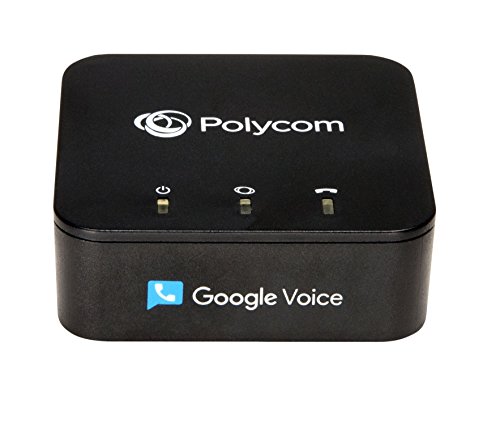
- My OBi device doesn't actually have the "Google Voice" logo on the front of the unit like it's advertised. I find that a little odd, but whatever (I guess it looks cleaner without it)
Received this a day early on a Sunday. Plugged into one of my Airport extremes and the other end into my wireless phone system's base. The Obtalk200 immediately and automatically prompted for the dedicated google voice account i had set up for this purpose) asking permission to allow it to be linked Obtitalk. The Obitalk basically then configured itself. It did ask me the local area code so I could do 7 digit dialing for my area code, so I did.
I canceled my existing landline service from Verizon Fios which has gotten stupid expensive. Should have done this a long time ago.
*** Make sure your buying a 200 series Obitalk I see Amazon is still selling the discontinued 100 series Obitalk these should not be purchased as their no longer supported or getting firmware updates. The reviewed obi 200 and the 202 are the current models. The 200 model supports multiple VOIP provider configurations and 1 Phone line while the 202 supports 2 Lines (regular pricing around $49 and around $69). Note the 200 model is tiny, only a 2.5 inches square, the 202 is around 4.5 inches square (both around an inch high).
Note some of have complained that Obi tries to sell you an 2nd year extended warranty and or priority customer service $20 also additional phone features you may or may not need. At this juncture I did not bother with either. Google voice has all the features I need: Clear calls and the option of blocking inbound calls and many other features. That is all I need. I only use my land line phone for making conference calls when I work from home and when I need a clearer call then I can get from cell phone.
** I will say I have no problem with Obi offering extended warranty or additional functionality. They are providing a great device that works well without... Some will want or need these services and they help keep the company be around to support the hardware, develop new hardware, provide firmware updates and be around to support their products.
I did scour the market as I always want the best options for my use case. This is really the best out there. Virtually every other product out there Ooma, Vonage, etc. not only costs more, but is locked into a single provider themselves for VOIP. Many of the others play games as well offering a low price on their monthly services only to raise it significantly after a month or year. Some other providers I read on line even make it almost impossible to cancel or modify service, Ooma in particular had many reviewers complaining about that Obi talk works with many providers including the completely free Google Voice. If you carefully read reviews and average star ratings there is no better option from a quality, reliability and price prospective.
** This device has always paid for itself in 1 Month as I was paying over $40 a month extra to Verizon Fios **
Tech Note:
The only thing I was not automatically promoted to do was change the default Obitalk password. Changing default passwords on all internet connected devices is always good idea both for you and the world.You can find out your Obitalk IP address from dialing ***1 on your handstand of a connected phone. Then Enter the IP address in your Web browser which will allow you to configure the admin password which is admin,. You should change that.
I work from home few days a week and I also need to attend a conference calls on a daily basis. Sometimes these are really long hours calls. In such situation traditional land line becomes much more convenient than a smart phone. So I needed a land line at home for sure but for that I was paying few extra bucks to a service provider for their service. Not anymore, thanks to Google voice + OBihai combination, that we never have to pay a single penny for using the landline at home.
I did a lot of research on internet on how to ditch your landline and I found google voice + Obihai is the way to go. I bought OBi200 under $50 which I think is good for normal user who just need a landline. If you are planning to get an additional phone line or using second line as Fax line then OBi202 is a good choice for some additional cost.
Setup of Obihai is very easy and gets done in few minutes. You need to have google voice account in place (if not, you can sign up using your gmail account). You also need to sign up for the Obihai account and register your device and a step by step wizard will integrate your google voice account with your obihai device. Once the setup is done, you are ready to make your free calls. You can download ObiOn app (available on iOS and Android) on your smartphone and you can make or receive your calls through Obihai endpoint.
Do remember to turn off the call screening feature in Google voice, otherwise person calling you will hear an announcement to announce his/her name after the beep sound.
Pretty good product. Like many people, I had issue with the incoming call. I can call out, but I could not call in. I read older forums regarding this issue and I figured it out. Forget about the "Chat Box". That has nothing to do with it. First, you need to use PC to log into your "Google Voice" account (MOBILE OR TABLET DOES NOT WORK!!!! ONLY PC!!!). Under your google phone number, click on "Transfer". That will open "Call forward to" options. You need to click on the "Obitalk Device" listed there. After you click it, it saves automatically and you will be able to receive your calls. Hope this helps.
Set up with Google Voice was a breeze (set up 3/31/2016). I just logged in to ObiTalk using my google account, and the form pre-checked a box to link the google voice number. Be aware that google voice does not support 911 calls, so if you want 911 capability, you will have to pay a little for it. GV911 has an E911 service for $12/year (yes, per year) which does require a setting change through the obitalk web access, or obitalk apparently has a deal with Anveo for E911 for $15/year (I didn't see the link at first, so I got the GV911). The Anveo E911 only link can be found if you go to Obi dashboard, then click your obi phone number at the top middle, then click Anveo E911 Service Sign-Up (this package does not seem to be available if you click any other Anveo link. If you don't need 911, the whole thing is free as long as you are in the US calling US numbers.
Ditch whatever else you are using for phone service, get a google voice number and this thing, and start saving money. They even allow you to enter speed dial numbers on the web access.
Tip for E911, if you get GV911, you can dial 922 to test your call-back number and address. If you get Anveo, you can dial 933.

Feature Product
- Works with Google Voice
- Easy to Set-Up Using OBitalk.com. USB for Polycom accessories OBiWIFi5G and OBiBT
- Supports T.38 Fax and Bring Your Own Device SIP Services like Anveo, Callcentric, Voip.ms, etc.
- Works with up to Four(4) VoIP Services Across One(1) Phone Port
Description
OBi200 1-Port VoIP Adapter with Google Voice and Fax Support for Home and SOHO Phone Service
I’ve had the OBi200 for almost 6 months now, I already have the Google Voice (GV) app on my android phone, there’s lots of situations where it’s incredibly useful and convenient to have a number just for taking care of business and where I don’t want to use/share my personal cellphone number. The MagicJack (MJ) service it replaces has been giving me headaches ever since they released the MagicJackGO and the MJ power adapters overheat and burnout on regular basis, using the device was an on-going hassle and the android app is clunky.
Obi’s GV box is only a little bigger then a credit card and seems better made then the MagicJack doogle, the call quality of GV service on both sides of the phone is *much* clearer then MJ, setting up the service was simple *but* if you’re behind firewall you need to forward some ports to the Obi box to complete the activation and for it to work properly. The guide included with the OBi200 only vaguely addressed forwarding ports to the device, which caused several hours of frustration, but getting the GV and 911 service setup was not to bad.
The only reason I waited to make the switch is because I had some concern that Google was planning on discontinuing the GV service, but with the recent refresh of their app and to the web interface, it seemed safer to make the leap. The OBi200 and Internet router are both attached to a 1000VA battery backup that provides just under 300 estimated hours of talk-time, so I’ll still have regular and 911 service for several days even during a total power black out.
--------- From the on-line OBi Troubleshooting FAQ ---------
“What ports should I keep open on my router/firewall?”
In order for your OBi to be able to send packets w/o interruption, please configure your router as follows:
Allow Outgoing:
TCP Ports: 6800, 5222, 5223
UDP Ports: 5060, 5061, 10000 to 11000, 16600 to 16998, 19305
Allow Incoming on UDP Port: 10000
Excellent, clear voice quality. Cannot detect any latency issues. The person I am speaking too says my voice is very clear on their end. I have bought this device because I was having quality issues when talking with Google Voice through the Google Hangouts mobile app. There is no problems talking with Google Voice with this device, however! I am also using with Obi Wifi USB dongle which is great. Also, go into your router configuration Web page and turn on quality of service (QoS) for the ethranet port the obihai is plugged into. If using the wifi usb dongle, turn on QoS for the Mac address that is assigned to the obihai. This will give you the best voice quality. E911 calls will cost extra, that's why I keep my old cell phone charged. E911 calls from a cell phone are free, even with no cell phone carrier or sim card installed.
Awesome product for what I consider a really customer-friendly price. I used this to get myself practically free phone service at my summer home, saving something like $30/month that I was paying the lousy cable company. (Now I'm planning to use the Obi202 to receive voip calls at my main home.)
The set up is really easy, their instructions are clear and easy to follow, and the website offers a ton of additional help. Here were my steps:
0. You need internet service with decent bandwidth.
1. Get a Google Voice number (free from Google)
2. Buy the Obi200 from Amazon.
3. Plug in the Obi200, connecting it to network (using ethernet cable) and cordless phone main station base (phone cable). (Test it as suggested.)
4. Go to obitalk.com, create account, add your device (using the product id), configure device and connect to Google Voice.
5. Wait a couple of minutes, make test call to Google Voice number, answer call.
6. Smile happily.
I connected two different Gvoice numbers to this unit, and calls to either number come through as promised. You can configure up to 4 such voip services, but of course can only use one at a time. The Obi202 enables two line simultaneous use.
Note: I was having trouble receiving calls and thought something was wrong. It turned out that the old telephone I was using at first to test wasn't working correctly with this box for some reason. (It wasn't worth investigating further, since it worked immediately with the newer phone set I was planning to use anyway.) So if you have any trouble, make sure you troubleshoot thoroughly, don't immediately blame the box or the configuration.
PS: If you want to register your number for e911 service (so that your address shows up when you dial 911), check if your county uses smart911 (smart911 dot com).
I desperately wanted out of my ridiculously expensive monthly Verizon Landline.
I've had my number for over 30 years and didn't EVER want to give it up.
I researched, read a few reviews, then purchased the OBi200.
The setup was quick & easy to my free Google Voice (provided) number.
I tested it out a few days, had no problems whatsoever, actually I was very impressed!
So on with my plan!
1 - I ported my Verizon landline to a $12.00 pay-as-you-go plan with PagePlus cell service.
(I had an old Verizon cell phone doing nothing)
It took about 2 days for Verizon to "give it up."
Yea! My "home number" was now active and considered as a cell, no longer a landline.
2 - Within minutes of the cell service becoming active, I registered at the PagePlus website to set up my account and create a PIN number.
Now I had everything I needed:
*My phone number was now considered cellular service.
*An Account#
*A PIN#
3 - I then immediately started a port into Google Voice from PagePlus.
Google charges a $20.00 port-in fee.
During this wait, I did receive a call from PagePlus, I didn't answer, I totally ignored them.
The port was successful, and it took about 3-4 hours to complete.
4 - Success!
My home number is now my Google Voice number!
***Really now, how can one not love FREE home telephone service?***
With the same number I was just paying monthly charges for, no less!
Works perfectly!
Great product.
Easy setup.
I was so happy after purchasing this, within a few days I went and purchased the:
OBiWiFi5G 2.4/5GHz Wireless 802.11AC Adapter
Now my phone base unit is placed right where it always was, no need to run a wire to our router!
The whole setup has been bulletproof!
Easily saving me $100's a year!
All in all.
OBi200 - $50.00
PagePlus "pay-as-you-go" plan - $12.00 (considered as "throw-away" money)
Google Voice "port-in" - $20.00
OBiWiFi5G Wireless Adapter - $25.00
Total "ONE TIME ONLY" charges:
$107.00
Yearly Savings:
About 4X that!
***THE ONLY DRAWBACK - NO 911 SERVICE***
It can be had for a subscription fee, but I wanted out of all subscription services.
If this was provided for free, I bet they would instantly triple their sales!
My Panasonic system has a pre-programmed number to dial our local Police Dept. (Small town, USA)
Another comment:
I've read a lot of reviews here that stated my Panasonic answering machine would no longer answer calls, and that Google Voice will take over all missed calls.
NOT TRUE!
Comparing my answering machine messages to my Google Voice logs, identical!
And lastly, for some strange reason.
When my answering machine reads out a callers number, it's like WARP SPEED!
We think it's funny, because when one of our recognized numbers calls us, the readout is normal - loud & clear.
(Gotta be a Google thing)
I highly recommend this setup for ANYONE who wants to keep the landline number they have had for years,
BUT JUST DON'T WANT TO PAY FOR IT ANYMORE!
I was looking for an IP/Internet phone that I could buy and not have to pay a monthly fee. I was hesitant at first, but this unit works extremely well and saves me from paying for a land line from my local phone company.
Quality is clear and clean. No delays, echos or or static - no one can tell that I'm calling from an IP phone - it's really great.
I had an existing Google Voice account and phone number (you can transfer your house phone first to a cell phone, then to Google voice if you want to keep your number), though there are other options I used Google Voice.
Setup was a breeze - very good directions. I connected to the OBiTalk Website (logon with Google voice to create a new account) and then follow the steps given to link your Google phone to the OBi200. (Basically you call a special # from your phone and it figures out that the account you're logged in with belongs to the device you just dialed from, then it links them - takes a couple of minutes for the activation to take place. Once done, your Google voice # then rings on the phone you connect to the OBi200 (be sure your Google phone settings are designed to "ring" that number and not go straight to voicemail.)
If you change your internet service or move to another location, you can easily repeat the process and reconnect your OBi200, so it will work wherever you have internet.
I also back-wired this unit into my homes phone wiring - Rather than plugging a phone into this device, I plugged in a phone wire and then plugged it into my (now totally disconnected) phone outlet plug on the wall. Now all of my regular phones ring when you call my Google Voice/OBi200 #.
Also - this unit can be used for a security alarm as well - my house system dials into the monitoring station whenever it goes off - having this capability allowed me to get rid of the land line and it works for free.
You must have Internet service for this phone - though "high speed" may not be required. I lost cable Internet for a few days and used my cellular jet-pack, linked to my router and this phone worked great - all on a really slow 2 - 3Mbs speed which was phenomenal.
If you're paying for a land line or home phone AND Internet, consider getting OBi200. If you have BAD cell service at home but you also have Internet, this device is the cure - and you don't have to pay any monthly charges like some of the other IP phone devices out there.
GREAT PRODUCT!!

0 comments:
Post a Comment