


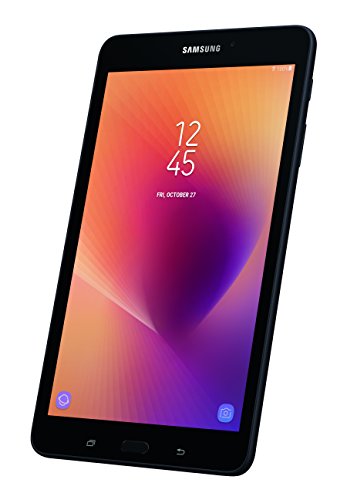
I own both the Samsung Tab A 8in 2017 version and the Amazon Fire HD8 2017 version. Here is my review of them both and which is better. NOTE: the newest HD8 2018 version is also REALLY close to the 2017 model as well.
Here is my comparison: And my quick synopsis, I don’t like being locked down to Amazon. But pretty much it is a wash on choosing between the 2 devices. The only big issue is the price difference.
Screen Size/Resolution – Same size of 8in on both units and both units are 1280x800 and 189ppi
Memory – Same memory of 32gb. But the HD8 also comes in a 16gb version, which I do not recommend as you can run out of space quickly. The Tab A and HD8 2017 supports external 256gb memory card versus 400gb on the HD8 2018 model. 256gb is massive, so 400gb is better but not really needed.
Battery – 15hrs on the Tab A versus 12 for the HD8 2017 or 10hrs on the new HD8 2018 model. And these times can vary depending on what you are doing. So between the Tab A and HD8 2017, I would say they would be close.
Bluetooth – They both support Bluetooth
Charging – Tab A uses the newer USB C charger – HD8 uses the old-style USB Micro. Not a big deal, most everything will eventually convert over to the USB C charger eventually. The Tab A comes with a wall charger and cable. Amazon sells the USB C cables and they are cheap. And I like the USB C charger better because it doesn’t matter which way you plug it in, unlike the USB micro.
Operating system – Tab A uses Nougat 7.1.1 and HD8 uses the Fire OS, which equates to Google 5 Lollipop. Not the most up to date OS, but they do auto upgrades from time to time. I think you have better control with the Nougat OS.
Processor – 1.4Ghz Quad Core versus 1.3Ghz Quad Core, not really a big deal on this. They are very close
Camera – 8mp rear camera vesus the 2mp HD8. Unless you are going to use this a lot for video or pictures, I don’t see a great benefit. Most of us will use this to read books and play games.
Speakers – Tab A has one tingy single speaker (What a disappointment) versus Dual speakers on the HD8 and they sound good. This was a huge disappointment for me as the price is $70 difference. I would say this was the most upsetting. But normally I use Bluetooth headphones, so I do not disturb people around me.
Warranty – 1 yr on the Tab A versus 90 day on the HD8
Price - $177 for the TAB A versus $109 for the HD8.
Overall, I chose the Tab A to get away from being locked down to just Amazon. Amazon does not let you access Google content at all, so I was finding a few programs that I needed that required Google Play Services and of course I could not load them. You would have to JailBreak the Fire to do this, and that is not easy for the common users. With the Tab A, I can access programs from Google that I cannot on the Fire HD 8. BUT, I can access Amazon content from the Tab A. So I have Prime Video and Kindle Unlimited, which I have no issues accessing from the Tab A.
I did not care for the price difference, I know Amazon cut their price just to get HD8 out there. They make up their money from content. If you are strictly looking at cost, I would stick with the HD8. If you want to break away from being locked down to just Amazon, I would spend more on the Tab A.
I know for a fact that Google has way more games/programs then Amazon. And I was loading a few games from Amazon and had noticed in the last 2 years, they were no longer available on the Amazon store.
Have had it now for a couple months, no problem. Previous tablet was a Samsung also, I think it remembered all of my apps. This one is slightly larger. upside is, you can see more on each screen. Downside is, out doesn't fit in my coat pocket as well. That's a pretty small downside.
Ordered this with the 32GB option. Was always deleting apps before, now over got lots of room to spare. Previously had a 64 GB card on the old tablet, but many of the apps couldn't be moved to an SD card. Now, I think I've just got lots of room for music.
This is my first tablet in a few years (probably 2012-2013). I purchased this tablet for use while on travel, as I got sick of reading books on my Galaxy S8's small screen. This device is perfect for this purpose. I also found this device to be useful when sitting on the couch, and wanting to scroll through work email, personal email, social media, etc. The speed of the device is apparently slower than my S8, although, not by much. The camera quality makes this function pretty useless in my opinion, compared to my cell phone. The fact that this device integrates with my current Samsung phone so nicely right out of the box is a win. I was able to restore my settings from my S8, effectively mirroring it, then modifying the apps for more of the tablet functionality. The screen clarity is excellent. I have played maybe one or two 3D "graphic intensive" games on it, and it ran games just fine. Overall a great device, the option for a MicroSD allows me to sync Plex data easily (I bought a 128gb SD card) and gives it the edge over the other devices on the market without this feature. Battery life is excellent, I charge it every few days, with moderate use (1-2 hours a day), and uses the same charger as my Galaxy S8 (I even use my Macbook Pro 2016 charger to charge these devices, and works perfectly fine.) Apple cell phones can't even do this :) Come on Apple, get with the times! Also should make mention: OneDrive gave me an additional 100GB for purchasing this tablet, and allows for me to backup my pictures (instead of using Google which only gives me ~15gb per account). I can finally clear up Google from my pictures!
Two functions I see that are effectively missing, that I wish Samsung would have included:
Light sensor (for auto-adjusting screen brightness). This would have been a great function that is missing. I am finding myself having to manually adjust the brightness.
Samsung should have brought over the buttonless interface to this tablet, mirroring what the Galaxy S8 has, or at least had a backlight for the buttons on the bottom of the tablet.
Just what I needed to upgrade from the 2015 tab A.
16gb is not enough for the google comglomerate on my older tablet which uses up almost 12gb of memory. I couldn't update to the newer vesion of android cause not enough memory and I had all my data on an sd card.
This tablet doesn't have any such problems or glitches and slowdowns due to memory.
Make sure to get cover and screen protector for this model sm-t380 cause nothing for the 16gb model sm-t350 will fit.
This screen is longer and narrower but still 8" in.
The cord for this is usb-c where the 16gb model uses a micro usb cord.
That being said,,,I love this tablet so far. It has Bixby built in where briefing used to be. Andoid version 7.1 . It has a faster processor. It has plenty of memory.
The 8 megapixel camera on the rear now has a flash!
RON!
I replaced my Kindle Fire with this tablet as I wanted a tablet that I could do more than just Amazon. I downloaded the Amazon reading app and it is just like I am on the Kindle Fire. I am very happy with this device. The only thing that is odd is that the controls for back and all open apps does not light up next to the home button. I mostly read with my tablet and it is great for that.

Feature Product
- Take in your favorites on a screen that looks good in any light on a sleek metal frame that's comfortable to hold
- Power through movies, games, emails and more with a long-lasting battery that gives you up to 14 hours of video playback
- Get 32GB of Built-in storage and expand your Memory up to 256GB with a Micro SD card (sold separately). Wi-Fi: 802.11 a/b/g/n 2.4+5GHz, HT40
- Internet use time: up to 15 hours, music play time: up to 153 hours . Get 3 free Months of YouTube red with Google play music, plus enjoy samsung's kid-friendly apps ; Bluetooth v4.2; Battery Type and Size: Li-Ion 5000mAh
- Bixby home serves up relevant content like weather and news, and gives you a preview of your day
Description
Doing what you love is easy when the galaxy Tab a does it all. Browse and stream for hours with a long-lasting battery on an HD display that stays clear in any light, from the afternoon Sun to a dim room at night. Keep all your memories right on your tablet, thanks to expandable storage. And with engaging content brought to you by YouTube red and kid-friendly apps, you'll have everything you want all in one place.
This is to replace a 6 year old Samsung tablet. I really like the faster speeds and the screen resolution. It works great as a DVR; I record movies and TV programs to watch while travelling and for those cutting the cable cord, the "MIRROR IMAGING" works extremely well, for watching recorded movies on the bigger screen, but the "BLUETOOTH" connections are iffy at times..
If you don't know what mirror imaging is, ask your grandchildren - I did. (LOL)
I have a Tab 4 that I was using prior to the Tab A. I really liked that one, too, however, it was slowing down and I really couldn't keep any apps that I wanted for lack of space. The Tab A has twice the amount of space, and I'm really happy with the speed of loading apps or even my preferred browser. All in all, it's just faster. Picture quality is way better on this device than the Tab 4. I also prefer the newer OS (Nougat) to Tab 4's Lollipop. I wish Samsung would update the OS to Oreo, but I don't think that's gonna happen. I will say that Samsung and Google always load these devices down with too much garbage, so I also purchased a small app that I'm able to disable any of the bloatware (or system apps) I don't use or want running in the background constantly (and I didn't even have to Root the device to do it). Nice. As far as durability is concerned, I don't take any chances. Electronic devices tend to be delicate, so I bought an Otter Box Defender Series case for it so when my Grandson gets a hold of it, it's not going to smash in to a million pieces.
Works fantastic! I took advantage of same day delivery. Arrived by 6pm in perfect condition. I wont get all techy with this review, there are plenty of other reviews for techy stuff. Just remember 32GB is Better than 16GB...LOL! This 2017 Galaxy Tablet A, 8in 32GB, replaces my 8in 16GB Galaxy Tab3. My old tablet was running out of steam fast. I had to remove all apps except the essentials. Now with the new Tablet A, I can reload all my games, video and audiobook apps without any problems. I'm very happy with my purchase. Good luck to all of you still deciding. :)
Great tablet. Replaced a 2014 Google Nexus 7. Thought the 8 may be too big, as I really liked the 7. But the size is great. The tablet is fast and I like the storage size. That was very important to me. I use an iPhone daily, so I like using the Android for my tablet. It's much more affordable than an Apple Tablet and it's just as good.
Great tablet for kids. Works with many of the newer STEM based toys. Thinks like the new LEGO Boost and Mecano Maxx need newer mostly flagship level tablets. This was the most cost effective tablet that works with these types of toys. Got two of them. One for my 8 year old son who is in High Cap and interested in robotics and one for my 6 year old. I manage a bunch of parental controls because out of the box the parental stuff is not enough. I use Circle by Disney, I use limited kid accounts, and I make sure to setup permissions on applications and use special applications to remove stuff I don't want this kids to have. If you are looking for something more limiting and don't care about the STEM based toys look elsewhere. But if your kids need advanced stuff and you are willing to do the work to secure them these are great.

0 comments:
Post a Comment