


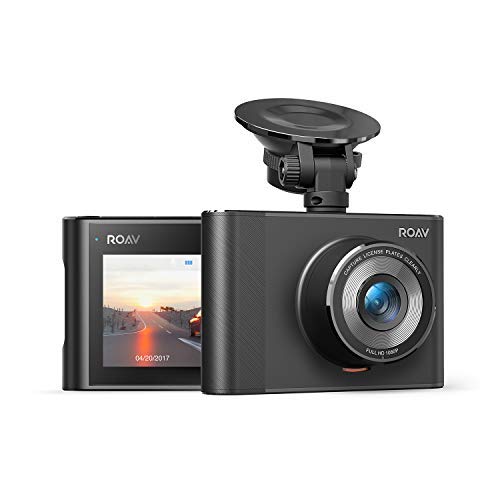
I purchased a different vendor's camera first, but I returned it because of a compatibility issue with my iPhone7. I then bought the Roav camera. This experience gave me two views of two rather different approaches to dash cams, which I will share first. I'll then talk about the Roav specifically.
The first camera, let's call it Camera #1, cost $47.99, and its main features were: 170 degree angle, WIFI, iPhone user interface that included live streaming of the image, 3M adhesive mount, ADAS, 30-day money back warranty.
In comparison, this Roav cost $59.99 and its corresponding main features are: 140 degree angle, WIFI, iPhone user interface but no live streaming, suction mount, no ADAS, 12-month warranty.
Both models have the same, small compact form factor.
I thought I would prefer Camera #1's wider 170 degree view, but in retrospect, I like the 140 degree view better. The former does give you more sight-line, but there's fisheye distortion that is inevitable with such a wide view.
Camera #1 can connect via WIFI to my iPhone, allowing you to set camera parameters, download video files, and stream the image. The Roav has WIFI where you can set camera parameters and download video files. It can't stream, and the camera won't record while the WIFI is connected. Being able to live stream to your iPhone is a feature I miss, as it's easier to see my line-of-sight cell phone vs the dash cam that sits under the rearview mirror.
Comparing adhesive mount to suction mount, I prefer the latter. I unmounted Camera #1 when I returned it, and using a razor blade to cut through the 3M adhesive pad was a PITA.
Camera #1's ADAS was a compelling safety feature, until I started using it. It's false alarms drove me crazy. This Roav camera doesn't offer ADAS, but it does have a cousin, "parking collision detection," which turns on the camera if the car is moved forcefully enough. However, even when I set the sensitivity on "low," this feature has many false alarms.
Last point of comparison is the warranty. I thought Camera #1's 30-day warranty would be fine, but once I encountered the problem that eventually caused me to return it and worked with their Support to try to resolve it, 30 days flew by fast.
--
Now on to the Roav itself...
Pros:
Excellent sturdy construction.
Excellent image, including at night, and good sound capture.
Compact size doesn't compromise driver's view of the road.
Generous length of power cord, which I ran around the perimeter of the windshield for cable management.
Mount is stable, in that it doesn't move/mis-align the camera if your hand or a cable brushes against it. You can also rotate the camera to face any direction.
Easy to re-mount to another location on your windshield, just rotate a ring on the shaft of the mount.
Fairly fast transfer rate for video files to iPhone, about 3mb/s. This translates to roughly a minute of download wait time for each minute of video.
Easy to set the camera's settings on the iPhone app.
Advertised higher tolerance to high temperatures, though I won't know if this is true until Summer.
Comes with a crowbar to tuck the power cord under the car's ceiling liner.
Cons:
No live streaming onto your iPhone, only video playback.
Parking collision detection, even in low sensitivity, is overly sensitive. Just opening the door and getting in would set it off. When it sets off, the camera starts a 30-second, locked video. Because the storage for a locked video cannot be re-cycled automatically, eventually you have to delete each locked file manually or erase the entire SD card by formatting it.
Wish list features, probably too much to ask for on a $60 camera:
Data compression to save on storage and to increase file transfer speeds.
Touch screen.
--
Overall assessment: a well designed, well made, reasonably priced camera whose user interface (iPhone app) is rather plain vanilla.
Coming from the C1 this is a nice upgrade. I'll delve into more details later in the review but to summarize, the night performance is improved, the form factor is much smaller, and the viewing angle of the lens appears to be a bit bigger. The only warning I would give is since this model uses a suction cup instead of adhesive this is not the best mounting system if you have the black sun blocking dots on the top of your windshield. The mount MUST be placed on only glass and no black dots.
Camera Quality: Comparable to the C1 but seems to have slightly improved night vision and a bit more wide capture overall. I attached pictures in the night and day to show how close you need to be to see a license plate clearly. I took the picture as soon at it was visable. Overall it is very clear in 1080P and a 32-64 GB micro SD card should be fine. I personally use a Samsung 64 GB Evo+ card and it works perfectly.
Form factor: My Honda CRV has black dots at the top of the windshield so I wasn't able to put the camera out of view behind my rear-view mirror, but in my Honda Accord without dots, I was able to FULLY CONCEAL it behind my mirror and never even notice it. It is a bit sleeker than the C1 and it is nice that I can freely move it from car to car since there isn't a one time use adhesive mount. Pros and cons to each mount type but get whatever suits your needs best.
Interface: The menus are easy to navigate and the instruction manual does a very good job of describing every feature. It truly is a set it and forget it device. The only option you really need to change is whether or not to have the parking monitor on or off which will record when it sees or feels movement or sound. I keep it on low sensitivity and the built in battery seems to do a perfectly fine job of recording things while I am not in the car. THIS HAS A BATTERY NOT A CAPACITOR. The temp range in plenty for me but please buy to your needs.
Last thoughts: The camera comes with a single port 1A power adapter and a very long usb cable so you have everything you need to get up and running. The included trim removal tool is a nice touch and I would highly recommend taking the time to hide the power wire behind your trim panels. Anker delivers again and the only thing I could think of is adding GPS which is in other Anker models. 10/10 for the the price. Feel free to ask me any questions regarding the camera.
Have had 4 cameras, Chinese brands. All the same software. Build quality. They last a year then die. Quality is ok. Battery problems sometimes or sd issues. Most on here seem to be cheap, it's hard finding a good brand.
Look no longer. I have found the one. Amazing quality. Cool features. App that can view and download videos but also UPDATE the software! That's a big plus for me. Nice design. Good price. Even says a warranty. Im probably going to stick with them. I put some YouTube videos for quality samples with the same title, "Roav by Anker Dashcam A1 day/night test".
edit: Only coming back a year later to repurchase this, mine was stolen from my car unfortunately. I just cant find a better camera with good support for the price. This just works so well. I put a secondary camera to hopefully catch the thieves next time.
I purchased this for two reasons - the reviews, linkage to a smartphone, and the price. There are many dash-cams out there but there's a balance between mortgaging your house for one and buying something that sensible and offers all that you'd need. This is the latter.
From opening the box to recording took all of two minutes and that's because I was fussy about where I wanted to affix the cam in my car. I purchased a 64GB card and formatted it in the camera (8 seconds total). You can set up the camera to record at three different levels 1080p, and two 720p formats. I used 1080p and the picture quality day and night is very good. License plates are legible and you can distinguish faces and license plates quite easily.
I turned on the parking sensing mode and chose a medium level of vibration (between low - medium - high). It's no joke! The moment it senses a strong enough vibration the camera immediately turns on and begins recording. The suction cup holder sits upon the windshield with a considerable amount of suction and doesn't threaten to fall off like many others I've seen (and used).
Navigation on the device is very easy. It has four buttons the move through the many options and modes and they're very common sense. What's really cool is that the camera communicates over a WiFi signal to your free smart phone app so that you can immediately view it on your tablet/phone device in full HD. The files can be sent, uploaded, downloaded, etc... in the event of a collision or to simply show a friend.
I really am pleased with this after a week's use for several hours a day.
I have always been a fan of Anker products. This dash cam continues their excellence in making high quality things. It’s a pretty standard dash cam and I’ve seen a lot. Pretty much all of them are made in China but don’t let that deter you. It’s a great quality camera and it’s really easy to use. The most important feature was the gravity sensor so I know when someone hits my parked car! I use a 32 GB memory card and that is sufficient enough for me.
It’s really great to see dash cams getting prevalent in USA. In Asia territories, dash cams are pretty standard in all cars. Happened to me once in an accident. His word against mine and in the end my insurance rate went up. So get yourself a dash cam and protect yourself!!

Feature Product
- Broad, Detailed Video: 1080P Full-HD Video with a super-wide angle lens captures the whole road in crystal-clear definition.
- Superior Night Vision: Advanced NightHawk technology, world class F1.9 Glass lenses, and a unique Wide Dynamic Range video system provide the best nighttime capture possible.
- Easy Video Management: Connect built-in Wi-Fi and open the Roav DashCam app to seamlessly view, configure, download, or share incredible HD video.Records While You're Away: Gravity Sensor detects sudden movements, such as a car bumping into your car, and automatically turns on to record activity, even when your car is off.
- What You Get: Roav DashCam A1, 1-Port Car Charger, Suction Mount, Micro USB cable, Trim Removal Tool, User Manual, Happy Card, our 12-month product replacement warranty and friendly customer service.
- Notes: A Class 10, 32GB micro SD / TF card (not included) is required as lower-class cards may damage the product. A 64GB or 128GB card should be formatted in the dashcam before using. Regularly formatting the card is recommended.
Description
DashCam A1
Capture the Unexpected
From Roav — Making the smart driving experience accessible to all
• A collection of connected devices that increases your driving experience
• Created by the same team as Anker—renowned for exceptional quality and innovation
Crystal-Clear Video
A premium Sony sensor with NightHawk Vision technology capture every driving moment in crisp 1080p. Clearly capture speeding license plates—even at night.
See The Whole Road
A wide-angle F1.8 aperture lens provides a view of 4 lanes of traffic at once so you record more than just the car in front.
Easy Download and Sharing
Built-in Wi-Fi and the dedicated Roav DashCam app let you view, download, configure, and share your drive with your phone.
Shock Activated
Equipped with a G-sensor to detect sudden jolts, such as a car bumping into yours, and instantly start recording.
Worry-Free Warranty
We have total confidence in our products and back them with a 12-month warranty. We will replace any defective product within 12 months of purchase, so use your Roav product without any worries
I always say dash cameras are invaluable because you never know if they’re gonna be able to capture what you need in the right moment. They may save you from insurance fraud, they may save you in case of a hit and run, and then again there are just circumstances where a dash camera is pretty much useless.
That being said, after almost a month of having this camera here’s what I think of it:
The camera (like the C1) has a great parking mode feature. So great that it’s extremely sensitive, even when you put the sensitivity setting to high. Often I go through my footage and see videos of absolutely nothing happening, which wastes a lot of space. And because the videos aren’t backed up, a lot of storage goes to waste because of the parking mode - which I won’t turn off because that defeats the purpose of the purchase.
Another peeve I have with this camera is no matter how many times I sync the time, it always gets out of sync. Every day it falls minutes behind. Today I’m writing this on tuesday. I last changed the time on the camera last saturday and it’s 18 minutes behind real time already which would be forgivable because being off by 15 minutes shouldn’t make THAT much of a difference in terms of accountability and insurance but what’s annoying is I’m using the A1 as my rear camera and a C1 as my front facing camera and having the time out of sync in the videos makes it hard to match them up and prove authenticity.
Another thing I don’t particularly like about these cameras is that when the parking mode is activated, it doesn’t have the 10 seconds before PM activation that would prove fault if someone hit your car. It would just have the person driving away or pulling away which can be deniable evidence by insurance.
Overall I value the camera and would like to see these issues fixed in newer models because I would for sure buy again but not until there are improvements.
When my last cheap dashcam stopped working, I set out to look for the best value for money budget dash cam with the best video quality. I considered the Viofo A119 which a lot of sites recommend, but did not get that one as at $95 it was a bit expensive and did not have WiFi, then I purchased the Yi Smart Dashcam which had an absurdly high number of positive reviews here on Amazon, but ended up being thoroughly disappointed by the Yi Dashcam due to its poor, grainy, out-of-foucs video quality with serious heat susceptibility issues. I ended up returning the Yi and getting this Roav A1 even though i did not see a large number of reviews for the A1 in the 'dashcam enthusiast' community forums
After testing the Yi & the Roav A1 side by side during my return window I can pretty much say that the Roav A1 is hands down the BEST WiFi dashcam available in the ~$50 price range with an excellent Sony Exmor IMX323 sensor with great daytime and night video quality . Here's how the A1 stacks up against the Yi :
COMPARED TO THE YI SMART DASHCAM:
- Much better, noise free, sharp in-focus daytime video quality with license plates clearly visible within 20-30 feet infront of you, even at high speeds or places where the YI would struggle (see my comparison pics)
- Much better, natural looking Night video quality with less noise and clear outlines (reading license plates at night is hard for both dashcams at this price point, but the A1 does a comparatively better job)
- Comparatively much better WiFi transfer speeds on the Roav A1 while transferring videos via the App than the Yi
- The Roav has a 140 degree field of view (FOV) , compared to the 165 degrees FOV of the Yi . While the Yi may look better on paper , In my testing the 140 degree FOV for the A1 was better in real life as it provided a less distorted 'Fish eye' image than the Yi and yet captured everything in front and the side lanes adequately
- The only redeeming quality of the Yi Dashcam was that it could record at 60FPS@1080P while the Roav can only do 30FPS@1080P & 60FPS@720P. But the poor image quality of the Yi ruins this advantage anyway
- The Yi also has lane departure warning system which the A1 does not have . But those features are really gimmicks and more of a nuisance than be helpful with multiple false alerts
SUCTION MOUNT:
- While I generally prefer sticker mounts , the suction mount included with the A1 was pretty good and did not fall off , even under 95 degree hot weather (where temps inside parked car can reach almost 140)
- Try using a bit soapy water to wet the suction cup for a more firm fit in case yours keep falling off
DISLIKES:
- The only minor negative that I can think of the A1 is that its video/image quality looks overly sharpened and as a result a bit harsh looking. But I can kind of understand the logic of using an overly sharpened image in order to get maximum licesne plate readability..so there's that.
- The WiFi must be turned on manually from the menu each time you wish to use the app (it turns back off once the camera turns off) . While having WiFi not running when not in use helps keep the camera run cool , but a dedicated hardware WiFi button would have been better
LIKES:
- Absolutely great daytime and night video quality , that captures license plates in most conditions where lighting is adequate and really thats the most important part of any dashcam
- Responsive and helpful chat support via the mobile app itself that actually responds to your questions when I wanted to know how to upgrade the frimware on the A1 manually (It was a pain to deal with Yi support in comparison)
FINAL THOUGHTS:
I loved this dashcam so much , that I got two of them for my car (one front , one rear). And to summarize :
- If you are looking for the best WiFi in the $50 price range - Get the Roav A1
- If you are looking for a cheaper dashcam , consider upping your budget to $50 and - Get the Roav A1
- If you're looking for a more expensive dashcam - Again take a good hard look and consider getting the A1
UPDATE 11/02/2018
I was using one of the two A1's I purchased as a rear facing dashcam , now since my car is an SUV the camera had to be mounted directly on the trunk, so with constant opening and closing of the trunk the suction mount kept falling off . I spoke with Kevin from Roav customer service about and he sent me an adhesive mount at no cost . Thats great customer service right there!!
Update!!!!
The company contacted me and Provided a few options to troubleshoot. They worked with me and we’re patient when I tried these. Upon trying them I realize that nothing was wrong with the camera nor the charger. It was another charger and I bought through a separate seller. This camera has worked great thus far, and it’s definitely a good run for your ba provided a few options to troubleshoot. They worked with me and we’re patient want to try these. Upon trying them I realize that nothing was wrong with the camera nor the charger. It was another charger in that I bought three separate seller. This camera has worked great thus far, it’s definitely a good run for your buck!
I got this camera back in July, immediately, I was happy to see it was working well. I got a cable to connect it to the fuse box and it would be on snd recording even while parking. Well , One month, the camera stopped working too well. I constantly says of the battery is dead although the charger is connected, I tried another charger that I have something must be wrong with the camera. I’m pretty disappointed .
In case you haven't looked at the permissions you are granting the Roav WiFi and their app:
"This app has access to:
Device & app history
read sensitive log data
Identity
find accounts on the device
Contacts
find accounts on the device
Location
approximate location (network-based)
precise location (GPS and network-based)
Phone
read phone status and identity
Photos/Media/Files
read the contents of your USB storage
modify or delete the contents of your USB storage
Storage
read the contents of your USB storage
modify or delete the contents of your USB storage
Wi-Fi connection information
view Wi-Fi connections
Device ID & call information
read phone status and identity
Other
view network connections
change network connectivity
connect and disconnect from Wi-Fi
full network access
prevent device from sleeping
modify system settings"
Otherwise it was easy to set up at my desk. Too bad they chose to use a Micro-Mini B when my last 3 cameras had USB Mini-b ports. Not a big deal, but now I have to re-run the plug and wire. At least my last one wasn't hard wired into the fuse box.
We'll start using it in the next day or two.
This camera doesn't have a battery. It has a capacitor, which has very little longevity. This is not an issue except during initial setup since it has no power at first and always goes into record mode when powered. It can take full 1080p video, but that will use-up SD card space fast. I recommend 720p, which is usually good enough to get a clear license plate. Also, you can set the file time increment down to 3 minutes, but with a 32GB SD card, doing that creates more files than the camera can manage and it stops working completely until you delete some files. Stick to a 5-minute file size and don't use >32GB SD card. The power cable is plenty long to get from in front of the rearview mirror, under the windshield bezel, behind the passenger kickboard, and under the dash where the power outlet is with length to spare in my Hyundai Santa Fe. So it is probably long enough for larger SUVs too. The suction cup loses its grip about once a month, but that's not a big deal unless you are driving when it happens. I got this camera after the next model came out and only paid $60 for it. At that price, it was a fantastic bargain. No regrets at all. I would buy it again.
0 comments:
Post a Comment