


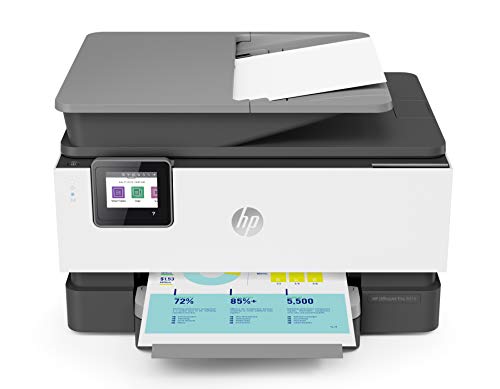
I have long used HP printers and HP Instant ink. I have always found them to be stable, durable, and reliable. This new model has surpassed my expectations.
This was fairly easy to install. You remove the packaging, plug it in, and install the cartridges. The USB cable is not included. It connected to my wifi easily. From there you go to 123.hp.com, enter the model number, and download and install the setup files. The HP Smart app is available to print from your mobile devices. I found setup to be a breeze, and quickly had multiple computers and devices setup to print.
From the touch screen you can connect your Google Drive or Dropbox accounts, so you can scan to those locations or easily print from them. I love that it can print two sided without having me flip the paper over!
When using this as a copier you can select from presets for document, ID card, and photo. You can also tap the settings icon to reduce/enlarge, set a binding margin, utilize 2-sided copying, etc. It really is a fully functional copier.
I do not have a landline so I have not been able to test the fax features.
And now a little bit about Instant Ink. I have been using Instant Ink for about four years. We are a homeschool family and print 300-500 pages per month during the school year, and Instant Ink has saved me a fortune. Prior to Instant Ink I was buying new cartridges every month, costing around $30 per month. I spend half that using Instant Ink. HP monitors my ink levels, and sends me new cartridges well before I need them. Using Instant Ink you pay for the pages you print, rather than the ink you use. 50 pages per month is $2.99, 100 pages is $$4.99, 300 pages is $9.99, and 700 pages is $19.99. Unused pages roll over to the next month (the number of rollover pages varies by plan), and you can upgrade your plan when needed, and downgrade (which takes effect the next month). Additional pages, if you go over are $1 for 10/15/20 pages, again depending on your plan. I use a lower plan in the summer and upgrade in the fall. I love that I always have ink when I need it, without going to the store, and I'm saving money too. Also, these cartridges hold more ink than the ones you can buy so they last longer. You are provided with a postage-paid return envelope for used cartridges.
The HP Smart app allows to to print, scan, set up tasks, monitor your ink levels, and scan to email all from your phone or tablet.
The printer prints fast, even from mobile devices, has yet to jam, and produces clean, crisp documents and photos.
I expect this one to last a long time!
The HP OfficeJet Pro 9015 is one of HP's latest inkjet printers. Instead of a new technology, HP has offered consumers a printer with most of the functions you would expect: printing, scanning, copying and faxing in one device.
This all-in-one does what is promised. It prints beautiful color color copies and does black also at a speedy 22 copies per minute. Scanning is a simple task. Just place your document on the flatbed or document feeder. Go to the "Print" menu and select "Scan" and the image will appear on your desktop or the file that you designate.
Set up is extremely simple, especially with Mac computers. Just insert the included starter cartridges and go to "System Preferences" in "Printers and Scanners." Click the "Add" button and your Mac will search for the 9015. When it finds it highlight the name and press "Add" again and your setup is complete. You also need to configure your wireless settings as well. Once it finds the network name, just add the password and you're done.
The 9015 is not without its shortcomings. My main complaint is that it uses a small LCD display of 2.65". For what you are paying for this device, I would expect a larger screen (such as 4") would suffice. Most of the parts of this printer are plastic. I would have preferred one that was more substantial with some metal parts.
Overall, the HP OfficeJet 9015 is a solid printer that performs most tasks admirably. For its price point, a more substantial build quality would have helped.
This printer is the "BEST", took about 5 minutes to set up without tech support, forget the less expensive printers that give you"ERROR MESSAGES" and cause you United issues and time.
Well worth the$$$$$!
Printed from all devices the first time and every time.
This product will pay for itself in time saving and is well worth the extra money
HP always makes excellent printers. Thank you!
Easy set up, semi fast and a good comparable to the HP 8610. I was hesitant to purchase this with all the bad reviews, but took a chance and so far so good. It's not quite as fast as I thought it should be, but the print quality is there as well as the ease to hook up to a mac environment. I would recommend for a small office.
This is a vast improvement over my last HP all-in-one. The wireless feature works with ease, from my wife's laptop and from my phone. It has a much smaller footprint than the previous printer. Still don't know how to fax from the program on my desktop rather than from the small screen on the machine itself. A learning curve for sure.

Feature Product
- UPGRADE YOUR OFFICE - Replacing the OfficeJet Pro 8710, this small office printer offers faster printing at 22 pages per minute, automatic 2-sided copy and scan, a 35-page automatic document feeder, and is 37% smaller
- SAVE TIME WITH SMART TASKS - Eliminate steps in repetitive tasks and sync to Quickbooks, Google Drive, and more using Smart Tasks-the easiest way to digitize and organize receipts and business documents on your phone or printer
- PRINT REMOTELY USING HP SMART APP - Access your printer and scanner, monitor ink levels, and print, copy, and scan on the go with our highly-rated HP Smart app
- SELF-HEALING WI-FI - Ensures you stay connected by detecting issues and automatically undergoing up to 3 stages of reconnection to keep your Wi-Fi stable and reliable
- BUILT-IN SECURITY ESSENTIALS - Protect sensitive data with built-in security essentials like basic encryption, password protection, Wi-Fi security, and document protection
- NEVER RUN OUT OF INK WITH HP INSTANT INK - Original HP 962 ink is ordered by your printer and delivered to your door before you run out (optional subscription required). Plus up to 50% savings on ink
- CREATE EDITABLE, SEARCHABLE DOCUMENTS - Use Smart Tasks in the HP Smart app to scan documents to cloud software like iCloud or Box that you can later search and edit before printing
- ONE-YEAR LIMITED HARDWARE WARRANTY - Get help with 24-hour, 7 days a week FREE HP Web support. Easily set up your printer by downloading the HP Smart app on your mobile device
- SUSTAINABLE DESIGN - This multifunction printer features a sustainable design made with up to 10% recycled plastic
Description
Upgrade your productivity—the HP OfficeJet Pro 9015 All-in-One is a revolutionary inkjet printer that works to meet your needs. Features like Smart Tasks and the scanbed's easy slide off glass help increase productivity and save time. Reduce interruptions and maintain privacy and control, thanks to the 9015's self-healing Wi-Fi and best-in-class security. No matter how you choose to connect to your wireless printer, you can be confident in quality prints.
I was a little worried about buying this printer given the other reviews, but it works great with my iMac. Setup was very easy, and the print quality and speed are phenomenal.
Very pleased that printer was as described and measured precisely to fit in location. The larger digital control is a great convenience. Very pleased with the prints and the pictures.
Great printer
My previous Samsung printed on two sides but I had to put the paper back in the printer in order to have two sided copies. My HP prints on both sides without that bother. This one is wireless, which I love and it can copy and scan. It's smaller than the Samsung and has more capability. It's also quiet and fast.
Set up is easy. Prints fast, even for pictures. Have only had for a day, so hopefully ink holds up well.

0 comments:
Post a Comment