


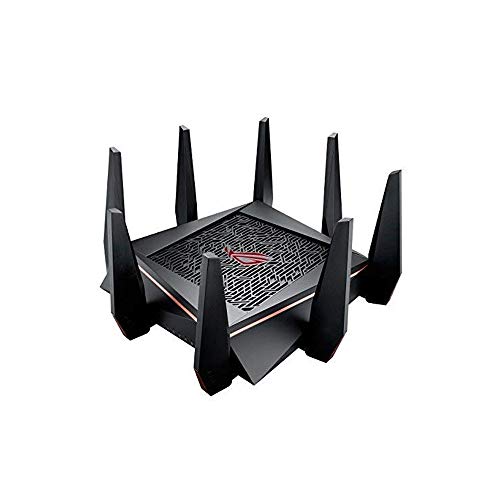
Before I start let me just say that wifi performance can vary depending on your home/apartment walls material and interference. I've read some great and some good reviews about the GT-AC5300. Some reviews say it's way too much money to spend and some say it's great in every way. At the end of the day, the only way to know what you will like is BUYING IT and TESTING IT for days.
I ended up testing both the RT-AC5300 and the GT-AC5300 to see which one I liked more. I ended up sticking to the GT-AC5300 for some good reasons; hardware specs, tools and the awesome webui that I liked the most. I will go over the things I liked first and then what things I didn't find too great which was totally not a deal breaker at all. If 8 ports and gaming boosts with the different webui is not a thing for you then the RT-AC5300 is more than enough to support your network. Plus with the RT version you can get merlin firmware (asus alternative firmware that is a more minimalist approach which I really like. I spend a good time also on small netbuilder website and its forums to watch how the GT-AC5300 firmware improved over the past year.
Hardware - This router has pretty insane specs. A 1.8Ghz CPU with 1GB of ram. This thing is like a gaming computer, pretty nuts. The bootup is a bit faster than the RT-AC5300. The 8 ports are one of the reasons I liked this one including the link aggregation. By the way, if you will not use this feature you need to turn it off so that you can use port 5+6 with different devices or they won't connect! I tested the network under heavy load with my smart TV doing netflix 4k along with my laptop transferring files to my NAS in the same time over wifi at over 75 MB/sec and the wife watching her youtube videos on her cellphone with zero issues. I do know that the GT-AC5300 and the RT-86U both have the newer wifi chips so that's nice.
Connectivity - A neat feature are the first two gaming ports that I use for my two gaming stations. I noticed they get a little nice performance boost. Things just respond faster on the network, the web and gaming wise. Lovely feature. I also really like the dashboard webui that shows network ping and ping deviation. Another feature that I have yet to test but is really awesome is the VPN fusion where you are able to assign specific clients on your network to be on VPN. I attached speed tests I did on speedtest by ookla and dslreports.com. DSLreports one can vary as their servers aren't really the best but it shows that the QOS I setup works well so I have zero complaints there. Keep in mind that these tests can vary time to time depending on the server load. There are times you can have bit slower speeds which doesn't mean you have any issues on your end. Before I got these two routers to setup I actually had spectrum come out to improve my cable signal since the signal was too strong (I only have the cable modem I use in my apartment complex so usually they send stronger signals since most homes have more than one device). I was also getting more error logs in on my Netgear CM600 cable modem before the fix and after the fix I only would get maybe one T3 error in 3 weeks now instead of a few daily. Wifi range and speed are absolutely incredible just amazing.
Gaming/Performance - I really love the gaming features of this router. When you combine the WTfast gaming network with the game boost for specific game like how I tested for Destiny 2 for PS4, you can get some pretty damn low pings in the low 10's. I really like also the game radar that shows you the servers that are close to you in your region. For the WTfast network, it only boosts one device for free which is perfectly fine as I mainly do online gaming more on the PS4. I used to play world of warcraft a lot on my PC but I quit that game a while back. Overall compared to the RT-AC5300 I like these small features that the GT version comes with that helps in small ways. Anything that helps to me is good in my book!
Here are some other things I noted that weren't maybe the best about the GT-AC5300 which I can improve over time.
Wifi radar. When I initially tried this the feature just did not work. I found out that you actually have to click the "start data collection" button to be able to scan the wifi in your area to get information.The information you can gather is quiet nice and can be useful.
5GHz-1 and 5GHz-2 Wifi performance. The two wifi bands actually have different performance. The 2nd 5GHz has better signal and performance than the 1st one. I verified this using the wifi analyzer app on my phone and the wifi radar app on the router. I disabled the 2.4GHz and will leave the 1st 5GHz for visitors/friends to use while I use the 2nd faster wifi band. I am using the latest firmware that is dated 9/19/2018 which has noted "fixed wifi stability issue." Not that I have any wifi problems or stability issues but that's kind of interesting. I sort of was hoping that maybe in future Merlin would support this router and make firmware for it but that is definitely not going to happen as the hardware is quiet different.
That's all. Overall I highly recommend the GT-AC5300 if you really are going to use the awesome features it comes with, want the 8 LAN ports and better hardware specs. I am just in love with this router and it's awesome features.
Strong signal and it seems to have improved my coverage in the house. I was running two ASUS routers as Asus MESH, in a house with a metal roof and signal at one end was spotty and the main router and modem were towards the other end of the home.
This seems to give more stable and stronger signal, over the same footprint and from the same spot. I haven't used it much for gaming, but it was an Amazon Warehouse, "Open Box" buy... and for $297 bucks, it was cheaper than buying the standard series vs. The ROG version...
Supposedly the firmware doesn't allow for tweaking with some of the more customizable firmwares, but for what I need it to do, it seems to be working well.
There are newer routers that are launching this year with the newer broadcasting 802.11ax routers, but none of my stuff is broadcasting/receiving x so I'm okay for a while.
I would recommend going with something like this, instead of the RT-AC68Us in MESH... it is almost the same price, but you probably will only need the one router to cover you...
Still can't get Xfinity with ARRIS 6190 and this router to get me my full 250MB Blast DL speed, but i set the channel and frequency so it seems more stable and im still averaging between 130-160MB DL speeds on my 5G channel.
Sometimes i feel after reading people's reviews about how it didn't do this or its DOA 4 times or it just sucks, i tend to think they are just the unlucky ones or just haters spamming nonsense. i took mine out of the box, hooked it up, it came on (after i figured out it had a power push button) my 2 computers, 2 tablets and phone immediately found it both wirelessly and wired in. i went in to do the basic setup and firmware updates (no problems there) then to setup the 3 different wireless bands (2.4Ghz and 2 5Ghz lines.) and come to find after jumping on an mmo to find things wouldnt load very fast like a ingame store page or event page. after a long timeline of a few days of buying a new modem from my ISP because i upgraded my internet previously and my old modem didnt support the new speeds, and got a new modem i still problems with super erratic download speeds. like really fast to almost nothing. long story short the QOS (quality of service) thing in the router settings was freezing up my true internet speeds to do the complete opposite of what it claims. i dont bother using really any of the other features in it like the vpn and the gpn thing. basically its just my high dollar, high speed router that does what a router should basically do and that's that. my computers, tablets, laptops, phones, and even my IRobot Roomba's connect and stay connected like they are supposed to.
As far as performance is concerned i usually have both of my computers turned on and doing something. i play an MMO that has alot of AFK-able tasks so 1 computer is usually always running that game about 16hours a day, and i'm usually playing something else online while sitting in a discord room with buddies chatting and neither computer has any lag or degradation of performance related to the router (lag from the game's connection different story). past that i've also ran a small minecraft server for myself, friends, and family without a hitch. forwarding ports on it is a snap, alot easier than previous routers i've had. i've also had friends over while also doing the mentioned above, with them doing their own downloading and playing, and still no realistic drop in connection quality to speak of.
i really have no complaints to speak of. i've had it a little over a year and its been serving me well for what i use it for.
i would add pictures but the store page ones are accurate enough. i will most likely add some later.
Power, speed, reliabilty — this beast has it all. Been running at the heart of my Aimesh network for about a year, and that has added flexibility to its list of strengths. BUT ... you had better know your nodes from your nose before you rely on Asus customer support. The support staff I’ve encountered are hapless, clueless, and will cut and run from a phone call or chat if a question flummoxes them. If you’re just starting with home networking, find a friend who is a class-A techie, or choose a plug-and-play set-up from a company that demonstrates that it cares about its customers AFTER the sale.
as stated in the above, its a great product. I'm now able to join EU servers (im in America) without any kind of lag or rubber banding.
The only problem arises when your streaming something like Netflix or downloading games, as an ISP will likely try to throttle your download speed with how much data you can actually get downloaded with this thing.
(odds are you'll be able to get a good 10 or 20 huge downloads done before this happens though, just keep an eye on streaming services)
Best get a VPN with the purchase of this (if your buying it, you've obviously got the coin, So browse through some other khajiits wares and find yourself a nice VPN software. I personally recommend you keep an eye on the humble store, as they do cyber security deals often and Vyper VPN (as well as other VPN services) can be founf floating around in there.

Feature Product
- Tri-band (dual 5 GHz, single 2.4 GHz) AC5300 wireless router with the latest 802.11ac 4x4 MU-MIMO technology for maximum throughput (5334 Mbps) and coverage (up to 5,000 sq. ft.)
- 1.8GHz 64bit Quad-Core processor maximizes data throughput from 8-ports and dual USB 3.0 for optimizing network traffic and connectivity speeds 3. VPN Fusion enables you to run a VPN and ordinary internet connection simultaneously, effectively maximizing your connection speed to gaming servers (available via firmware update)
- VPN Fusion enables you to run a VPN and ordinary internet connection simultaneously, effectively maximizing your connection speed to gaming servers (available via firmware update)
- Game IPS Powered by Trend Micro provides multi-stage protection for your gaming network from external attacks and threats, neutralizing them before they reach your network or devices
- ROG Game Dashboard gives you access to exclusive features like Game Boost, Game IPS, VPN Fusion, and route-optimized low ping time gaming servers using WTFast Gamers Private Network (GPN) - all to help you optimize your gaming network
- AiMesh Supported - Upgrade your firmware to easily connect to other compatible ASUS routers to create a powerful and flexible whole-home Wi-Fi network; 1024-QAM high data rate, 20/40/80 MHz bandwidth
Description
The ASUS ROG Rapture is the world's first gaming tri-band router featuring a 1. 8GHz quad-core processor and the latest 4x4 802. 11AC MU-MIMO technology. Game dashboard with game IPS controls and protects your network in real-time while delivering data rates up-to 5334 Mbps across prioritized ports and gaming-dedicated 5GHz Wi-Fi band.
I replaced an older Linksys router with this ASUS router. I think this router is the best I've owned. It has 3 reliable WiFi bands, good coverage, ample ports, and many options that allow expert configuration to optimize how you use this router. In my situation, I keep it rather simple. I only use about 50% of the advanced features / capabilities of the router; however, the things many users look for are great. The WiFi covers my 3 bedroom house. The ports provide ample connectivity and configurations that fit my needs. ASUS provides excellent support for the software, and I have had no issues with anything to date. The user interface is simple, easy to navigate and provides good definitions for most of the options available. I have had zero issues with this router. My Samsung Galaxy S10+ connects well at 1083 MB/s, as do most of my other devices depending on their capabilities. If you want a good solid router with many extra features that will stay with the technology curve, this is a great choice.
I upgraded from the ASUS RT-N66R Dual-Band Wireless-N900 that worked flawlessly for me for over 6-7 years. So when I wanted to upgrade, looking into another Asus router felt comfortable for me given the track record I had with them.
I broadcast live streams as well as all the typical media streaming. My network consists of a 2 pcs (gaming and streaming) hard wired, and on WiFi a 4k tv, an iPad, a laptop, and my cell phone. I use the ARRIS SURFboard Gigabit DOCSIS 3.1 modem and my ISP plan is 1Gb down / 20Mb up. I have a 1k sq foot condo on 1 floor and it supplies strong 5GHz and 2.4Ghz WiFi signal throughout my entire place. I'm able to stream content on Twitch at 8k bitrate while watching 4k video, playing whatever online game, and watching other streams via any other device. It never hiccups. I'm baffled by the number of negative reviews. My experience with this device has been stellar. This could be overkill for some depending on your network needs, but I would definitely recommend this for those looking to upgrade to a high quality router for intense network traffic. Nothing else to say. (Forgive the cable management, or lack thereof in my pic)
This modem is everything it is advertised to be. The performance is the best there is. The software based setup makes learning to control the router simple and easy. This is the fastest and best router of all the top of the line routers I have ever owned and it's best feature is that it also the easiest to forget that I even need a router because the CPU is killer and I never have a clue of any performance issues.
It may be more router than most people need but if you want serious, flawless bandwidth it's the one to buy.
I got this to improve my home network to stream content on a Peloton Bike. It solved the buffering issues I was having. I haven't used it for gaming but it is awesome and handles multiple devices at once. I like that it has 3 separate networks. ASUS app works great. I did have to manually input my setting from the old ASUS. At some point I may add another to make it a mesh system for better coverage outside the house.
The best router so far and we have so many devices. It has the 2.4 GHz, 5.1 and 5.1(b) so there are three band widths to chose from (5.1 & 5.1 b are the same but separate band widths) so I have all my devices on the 5.1 (b), other family member is on 5.1 and printers etc. are on the 2.4. Tech support are pretty good and better than other companies but not perfect.
0 comments:
Post a Comment