


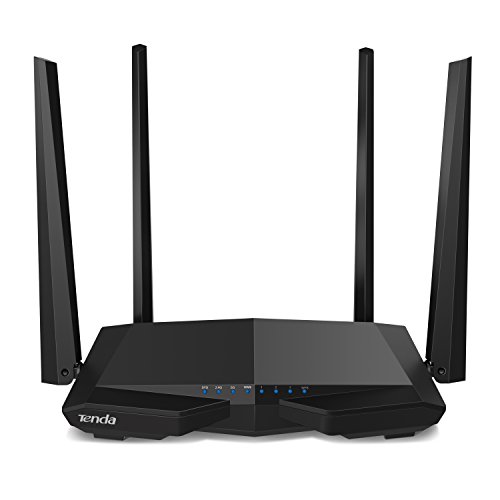
When my ASUS router began acting flaky, I got this as a replacement. I have a lot of wireless devices, so I wanted to configure it to work exactly as my previous router did, including the same wireless credentials.
Having now gone through that experience, I like this router, though it did have a couple of minor frustrations.
The default setup is an absolute piece of cake. If you don't care what your wireless network is named, and you're not very technical, this will work well for you. Your unique SSID and password are on a sticker on the back, so you don't have to configure it. It has its own unique login password too, so it's pretty resistant to standard hacking attacks that scan the Internet and use default passwords to gain control over routers (usually to use them as spambots or denial-of-service bots). That was one of the features I liked - since it's so hard to log in, and isn't one of the most popular brands, the hackers probably won't even try an attack.
It also gives you a chance during setup to change the SSID and password, but it had a minor limitation. My security-conscious standard wifi password is forty characters. The standard setup only takes 32 characters. I had to set everything up and get it running on one device, and then logon to the router and access detailed wireless settings to put in my standard 40 character passphrase.
After I did that, all my devices connected just fine. I had to be firm with a Windows 10 machine that stayed on through the changeover and got petulant about the new network. But after hitting the troubleshooter to reset the network and make it connect again, it worked. Interestingly enough, my Xbox One was on the whole time, and had no trouble with the new network at all. Same with my Alexa devices.
The only other minor setup glitch was my fault. I put the connection to the cable modem in before going through the setup, which the instructions tell you not to do. So I had to restart my cable modem to get internet access. My fault, though.
When I got Internet access and logged in to the router, it notified me that a firmware update was available. It offered to download and install it. That went off without a hitch too. Way easier than firmware updates on some of the other routers I've had.
I like the form factor. It's compact and easy to set vertically, with the usual adjustable antennae.
I found signal strength to be really good. This is the first router where I've seen a setting for signal strength (high vs. low). I live in a residential neighborhood, so I'm not interfering much with my neighbors to use high. So I do, and it covers the entire house (about 2500 sq ft).
With the advanced settings, it covers a nice range of users, from non-technical to pretty technical. I rate it as good as $100 routers from Linksys and ASUS (I've owned both), but it's roughly half the price. Nice router, excellent value.
*** Update 1 July 2017 ***
I've had this in six months now, and never had to reset the router. It just works. Coverage continues to be excellent. This is as close to a set-it-and-forget-it experience with a router that I've ever had.
This product came in a retail package and pulled out of the box, plugged it in and was extremely easy, easy enough for someone with no experience to easily read the instructions and setup, setup was simple and easy step by step and out performs the latest, greatest available dual band A/C WiFi modem provided by Comcast on both 2.4 GHz and 5 GHz bands for downloads and uploads speeds which is nice since I wasn't getting better speeds with way more expensive MuMimo modems that didn't enhance the speeds on a MuMimo Laptop I already was getting with the Comcast Modem so that much has so far been nice as I bought this to save $150 to $200 dollars off the modems and I won't list as I tried 4 models ranging from $179.99 - 249.99 plus tax so in the end the cheapest wifi modem I've tried is performing the best and has the same range as the most expensive unit I've tried and the antennas look the same on this cheap model as the $200 models I tried. Would I recommend, YES
Loving this new router, I cannot recommend it enough, so much better than what we had, (this is #3 since we moved here) The first one which I moved for some reason did not want to function correctly and I paid a lot of money for it. The second one was a hand me down and honestly I think it was just old and tired (about like me) The set up was easy, we immediately had wi-fi, little trickier on my desktop but did get set up, changed out some cords. Definitely speeded up the connection rate even on the lower setting. This is in a bedroom/office, and I am out here in the living room typing this review. I can't say enough good things. Hopefully all will continue well, This by far is the BEST BANG FOR YOUR BUCK!!! Recommend
I wasn't expecting much from this Tenda router because of how cheap it is. However, I was WAY wrong about that. :D
Within 15 minutes of receiving it, I had the router set up and working beautifully. It's very easy to use! Also, after having it for several weeks now, I'm pleased to report that my network performance has never been better.
I love that the dual band tech lets me set up dedicated networks for different device needs. I've put our smart tv's on the faster network to better accommodate streaming, and our computers/mobile devices are paired with the primary network. Being able to direct traffic this way, so to speak, has improved the overall user experience for everyone!
This replaced my old TP-LINK which did not support AC or 5G, and the wifi was failing. Running the Tends on 5G, I am able to get full speed to my gaming laptop (100mbs) and all my devices including my phone and tablet. The setup interface is SO much better than anything I have used, up and running in minutes with it's initial bootup quick start process. I especially like that the MAC filtering is a breeze, just connect all devices and then click whitelist all. No manually entering MACs or messing around. Menus are dynamic, showing current connected devices, current upload and download kbs, all without refreshing the page or whatever. You can also disable one band or the other if you don't need it. Another nice thing is you can disable the LED lights on the front. Tons of options if you want to get in deep as a power user, but super easy for the average consumer to get up an running in a snap.
Oh, and style points. Looks cool.
Just an overall great experience on this one. After sticking with TP-LINK for so long, this is such a refreshing change from it's clunky and often quirky interface. Price was great too.

Feature Product
- Get lightning-quick connections for all your wireless devices by upgrading to Tenda's enhanced 1200 Mbps high speed Wi-fi technology (300mbps@2. 4GHz +867Mbps@5GHz)
- Link up to 20 wireless devices like the Google assistant, Alexa and various steaming devices, simultaneously, while maintaining optimum network conditions
- 4 omni-directional antennas with beamforming and Mu-Mimo technology, deliver high-speed internet throughout your home and provide seamless coverage for up to 2000 Sq. ft
- Manage your network from anywhere with the fun-to-use Tenda Wi-fi app and access helpful tools like our parent-friendly Wi-Fi timeout feature
- 4 LAN ports offer fast and secure wired-connections when you need them
- Enjoy safe and secure internet connections for you and your family, with WPA/WPA2 PSK Mixed security and industry level password encryption
- Fully compatible with all major internet providers and perfect for any internet plan (AT&T, Comcast, Spectrum, Verizon, etc.)
- Industry-leading 3-Year Warranty, with FREE 24/7 Amazon-dedicated tech-support (Support.Amazon@tenda.com.cn)
Description
Experience smooth HD streaming and online gaming with high-performance AC1200 Wi-Fi 1200Mbps of Wi-Fi speed over dual 5GHz (867Mbps) and 2. 4GHz (300Mbps) bands. Superior, far-reaching Wi-Fi coverage with high powered amplifiers four high gain 5dBi dual Band antennas. Smart management through your mobile device through Tenda cloud, Wi-Fi scheduling, and control over LED indicators.
Good value for money at $30. Bought as a replacement for TP-Link $40 AC1200 that did not support WISP or WDS. Using with AT&T Velocity 2 hotspot, which requires WiFi to connect (WISP) as there are no physical ports. Router's 5g signal to 10-15dbm better than Velocity 5g at same location. 2.4g signal is 5-10dbm better than Netgear WNR 2020 twin antenna at same location
Tenda however does not currently support OpenVPN, while TP-Link does. It does support older PPTP, which, if security is not a major concern, provides effective tunneling. But be aware it may not be compatible with certain VPNs (NordVPN) who are moving away from PPTP and no longer support it. TP-Link also has gigabit lan ports, this Tenda does not.
If you are looking for a router that supports WISP/WDS, the Tenda is a good candidate (though you need to dig for the settings, which are buried). If you need OpenVPN, and WAN connect via cable, and/or otherwise need gigabit lan ports, Perhaps consider the TP-Link AC1200.
2/2/2019 - now it's $37, not $30. 20% more! I hate it when Amazon starts gouging after good reviews. The only way to counter this behavior is to refuse to buy until the price drops back to $30.
WOW! All I can say is BUT THIS ROUTER!!! Contrary to what some of the other reviews say, IF you know what you're doing in setting up routers etc. you DON'T need extensive documentation. I bought this router to replace a VERY recent cheaper router purchase (Wireless N, NOT AC like this one) and the router failed miserably! It lost speed on 'WIRED connections, then a few weeks later, WiFi speeds plummeted. All I can say about this Tenda router is that setup is EASY, a BREEZE, FAST setup, and the performance thus far (several hours) is rock solid!! NO drop in speed wired or wireless, range is excellent, strong signal, and if you want the rock solid wireless security that MAC address filtering offers, this router has it! Web interface is GREAT. The router is large, but I LOVE the fact that it stands upright which allows me to place it on my surround sound receiver without blocking air ventilation of the router or the surround sound receiver. The upright standing position of this router almost guarantees that it will not overheat. I know I just got this today, but compared to the D-Link that I just replaced with this, this is amazing for this price! If it holds up over time I just don't see how other routers will compete with this because Wireless AC standard routers are still a bit pricey and this one was under $40!! Again, if there is not enough documentation for you, or if you are not a tech savvy person, ask a friend or family member who is technically inclined to set this up for you, and if you want the maximum in wireless security, ask them to set up MAC Address Filtering, if you don't know what that is, Google "Mac Address Filtering", but in a nutshell, it has the ability to let you tell it just what devices are allowed to access your WiFi, this goes beyond the simple password entry, passwords which can be hacked, but every electronic device has it's own unique "MAC address", think of that as the devices unique "social security number" by listing the "MAC addresses" of each device you own on the white list/allowed list, this tells the router to ONLY allow THOSE devices that you list with that number to access your WiFi network! No more neighbors hacking your password and using YOUR WiFi. Again, BUY THIS ROUTER!
I ordered this router as my previous unit was just not quite enough to handle the bandwidth my new roommate used, so I was experiencing problems with both wireless and wired internet.
This one was pretty easy to install, though it took a long time to actually connect to my internet and tried to convince me that I use a static IP versus a dynamic IP. Still, it was fairly foolproof and, though I haven't tested it under full load, or with my streaming devices (PS4 and Steamlink) it has given me no issues so far.
The menu for controls is way, way easier than TP link or the other "off" brands, with large, easy to understand icons and clear instructions on screen. This would be a good router for someone who needs parental controls, but doesn't want to have to read a tutorial on how to set them up. You simply select the device you want to limit, add certain websites to the blacklist, or hours you want them to have access and you're done.
Bandwidth limiting was pretty standard for individual devices as well. Nothing was hard to set up with this router.
My only issue was setting up the wireless password, but I can attribute that mostly to user error, not the system malfunctioning (sometimes I don't read as well as I should). It does have a password already set up for you, if you want to use it out of the box, but since I already had a network and didn't want to have to change everything on all the wireless devices I own, I just set it up with my old SSID, and that caused me a bit of confusion when it wasn't accepting the passwords at first.
I've downloaded the application for router control, but I haven't got it connected yet.
This is based on a setup I did last night, so durability is a preliminary call. I got this for my girlfriend. Her Netgear 1600 is approaching old age and had a bit a bit of occasional cutout on the high band. Not enough to make it unusable, but at the sale price of the Tenda, I was able to buy one and save the Netgear for a spare in case something really failed.
I paid good money for a Netgear Nighthawk 1900 for my home, and after installing an AC1200 in a rental property I came to the conclusion that all that extra power in the router is wasted if you're only getting 60 megs down through the cable system.
The Tenda cost a small fraction of my locally purchased AC1200 unit and works as well as anything I've used. I was able to hang nine devices--Roku boxes, Amazon units, smart speakers, phones, tablets and computers on it in a matter of minutes. It had enough power so that I was getting good signal on my phone way out on the street, at least a block from the unit. If anything more expensive dies in the router department (and the spare Netgear unit dies), this will be my new go to router. Now I'm asking myself what was I thinking when I laid out that extra $140 to get that high end Nighthawk.
I'm researching to buy a new modem for my grandmother and returned to this one because I bought one for myself about a year ago for use in my college apartment.
I saw a lot of bad reviews and wanted to throw my 2 cents in that this modem worked excellently in my year of use. I didn't encounter any trouble whatsoever.
I'm a tech savy person and play a lot of video games and stream a lot of videos and content at once (some in 4K) and I can say this router did a fine job! It never quit on me and has a very far range.
In looking for a modem for my grandmother I'll probably choose this one again as it seems very reliable and strong. Heed bad reviews but remember human error is a thing and it's fully possible those people's units were broken in manufacturing, transit, or use. If you're responsible and careful this unit will probably do you fine as it did me.

0 comments:
Post a Comment