


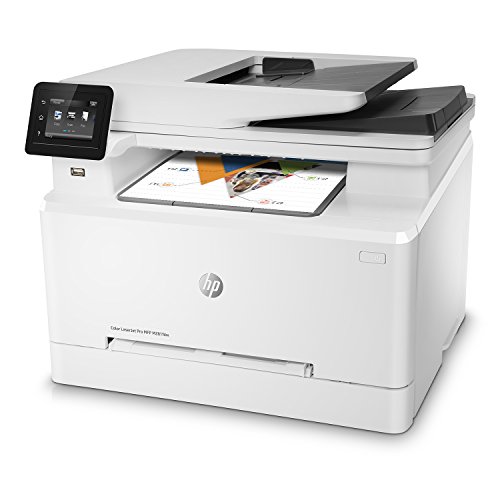
Strong Recommendation
I find this printer to be a perfect fit a small business or home office. I have experience with many inkjet and laser printers including Brother, Canon, and Samsung and I have to say that this one really right in the Goldilocks zone of price vs performance. Here is my review:
Size: The footprint on this printer is comparable to most 3 in 1 inkjets, but it is taller. This is not a hulking piece of equipment. It’s very compact.
Setup: I did the initial setup on a MacBook Pro and it was simple and complete in under 10 minutes. I setup the scan to network folder on the MacBook Pro without a hitch. I also setup multiple email accounts for the scan to email function. It’s all very easy.
Printing: This color laser printer prints absolutely stunning quality color pages and the speed is amazing when compared to inkjet technology. The colors are more vivid than other color laser printers that I’ve used in large offices before. The duplex printing is pretty quick and seamless. At 22ppm this printer is blazing fast for a printer in this class.
Scanning: The 50 page document feeder is pretty quick and I haven’t jammed it yet despite fully loading it numerous times. This is huge for me as I do a lot of scanning for my job and it hasn’t failed me yet. You can control the scanning from the front panel of the printer or from the client software and both are fully functional (file type, quality, etc)
Network Clients: I have printed and scanned from a MacBook Pro OS X 10.6, a PC Windows 10, and an iPhone iOS 10 without any problems at all. The most interesting of that list is the fact that the iPhone can print to the printer without loading any extra application. It can just discover the printer and print. There is also an application that you can download to scan and control the printer from your phone if you like, but you don’t need it to print from your iPhone.
Copying: It fully functions as a high quality copier. Note that the color options are initially set on High Quality so you may choose to reduce quality depending on your needs for the print job.
Fax: Plug in the phone line, use the console menu to set the fax header, date, time and you are in business.
Toner: This printer incorporates HPs JetIntelligence technology that apparently has 53% less energy consumption, 40% less energy consumption, and 33% more pages than competitors. So, while the toner cartridges are expensive, hopefully your per page cost might still work out to be pretty good. I haven’t had the printer long enough to do that analysis.
Overall, I strongly recommend this printer for any small business or home office that is search of a color printer.
We bought this printer as a replacement for an Epson inkjet printer that the suffered from poor print quality and frustratingly short ink cartridge lifespan. I wanted to upgrade to a laser jet that still retained the copy and scan functions that we used on our old Epson. I also wanted something small that would not be a bear to operate given we use it in a home office and print less than 1000 pages a year -- a major issue with the Epson because there would be some months where we rarely printed and the ink would dry out.
I was about the buy another HP model which turned out to be last years version of this printer, but I saw the new version in a retail store and liked the fact it had a larger sheet tray and increased print speeds from 19 ppm to 22 ppm. At $429 its not a cheap printer -- but handles all the functions we wanted well.
Setup was easy out of the box -- plugged it in and found my home WIFI in seconds. I was able to print directly from my Mac and iPhone without installing any drivers or software. The toner cartridges were pre-installed and included a normal yield black toner cartridge (which should last us 12-18 months) and the three starter color cartridges.
Printing was fast and the quality of mono-printing comparable to the laser printers I use at work. The scanner was automatically recognized by my Mac and worked flawlessly. The sheet feeder was quick and able to scan and copy without any issues. The touch screen is small but is functional. The small screen did not bother me as you end up rarely using the touch screen unless you are copying or scanning to a USB drive -- which I have not tried yet. This printer also works with web services which allows you to print to an email address or through Facebook Messenger -- although I think I may end up turning that feature off for security reasons.
All in all, this was a good quality printer for a home office or small home-based business. I am so glad to get rid of the inkjet -- the nightmare of dried out ink is a thing of the past with this quality laser printer.
So......we have all tried the $79-$150 all in one printers. Yes they are inexpensive and go through an enormous amount of ink, but my biggest with these printers is keeping them connected wirelessly and keeping all the features working. After years of struggles, I spent the money and went with the higher priced option as I had used one before. I have had it 2 weeks and it has exceeded my expectations. I gave it 4 stars simply because I have only had it 2 weeks and it is a touch loud, but still a great product. Took me roughly 3 minutes to connect it to my network via my wireless router too!!
If lightning fast speed with color graphics is your priority, this may not be the best choice, but for me, I'm loving the high quality text, vivid brochure graphics, and compact size this printer offers. My text is sharper than any inkjet printer I've tried, and it prints to 167 gram cover stock, or 200 gram card stock without any issues, even in duplex mode. I can't believe I've held off this long at switching to a color laser printer. I highly recommend this one, after a friend who works for HP suggested it to me after hearing me complain about the inkjet printers I've been using.
This printer works exactly as advertised, it was extremely easy to set up and all the features worked perfectly even after i put them through the ringer to make sure it worked as it should. I purchased this printer refurbished, mostly because it had 4 starts and a lot of reviews, has a very reasonable price, and came with a 1 year warranty. After ordering it i started to go through the 1 star reviews and basically freaked out when i saw how many people had major issues with this printer. I can tell you that I did not experience ANY of the problems that people described (I did make sure to follow the setup steps exactly).
- The setup went perfect
- I have internet hardwired in my house to I used an Ethernet connection, rather than wireless, to connect it to my network.
- I am using Windows 10 (and Apple iOS on my phone and tablets) so i installed the HP Easy Start app via the Windows Store (for Windows 10). It worked perfectly.
- I then FULLY tested this printer, i printed hundreds of pages, PDF documents that had 136 pages in them and used the two-sided printing feature
- I printed photos of people and graphics (they look great, not as perfect as an Ink Jet would for pics of people but really good for a laser printer).
- I scanned multiple page documents using the document tray (located on the top)
- I scanned documents using the scanning glass (worked perfect),
- I printed from my iPhone (worked perfect)
- I set up Print to Email and tested it (worked perfect).
- I printed 50 copies of a flyer (came out perfect).
- I printed on heavy card stock (110 lb) paper (worked perfect).
- I tested this printer over multiple days to ensure it would "wake up" when a print job came in (worked perfect).
I literally have zero complaints at this point, if it continues to work as it has so far I will be 1000% satisfied.
UPDATE: it’s been several weeks since I first received the unit and wrote this review, it continues to work flawlessly, definitely the best printer I’ve ever had

Feature Product
- BIG PERFORMANCE IN A SMALL PACKAGE - This compact color laser printer features fastest in-class first page out and double-sided printing, plus scan, copy, fax and wireless, as well as an auto document feeder, USB port and 2.7-inch color touchscreen
- FAST PRINT SPEEDS - Prints up to 22 pages per minute black/color, first page out as fast as 10.3 sec black and 11.7 sec color, input tray paper capacity up to 250 sheets
- EASILY PRINT FROM YOUR MOBILE DEVICE - Simply connect your iOS or Android device to the same network as your printer to print, or print without a network using Wi-Fi Direct
- THE POWER OF YOUR PRINTER IN THE PALM OF YOUR HAND - The HP Smart app allows you to easily set up your printer, scan from your smartphone, order toner, and print from the cloud-such as iCloud, Dropbox and Google Drive
- WIRELESS CONNECTIVITY YOU CAN COUNT ON - Have confidence in your connection with steady performance from dual band Wi-Fi, plus Ethernet capability for wired networking
- MORE PAGES, PERFORMANCE, AND PROTECTION - Count on high-quality color and more pages than before with Original HP Toner cartridges with JetIntelligence
- NEVER SHOP FOR TONER AGAIN: Save 10% with Amazon Dash Replenishment. Upon activation your printer measures toner level and places smart reorders when you are running low. No subscription fees.
- ONE-YEAR LIMITED HARDWARE WARRANTY - 24-hour, 7 days a week FREE HP Web support
Description
Designed for office work teams of 1–10 individuals looking to increase productivity, the HP Color LaserJet M281fdw allows you to print high-quality color documents quickly and conveniently. With the fastest in-class first page out and two-sided printing, plus scan, copy and fax capabilities, easy mobile printing, auto document feeder and a reliable wireless connection, this printer can help streamline business performance. Pair it with the HP Smart app and you have the power to scan documents on the go with your smartphone camera, and print from the cloud using iCloud, Dropbox or Google Drive. Operating temperature range 15 to 30 degree Celsius.
This printer has worked well right out-of-the-box, with absolutely no problems, save one. My wife when VPN'd out to her work could not use it. This is a networking issue, and not the printer. We resolved that simply by plugging in the direct USB cable to the printer. Now, since the printer is connected to the laptop, whether VPN'd out or not, it works great! For the rest of us "Wifi folks" in the house, it - is - flawless!
I highly recommend this printer! Great quality, excellent imaging, fast and efficient!
(and it doesn't blow through ink like an inkjet would)
Best purchased I've made in a long time. I have always used ink jets because lasers cost too much. I finally reached my frustration breaking point with my P.O.S. Cannon Pixma that took forever to warm up and even longer to print--what a joke. This laser Jet fires right up and prints soooo well! The ink cartridges will cost plenty when the time comes but that should'nt be for a year or so but the time and frustration this Laser jet is saving me more than off sets the price of the cartridges.
One significant item prevents me from giving this a five-star review. See the two pairs of images below printed on plain paper. The color graph on top is from the LaserJet printer and the landscape photo I took in Yellowstone on the top is printed from the HP Laserjet printer. The others below were from an Epson WF-4630 inkjet printer for reference. I used a Canon D5 Mark II camera to photograph the prints. The paper isn't lying flat, so I cropped the edges so that it is not a distraction. The images look much better in person than the camera's images below indicate. I expected the inkjet print edges to curl when using plain paper, but I was surprised a laserjet print would curl nearly the same amount, but a little less. I used high brightness 24-pound paper – thicker than the average paper. I put some weight on the printed paper and it does help flatten them.
1. The images are too dark and I can't find a setting to adjust the darkness, but surely there must be some way to change it. So far I haven’t been able to find it. The detail is lost in the upper Yellowstone National Park photograph because it is too dark (laser print). On a different portrait photo I printed, the laser printed image was so dark, the photo was unusable. An inkjet print of the same image had the expected color depth.
2. On that same laser printed portrait image, the printer left an extraneous mark (actually an ink omission on the print) – a significant mark you couldn’t help but notice. Apparently, I am not allowed to show a photo of a person on Amazon, so I had to remove the image. This missing toner ink mark only happened once. It looked somewhat like a letter C on its back about three-eights of an inch in size.
It comes with a standard capacity black toner, but the three color toner cartridges are roughly half capacity versions. So you shouldn't run out of the color toner quite so fast, but currently, it will cost you an additional $231 for a set of standard size color cartridges (1300 pages) when that day comes. And that assumes that when you print 1300 pages, there are not a high percentage of full-page color photos. It is an estimate because everybody has different usage plans - photos versus charts or a mix.
The high capacity cartridges will cost about $309 at current pricing and you get 2500 prints depending again upon what you print - charts or photos. So just the color part of the print cost is 17.77 cents per print for standard cartridges and 11.64 cents per print from the high yield cartridges. So if you are pretty certain you'll eventually use up a standard cartridge, you'd be much better off getting the high yield cartridges from day one because there is about a 50% difference in price per print. Inkjet ink isn't cheap either unless you buy generic ink. I’m not sure how to compare inkjet cost of ownership to a color laser, but I’m pretty sure the color laser is more expensive.
So far all my Excel spreadsheets have printed fine, but darker than the screen image and darker than the same thing printed on an inkjet printer. The inkjet printed paper looks almost exactly like what is displayed on my computer monitor. Darker ink on graphs looks better. But if you have a mix of photos and text on a PowerPoint slide, it doesn't work out so nicely on the printer I received. The photo images are very dark, so I have to compensate the original to make it look correct and there is a fair amount of guesswork involved. So I hope there is an intensity adjustment somewhere. Suggestions accepted. I'd like it to print the same as my inkjet printers do in terms of brightness or in this case darkness. There’s no doubt that the laser printed sheets look better if the color density is correct.
Otherwise, it works just as you'd expect a regular laser printer to work. The setup is easy. Remember to install the software first and then the USB or network connections. I started using the USB cable, but that was because this initial setup is temporary. I'll do the network setup later in the final location. I don't expect any issues.
I noticed at least one other reviewer complaining about dark photos. There may be more, but I try not to read other reviews until mine is finished so that I keep my thoughts independent and not influenced by others. But since my prints were so dark, I had to check if I was the only one with this problem. I’m not. I’ve owned many HP black and white laser printers and in fact, HP has been the only brand I’ve ever purchased. I used them so very much until color inkjet printers hit the market. Color is important. I am confident I will be able to solve the dark photo image, but at the moment, I don’t know how to adjust it. Maybe other people will solve it before I do. I will download the full manual and read it. Other than the color darkness issue, I really like this printer and look forward to using it a lot.
I got this thing so that I could finally escape Ink Cartridge Hell. So glad I did. Yes, replacements for these toner cartridges are not cheap...but they don't dry out and should last for YEARS vs. cartridges that DO dry out and a box set of them cost as much as 1 or 1 1/2 of these toner cartridges. Do the math...
The printer itself works like a charm. I would recommend this printer for anyone in a Home Office or Small Office Environment.
I am very happy with this purchase. It is very easy to set-up. The toner cartridges were pre installed. I used it for a few weeks now with a mix of Windows PCs from Windows XP to Windows 10, MAC books, iPhones and different iPads. I use it mainly for printing and it works flawless from all my devices. The scan to USB drive is a great feature together with the document feeder, however this model doesn’t scan both sides of a page by itself. You have to do it manually page by page direct on the flatbed glass, but you can specify the scanning of multiple pages in that mode so you end up with one PDF file. Setting the file name on the small touchscreen display can be a challenge but is doable. I normally scan all my documents to a USB stick and later rename them when I transfer them to their intended location.it is possible to set up a network share on one of your devices for automatically receiving the scans or let the printer e-mail it to you. There are a ton of more features I didn’t even try yet or don’t need at the moment, like FAX ( anybody stil using FAX machines?). Al in all a great device for good price.

0 comments:
Post a Comment