


I have bought from Techmatte for probably 5 years it seems. I have had their screens for Iphone models 4, 5, 6+ and iPad models Air and Pro 10.5. These protectors have been in plastic film and glass. The latest glass versions such as the 10.5 are excellent and work just as adverstised. In the past I used the plastic versions and like them better since they do not break easily on installation and will not break when dropped. Installation of the plastic screen is more tricky and they seem to be more suscepitable to dust entrapement. It appears that the glass version will actually hide the dust in the glue but that is just a guess.
This specific product was easy to install and since I had two I just jumped in and did it the first time without all the preparation such as steaming bathroom, etc. Here is what I did and recommend:
- If you have very dry air and detect static anywhere in your house then do this project in a recently steamed bathroom to kill off dust and static.
- turn off all air handling systems such as A/C or heat, ceiling fans and get in an area with NO AIR MOVEMENT.
- find a hard surface to work on like a desk and make sure you have strong light. Wipe off the entire work area to get rid of dust.
- read instructions and watch video before starting.
- wash your hands, wear the most lint free clothing you have. Dry hands with paper towel.
- clean your screen with dish detergent and water but only on a 1” area of paper towel. Dry screen with paper towel and look at an angle for dust. Blow off whatever dust you see.
- wipe screen with alchohol wipe provided. Go from one edge to the other and off the phone.
- wipe the damp screen with the microfiber cloth supplier in circular motion and check for no dust looking at a angle of reflection.
- peel off step one but do this away from the phone and do it slowly to make sure you do not have static buildup attracting dust.
- looking straight down carefully align the home button and speaker holes. I have found that some times just centering the screen and using the sides for equal clearence works best. Now gently touch the glass to the screen and let the attachment flow...you will actually see it flow like water from point of contact to edge. I would not touch or press until you see most bubbles are out. If you have some then gently work with the squeege out from the center to the edge. Once you have it all in hand then you can press harder. Do not attempt to lift and reset as you will only find you get dust and loss of adhesion. I think this is why you get two in this package!
- If you see any dust then put the device in a warm place or in the sun until it warms then try to squeege it out. If you have no success then just wait a few days as it may just go away as the glue flows around the dust.
So I got a new iPad Pro 10.5 for Christmas and wanted to get a screen protector on it right out of the box. Did a bunch of research and finally went with this product for two reasons. First, they give you two so if you mess up there is a backup. From having installed iPhone screen protectors many times over the years I know that the process can go quick and easy or can be brutal particularly if dust enters the equation. Second, I really liked the method of applying this protector with the tabs at each end.
Before starting I watched the manufacturer's website installation video which gave a couple of useful tips. I carefully opened my new iPad and loosened the plastic cover on the device. I then slipped one of the protectors out of its envelope and found tab #1 placing the protector with the sheet attached to tab #1 facing up. I held my breath and then gently pulled tab #1 removing the film covering the adhesive side of the protector. I immediately grasped the tabs attached on the remaining film on the protector and flipped the whole thing over. I completely uncovered the iPad exposing the glass to room air for the first time. The tabs then allowed me to suspend the protector above the iPad making alignment of the camera and home button cutouts a snap. I am a perfectionist and with minimal trouble got the screen protector aligned to less than 1/2 mm out and then lowered the protector onto the iPad screen. The protector immediately sealed itself to the iPad with a couple of small residual bubbles easily pushed out in seconds with the provided squeegee. I then let our my breath satisfied with a pretty perfect install in less than a minute with an extra protector left over in case I should need to replace this one. Not bad! Also looks great and the iPad response to touch is not diminished at all.
So, the two reasons I chose this product worked out. Most importantly, easy accurate installation, and secondly an extra protector for a rainy day. Note, I did not use the screen cleaner or dust removers as my iPad was new out of the box but if I have to do another install in the future I will definitely use all of those things.
One great product! I just had my iPad fall off a decsk during class and only the screen protector broke. Definitely buying again! Pictures below is of the cracked screen protector and the iPad.
Six stars if I could. This is a very well designed glass screen protector. The designers/engineers really thought out how to make installation easy as possible. 5 steps: clean, peel, place carefully, press, and peel. The addition of the tabs on the end of the glass really make it easy to position the glass and place it on your device. I was thrilled with the result and love it so much I am ordering one for my other iPad. Well done!
This is a great screen protector which is easy to install, has great tactile feeling and works great with Apple Pencil-I did not feel any difference in responsiveness and precision when I used my Apple pencil-it is amazing how the protector behaves like the original screen. It is a wise long-term investment for your iPad Pro. The installation instructions are very clear, and the screen protector comes with two tabs at both ends that make it really easy to align over the iPad screen. The package contained everything I needed for correct installation and to remove grease and dust from the iPad screen prior to the installation process. I would recommend working in a bathroom environment to minimize dust sticking on to the screen during installation. If you end up with small bubbles despite being careful during installation, I would also recommend waiting for 24-48 hours as the residual air bubbles disappear with time. I have used this seller's product on my previous iPhones and this was my first attempt at installing it on an iPad. Also, the seller has been really helpful with feedback regarding the installation process. Overall a great product from a great seller-and this is coming from a perfectionist. Definitely recommend this product!

Feature Product
- Trusted Brand: Join the millions who are protected by amFilm Glass!
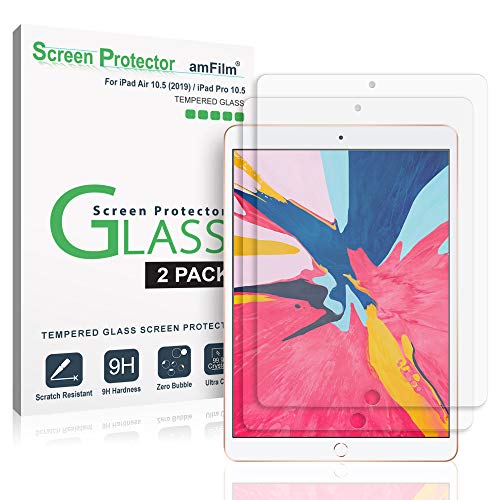
- Designed to Fit: This Glass Screen Protector is specifically designed for the Apple iPad Air 3 (10.5", 3rd Generation, 2019), iPad Pro 10.5 Inch (2017), and is compatible with the Apple Pencil
- Premium Quality: Our Premium Grade Tempered Glass is scratch-proof, resilient, crystal clear, and long lasting. Each protector is custom fit for optimum screen protection. Our protector absorbs damage from daily wear and tear, and has an oleophobic coating that reduces fingerprints and smudges.
- What You Get: Includes 2 screen protectors, installation instructions, dust removal stickers, wet and dry wipes, and a squeegee to help remove bubbles.
- Satisfaction Guaranteed: We guarantee an easy installation with our unique handle application method, and we offer round-the-clock customer support.
Description
Introducing amFilm Tempered GLASS Screen Protectors for your Apple iPad Pro 10.5" 2017.
amFilm Premium GLASS Protectors are the latest in state-of-the-art screen protection technology. Highly durable and scratch resistant/chip resistant, this strong 9H (hardness level) protector will guarantee your cell phone the best protection against drops, bumps, scratches and normal wear and tear. Get all the protection without any bulk - amFilm Glass protectors are a mere .33mm thin making them ultra-light weight to allow for a 'delicate touch' style screen protector that promises not to interfere with the sensitivity of your touchscreen. To top it all off the amFilm GLASS protectors are designed to be 99.99% transparent to promote an optimal, natural, crystal clear viewing experience. Backed by our Easy Install Guarantee - simply align the protector with your device and a simple swipe of your finger adheres the protector to your screen.
Works with:
Apple iPad Pro 10.5"
Kit Contains:
2x GLASS Screen Protector, Wet/Dry Wipes, Dust Removal Stickers, Installation Guide
Color:
GLASS (Ultra-Clear)
Application:
GLASS Screen Protectors are comprised of 3 layers - Two protective film layer and the actual GLASS screen protector. Please use the sticker (tab) as a handle to grasp and fully remove the first protective, plastic film layer before application. And remove the second protective film after application.
Warranty:
30-Day Money Back Guarantee
Lifetime Warranty
I had to come write a review for this protector. Very recently I purchased the amFILM tempered glass protectors for my iPhone. I immediately fell in love with the feel on my phone so I knew I needed to get one for my new iPad.
First off application. This is the first screen protector (and I've applied a dozen or more over the years between my devices and friends and family) that puts grips on the protector to hold it while lining up. I didn't need masking tape tricks anything else. My iPhone protector didn't go on perfect though, there's a corner where it didn't adhere (even after I had hoped it might settle in after a day or two), but it's in a corner and I'm still more than happy with the result. During application of the iPad one however, I immediately hit a dust bubble dead in the center of the screen. I immediately thought "uh-oh", because I never get those out. You pull the screen up to get one piece of dust and either you end up with a fingerprint on the screen, or 5 more dust particles. I pull that one off with one of the stickers they provide and lay it down... sure enough 2 more. I think surely if I pull this off and try to get this that I'm done with this protector and I should just toss it in the trash. I pull it up again, get the pieces of dust, give the screen another quick swipe with a microfiber cloth, drop the protector onto the screen and like magic it starts pulling itself onto the screen again, this time a perfect install.
So as for using these protectors. They're awesome. They have a glass feel to them so it doesn't even feel like there is one there unlike the film-like protectors I've used in the past. There's no friction which is even more important with the Apple Pencil on the iPad which I can confirm works wonderfully. The best thing I've noticed about these though, there's something about their oleophobic coating that's different than that of the one used on the actual screen. In the 2 to 3 weeks of using my phone, I think I've cleaned the screen once. This screen for the iPad is shaping up to be the same already. Fingerprints just don't seem to stick and after a week of using the iPad with no screen protector, I can say that's just not the case with the bare screen. I had that full on fingerprint section where you could see where the keyboard shows up on the screen.
I will definitely be coming back to these for future devices.
Instructions say to use wet wipe to clean screen, then use the dry wipe. Wet wipe is clearly marked om the packet. I first looked for a packet of something like lens tissue. It took me a moment to realize the “dry wipe” was the very small microfibre cloth. I found the microfibre to be too small. My fingers kept slipping off and smudging the screen. I ended up using my own much larger microfibre. I didn’t use the dust removal stickers provided, but used my own compressed air.
I managed to break the first protector glass while peeling off the first cover layer. Fortunately, there are two screens in the box. I was more successful with the second screen. I do like the wing tabs to position the screen. On the first attempt, I had a large air bubble, but was able to lift up a corner of the screen and lower it again. It made a good seal that time.
I also managed to catch a single speck of dust when I re-seated the screen. I know it’s there somewhere, but with the iPad on, I can’t find it anymore.
This was my first glass screen protector. I have installed many of the thin plastic ones over the years, and I have been able to get good results with patience. The tempered glass feels and looks much better, and is surely more durable. It is, however, more tricky to install and less forgiving. The main reason is that it is very stiff, so you cannot (easily) peel it back and get out that inevitable dust particle or two, or easily re-position it.
The tabs are a definite plus and are what I ended up using. I was going to use the hinge method - but when I taped it on one side there was too much give so I just decided to use the tabs and be really careful. The trick is to get it aligned properly because you can't just pull it up easily like the plastic ones - it helped to try a few "dry-runs" before removing the bottom adhesive cover. The cutouts are extremely precise - so if you exactly center the home button and the front camera you should be good to go. Just make sure it is centered to your liking BEFORE you press down or let it start to seal itself to the screen. Once it seals itself to the screen, it is quite difficult to remove.
Even though I was careful, I still got two pieces of dust under the cover. I was lucky in that it was aligned well on my first try, so I just carefully lifted the corners and used a dust removal sticker to get the dust out. To lift the corner, you just have to stick your fingernail under it, but you have to be patient and let it come up on its own. If you don't do this patiently and try to make it go fast, it will surely break. The glass can only bend but so much...
Other than the trickiness, I really like the glass version. As I said above, the cutouts on this are perfect. It's also nice to have two, in case something goes wrong or I just need to replace this one in the future.
I would definitely purchase this brand again.
This review is virtually the same as the one I wrote for the iPad Pro 9.7 and iPhone 7 Plus versions. I purchased all three typesThis is the first one I had purchased. I bought one box, which included two screen protectors - incredible value. Once again - just like before - the product is exactly like those that are 4-6 times more expensive. This is the real deal; ultrathin, HD, thin glass cover that fits perfectly. Application instructions are clear and simple. GREAT customer service from this new and upcoming company when one application failed. Yes; I failed to apply it correctly the first time. Because it is glass, it is important to follow the directions of applying to surface, then smooth out from the middle before it "sets." Apple Pencil works perfectly with this protective surface.
Frankly, I bought this because the price was good for two screen protectors and it was tagged as Amazon's Choice, which just made it a bit easier because I was pretty tired of sifting through the 98765432345676565434543 options out there after having done the same for a case. I figured if it didn't work out I wouldn't be out much and I could always try one of the myriad of other ones on the market.
This arrived on time and was as I expected it to be -- neither of the protectors looked damaged when I checked. Installation was as much of a bother as any other screen protector in that you need to really make sure to clean your screen well first and carefully lay the screen protector on. I didn't have a problem-- I lined up the different cut outs (for the home button and for the camera) and the rest pretty easily just took care of itself. At first it had a couple bubbles but those worked themselves out pretty quickly.
Writing on it with the Apple Pencil is fine and pretty similar to the regular iPad screen. I don't notice a difference and I primarily use my iPad for writing so I think I would get annoyed pretty quickly if the surface was difficult to use. There's no difference in pencil use or sensitivity as far as I can tell. It doesn't add much bulk to the iPad which is nice, though I do notice the increased lip created around the home button but it's not a bother. I haven't had any problems with it cracking or chipping or breaking so far and it's been a few weeks.

0 comments:
Post a Comment