


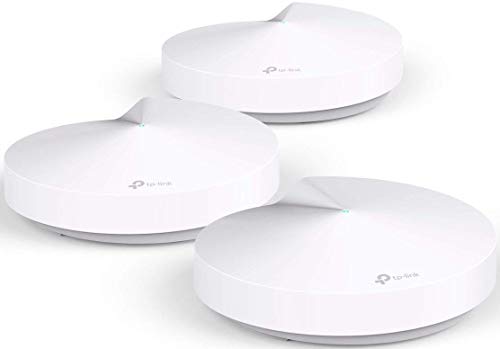
One month in, and we have been extremely pleased with this router so far. We have seen performance equivalent to what is stated in the specs. We bought the 3 pack, which was more than we needed for our 2 story townhouse, but the sale price was cheaper than buying the two pack. We are using only two at the moment, which is giving our home full, high speed coverage. Streaming video in multiple places at once has proven to be no issue. There are some corners of a couple of rooms where buffering used to happen with our old router, that no longer have any issues. It has also given us extended coverage outside for the patio and courtyard, more than 50 feet from the house. Speed tests show marked improvement outdoors, and the range is significantly enhanced.
The router itself is a disc shape with a 4.5 inch diameter, and is white in color. We have the second unit sitting on the fireplace mantel in our bedroom and easily blends in. It could also easily be covered. There is a single green led on the top of the unit, but the app does offer a Night Mode to turn off the light at night if it is not wanted, or you can choose to turn it off all the time. Each of the three disc are identical in size. The one you choose to attach to your modem becomes the “main” one.
When comparing this brand to others, look at the specs carefully. This is not the fastest mesh network available, but it has plenty of speed to match our service speed (300 Mbps). We have several IoT devices (Hue bulbs, Wemo switches, 3 Echos, HomePod) along with phones, tablets, computers, printer, TV/video streaming, security system, and video surveillance. The setup was very easy, and I’m happy with the app. If you have children, there are substantial parental controls available, including limiting amount of time of internet access, when access is available, blocking types of websites or specific sites (I wish I would have had these options when my kids were teens). There is no web setup for the router(s), so you do need some type of mobile device (I used iOS, so I can only speak to that version of the app). The app also offers settings for IPv6, address reservation, port forwarding, DDNS, and VLAN. The only other drawback I see is that there are only two networking ports on each disc. On the “main” disc, one will be used to connect to your modem. So if you need more than one item with a wired connection to the router, you will need a switch.
So far, I feel like the Deco system offers a great price/performance combination, as we got this for under $170 on sale. As of August 2018 there are several highly rated mesh networking options on the market at the moment. This one meets our needs and performance expectations at a wallet friendly price point. My recommendation is to know your needs, and pick a system that prioritizes them.
My original review is below, but I was pleasantly shocked when I opened the app one day and there was an option to toggle each band on or off, plus other good additions. The tech on the phone had originally said it wasn't possible, but apparently they found a way and listened to their customers. SO, I'm going from 1 star to 5 because of this...and because they are flawless in their performance...I just can't say enough good about them. I've had them for several months now and I've never had one single issue. The app is great and I can add my 2.4ghz Iot devices quickly. Great product!
The coverage and performance of the system is outstanding, but unless you try to connect a 2.4ghz device far enough away from any deco AP (or router depending on your settings), the presence of the 5ghz signal will prevent you from connecting. I have several different devices that only run on 2.4ghz and the only way I've found to add them is to be far enough away from the M5 that only the 2.4ghz radio can connect (2.4 reaches farther than 5). With the same exact devices trying to connect, the ones farthest away connected right away. Only after I took the others farther out did they connect.
These broadcast both signals on 1 SSID, so there is no way to choose which radio you connect to, and there's no way to change it in the "cute" app they provide. I gave it 1 star instead of 5 because it's a basic thing to be able to choose which radio, on both ends. They're much cheaper than the competitors I guess for a reason.
Tried contacting Tech Support and it was a nightmare from the get-go. It's very disappointing that they haven't addressed this and all indications are that they won't.
I am so deeply entrenched in the Apple eco system. I hated to take down my Apple AirPort Extreme router, but I was tired of trying to get WiFi throughout my whole house because I couldn’t find a range extender that did the job, and I tried several. I swallowed my pride and replaced Apple with this TP-Link Deco, and am I ever glad! 20 minutes start to finish, three units on two floors. Easiest setup ever, and flawless. Max WiFi everywhere in house. Speed of WiFi exactly same as speed of modem. Great job, TP-Link!
These mesh routers are amazing! I switched to these because my old Apple router was no supported by Apple and I'm glad I did! These mesh routers are so easy to set up and they work so seamlessly. I have an HDHomerun prime that streams my cable signal through the house and I was never able to get it to work on the wireless network since it used too much bandwidth. With these, there is absolutely no stutter in the playback and I can watch the TV signal anywhere in the house now.
I saw some older reviews where it said that some features like port forwarding weren't supported yet, but due to software updates that is no longer true. It seems as though TP-link cares enough to listen to concerns and actually fix these issues unlike my previous router.
The only thing that I was kind of disappointed about was the priority controls. It seems like if you set one computer as the priority, everything else drops to like 0.1Mbps. I was watching a show on Amazon on the prioritized computer and it was running fine, but when I went to IMDB something on my phone, It was taking forever; I have 100mbps internet so this shouldn't have been a problem. It seems like it just a little too aggressive with the prioritization. I liked the idea of the prioritization but I don't think it's executed very well so I just put it on the default standard mode.
Look; I'm not Geek nor a tech wizard. All I knew was that my wi-fi coverage sucked. From room to room, from space to space, it was either blasting or whispering. So I read about this Mesh thing and took a shot.
First of all, the packaging and instructions via your phone are brilliant. First time I ever installed something with such clear and easy to execute instructions.
When I discovered that my mobile phones were not picking up the signal I went online and contacted customer service (the dreaded customer service ordeal). To my surprise, in a matter of seconds that had my problem resolved and with a smile (I assume) they thanked me for using the system and promised to keep in touch.
Well, the thing works like a dream and is the perfect solution to your coverage issues. Its a home run.
No need to get all crazy with spending a fortune - this is more than adequate and you're gonna' love it.
Especially since I can now read my magazines on my tablet in the loo, hear my music in the living room and, ok, answer calls by the pool. How sweet it is.

Feature Product
- If you're looking to ditch your traditional router-extender setup for a whole-home Wi-Fi system, put the TP-LINK Deco M5 Wi-Fi system on your short list - PC mag said
- Unlike traditional routers that can cause dead zones and buffering, Deco M5 uses three units working seamlessly to create a mesh network that can cover homes up to 5, 500 sq. Ft. And keep 100+ devices connected at the same time
- Rather than range extenders that need multiple network names and passwords, Deco M5 allows you to enjoy seamless roaming from room to room, with a single network name and password
- TP-LINK unique Adaptive routing technology automatically chooses the fastest path for every device and allows for more flexible placement than a satellite system
- Easy setup download the TP-LINK deco app, plug in your system, and follow the instructions to get your new home network up and running in minutes
- Comprehensive Antivirus powered by Trend Micro helps protect your personal information and devices (free 3-year subscription). you can also prioritize each device, filter internet content and pause the Wi-Fi for your children
- Industry leading 2-year warranty and FREE 24/7 technical support. Amazon Dedicated Email: Support.Amazon@tp-link.com
Description
Maximum wireless transmission rates are the physical rates derived from IEEE Standard 802.11 specifications. Range and coverage specifications along with the number of connected devices were defined according to test results under normal usage conditions. Actual wireless transmission rate, wireless coverage, and number of connected devices are not guaranteed, and will vary as a result of 1) environmental factors, including building materials, physical objects and obstacles, 2) network conditions, including local interference, volume and density of traffic, product location, network complexity, and network overhead and 3) client limitations, including rated performance, location, connection quality, and client condition. MU-MIMO capability requires both the mesh system and client devices to support MU-MIMO. TP-Link HomeCareTM powered by Trend MicroTM (HomeCare) is included for 3 years from date of activation at no additional cost, after which would require an opt-in subscription at an additional cost. Opting-out of this subscription will disable certain features. For a complete list of HomeCare functionalities go to www.tp-link.com/us/HomeCare. Protocols: Supports IPv4 and IPv6.
Super simple to use, performance is good, and the price is right! We have a 3800 square foot, 50 year-old single level home. Construction technique makes it a challenge for wireless, but the Deco performs well. I bought this one to add to the 3 units we already have. I'm not even sure I need it, but it went on sale and I added one to a room that's furthest away from any unit.
Set up couldn't be much simpler, and it's great to have another layer of protection from viruses and malware. The iOS management app is good and gives you a level of visibility and control that is better than other routers I've worked with. You can even do a remote reboot of the system as I recently did when the FBI advised to do so.
One more great thing about these -- every unit includes two Ethernet jacks. Not all of the mesh systems include an Ethernet jack on every unit.
I purchased this to replace a cable modem/router combo unit I was using in a small office space. My Spectrum Internet speeds are provisioned for 100mbps/10mbps. With my previous modem/router, I was receiving somewhere between 20-30mbps on wireless and about 50-60mbps wired. I replaced the modem with a Spectrum modem and bought this product. My speeds are up to 120mbps on Wi-Fi. The internet feels faster and more stable. I’m very satisfied with this product! Highly recommend this! It was simple to set up and the range is incredible!
This system is very impressive. I set up the 2-pack version in my MIL's 3,000 square foot house. She previously only had the Verizon FIOS modem/router installed, and I had added a range extender, but she was only getting about 9 Mbps in the living room, with a lot of annoying drops. After some fiddling with the Deco M5 to update the firmware on both units, she is now getting 80 Mbps in the living room and the connection is very stable. Awesome!
One tip while setting up: the app is super simple to follow, but you will be creating a new WiFi network, so you will need to update all devices to use the new network. If you need to update your firmware on the Deco (which is likely), your phone will probably revert to picking up the old network while the devices reboot. I didn't realize this initially, and thought I was getting slow speeds - but that was because I was back on the Verizon modem/router network. Once I re-selected the new network in Settings - super fast speeds were back! Good luck!
Setup was more difficult than it could have been. First day of installation and everything was pretty easy until I tried to add the 2nd and 3rd unit. I think it had something to do with the firmware version. When I added the 1st device, I received a prompt to update the firmware, so I did. But then no other devices could be detected or added after that. So I removed the newly added device, started over, removed the newly updated device, plugged in a different device, and then went through the setup process all over again. Then removed it, then repeated everything until the 3rd device was done. Now I had 3 devices that had all updated firmware. So I added the 2nd and 3rd device easily.
Now, I went around the house and checked for coverage but running speed tests (from Infinity/Comcast). I was getting much better speeds throughout my house with these 3 until dispersed throughout the house compared to the single TP Link AC 1750 router I had before (which ran flawlessly for 3 years by the way).
My Ring doorbell now has better WIFI access, which it was suffering from before. My wife couldn't get her iPhone and iWatch updated in the bedroom due to poor WIFI - that's all completely resolved now with the Deco M5s.
I'll report back later after I'd had this for some time.
Replaced my 3 node AC1200 home WiFi network with these 3 M5 Decos. Very easy setup from my phone. Amazing improvements in signal strength, coverage and throughput. Speedtest shows 440 Mbps down from my phone standing near the cable modem and deco disk. Not sure how that is possible with 300Mb service. Never tested above 250 Mb on my old network. Airplay benefits greatly from the expanded WiFi coverage. Now I can stream from Amazon Music without losing signal as I walk to far ends of the house. With a single SSID plus guest network, We went from 7 SSID’s to 2, and only one that we use. The Deco automatically switches to the optimal router and frequency as locations or devices change. Lovin the Mesh network technology. Well worth the price paid.
Thanks for give us valuable information If you are Looking for D-link Support , visit on
ReplyDeleteD link default password
d link router page