


I have been using Roku for years,including several different models.The best new thing of note is Roku has recently released The Roku Channel,which has hundreds of free movies.It is ad supported..And now Locast.org app gives you free local broadcast stations CBS,NBC,FOX,ABC,PBS.Locast now offers local TV network broadcasts for New York,Boston,Chicago,Houston,Dallas,Denver areas and plans to add many more cities.This means many folks will no longer need antennas to watch local networks for free. Roku has just about every app you can imagine (YouTube/Pandora/Netflix/Amazon/Hulu/HBO Now) plus thousands of more apps in many different categories.Here are some points to consider when deciding on which model of Roku to buy:
1)If you need to connect by WiFi in a room far away from your WiFi router,I would recommend the Roku Streaming Stick PLUS or Roku Ultra.
2)If you have a 4K TV,I would recommend the Roku Ultra or Roku Streaming Stick PLUS.The Premiere 2018 model also plays 4K.
3)To search for content using your voice,go with either the Streaming Stick,Streaming Stick PLUS or Ultra.All 3 of these models also have a remote that can control the power and volume on a TV.
There is also a Roku app for Android & iPhone/iPad that lets you use your smartphone/tablet to control any Roku device and use your phone/tablet on-screen keyboard or voice for searches.
4)If you want a wired ethernet connection,go with the Roku Ultra.
5)If you want to connect to an old TV with RCA/Composite audio/video jacks,you will need the Express PLUS
6)The Express and Premiere 2018 models have a remote where it has to be pointed at the device,unlike the other Roku models.
7)If you are only going to buy one Roku device,I would recommend the Roku Ultra.The Ultra has many unique features that the other Roku models don't such as:
-Gaming buttons to play video games
-Remote finder to find a lost remote control
-Ethernet port for a wired connection
-Micro SD card slot
-USB Port
-Night listening mode (this lowers the volume of loud,explosive sounds and raises the volume of soft sounds like whispers.Very useful!)
-Headphone jack on the remote for listening without disturbing others
For those who have not used a Roku before,here are some tips that might be helpful:
1)There is no monthly fee to use a Roku.There are many free channels/apps with free movies,music and TV programs and some people use Roku only for the free channels and do not pay any fees.
You do NOT have to enter credit card info if you only wish to view free content and you can always add credit card info to your account later for paid channels/apps.If you plan on viewing free content only,I suggest setting up a Roku account before you activate the device.When you reach the page to enter credit card info,some browsers will show a "Skip,I'll add later" option at the bottom.If you do not see this option,simply log out of your account,then log back in.You may have to then enter a different activation code for your device if you skip entering credit card info during device set up,but you do NOT have to enter credit card info if you only want to view free content.
2)Some of the most popular free channels/apps are: YouTube,Pandora radio,The Roku Channel,Pluto TV,Tubi TV,Crackle,CBS News,NBC News,ABC,PBS, PBS KIds and many more.You can also find a free live stream of FOX News on YouTube by searching "Fox News Live" on YouTube.
3)Some of the most popular paid channels/apps are Netflix,Hulu,Amazon video,HBO Now,Vudu,Sling TV,Spectrum TV and Direct TV Now.
4)If you are looking for a bundle of channels of live TV to replace cable TV,check out Sling TV,YouTube TV,Spectrum TV,Direct TV Now,Hulu,Pluto TV and Playstation Vue.All of these are paid services except for Pluto TV,which is free.
5)To find and add new channels on Roku,just press the Home button on the remote control,scroll down and select "Streaming Channels".There you will find thousands of channels/apps in many different categories and many of them are free.
My one gripe about Roku (and other streaming devices) is the lack of a fully functional web browser and I hope Roku will include web browsing on models in the near future.I have been surfing the web on the big screen for years and find it ridiculous when an internet connected TV device does not allow you to surf the internet and forces one to switch to yet another internet connected device to do so.
I am aware of screen mirroring function from smartphone/PC/tablet but find that a poor excuse to not include a web browser.Many people who type a lot of messages and/or emails like myself prefer typing on a wireless keyboard rather than a phone/tablet/remote control.
Bottom Line:You can now get a Roku device to replace your cable TV box & service or to replace an antenna for free local network TV.And of course you can create your own custom TV experience that simply is not possible with cable or antenna TV.
I have to tell, this is the most wonderful and easy to use device I ever owned. I have a few Google cast sticks in my home, but the ROKU is much much better! I accidentally stumbled up on the thing as a recommendation from our cable guy. Where we live, Time Warner Cable was taken over by Spectrum and recently they decided to go all digital so every TV in my home needs a cable box, which was a sudden surprise because we have 6 TV-s and we just did some remodeling recently and work extra hard to have the TV-s on the walls neatly. We did not wanted to have anything around them because the space is limited and after all what's the point to hang a TV on the wall nice and flat and then install a stupid cablebox somewhere sticking out 3 times more and collecting dust... I know whit long enough HDMI cables and RF remotes we could solve the problem after all nothing is impossible these days but everything is extra cost and again just because Spectrum cable decided to not to send signal in their antenna cables anymore... So in this upsetting situation our cable guy came and save us whit a great advice, to buy a ROKU stick and check it out. The reason why the ROKU, because this is the one and only media stick which supports the Spectrum cable app and we can watch all the channels what they provide and we are paying for it already! Of course ROKU supports others as well, like NETFLIX and even Google Play, so they don't discriminate anyone! I can't do anything just recommend this little stick to everyone! I was worried about not to be able to record my favorite shows anymore, but the cable guy said, don't worry, because everything is on-demand these days, even if it's not the same day, you might have to wait a day or two, but that's okay we can live with that. Just in case we still have a DVR cable box in our living room on the biggest TV for shows like the Superbowl... :)
Set up was very easy and the stick supports 2.4 or 5 GHz WiFi signals so the streaming is buffering free all the time. Our cable guy said the main reason why they go all digital, because in the old way, the TV signal eat up half of their bandwidth and this will help to speed up the internet as well so at the end it's a win-win situation for everyone. And the ROKU stick helps a lot, we don't have to rent a cable box from the cable company for $11.00 per piece per month... We got ours on Amazon but it's widely available of course and for $40.00 it will bring back their price under a few months compare with the renting! The available channels and contents are overwhelming, we still learning what is worth to watch, but the combination of Netflix and Spectrum and our own Google account, the possibilities are virtually endless. And if you can't find anything you can stream your family or vacation movies from your own phones and tablets. Or listen Pandora radio for example!
AWESOME AWESOME AWESOME!
Now I just have to buy 3 more for the kids rooms... Yay kids! :)
It is very rare when I write reviews but for a company who works this hard and created such a good little device they deserve it!
They even give away free HDMI extenders if your TV doesn't have a side HDMI port and you can't connect the ROKU stick in the back because your space is limited (which is the case with one of my TV-s)
When my cable bill nudged over the $200 per month mark I was furious. I called Comcast our cable provider and asked them if they could do something about the price. They didn't seem interested in cooperating with me. So Roku here I am. I've installed Roku on one of my television sets with excellent results. The problem is that I don't watch half the programs normal cable systems provide. why pay for something you don't use? Roku has so many great movies and shows. Some have a nominal fee per month but not a thing like big cable charges. We are very pleased with the results we have obtained. You don't have to be a genius to set it up. its a one time cost and I even purchased our own router instead of paying big cable a 10.00 a month rental fee. I only wish I had gotten smarter sooner.
I've used a few different streaming sticks (older roku model, Amazon fireTV stick, and whatever googles hunk of crap is called now). This by far has been my favorite and the only one I'd recommend to anyone. Same great Roku interface but the improved wi-fi capabilities ensure that it doesn't buffer when watching content (I typically use SlingTV, Hulu, Netflix and Youtube);works flawlessly with all those. Plus there is the new volume button on the remote that automatically synced itself to my TV so I was able to consolidate down to one remote! Highly recommend it to cord-cutters and anybody who regularly streams video content.
We are a family of two Roku TVs and a Roku (last years version of this model- 3600R). The problem was the 3600R in the family room did not control the TV power and volume. I was about to order a sideclick when I heard about this new model. The sidelick is $29 here on Amazon and the new Roku was $49. Plus the sideclick added some clunkiness to the remote.
I just received this today and setup was very quick. All I did was unplug the old roku and use the same power adapter and cord. The roku comes with two Duracell AAA batteries. After I connected it to my wifi it updated it's firmware. Then it auto-detected the resolution of my Sony TV (1080p). Next it played some music and asked if I heard it. I clicked OK and it muted the music. It asked and I confirmed if the music was not playing by clicking OK a second time. Voila...remote setup for TV power and volume. I signed into my Roku account and it downloaded the apps.
I'm not sure what the other reviewers issue was with this controlling his soundbar. I have a 60" Sony TV connected to a Vizio S5430W-C2 Soundbar. It works perfectly fine. I do use HDMI-ARC as the connection to the soundbar so that might be the issue.
The other feature that is added to this remote is the voice search. I haven't played with it too much and will update my review.
I bought this from Amazon. Please note the Walmart version has the hard coded Vudu button (I don't use Vudu). The Amazon version has DirectvNow as its bottom right button. I subscribe to PS Vue but we might switch over to DirectvNow in the future.
The only con I can say is there is no mute button. They could have put a third button below the volume controls. There also seems to be a little bit of play with the volume rocker but maybe that is by design.
So far so good. I didn't need this as my existing Roku from last year worked perfectly fine. I just wanted to get something posted as there are only 4 reviews and one was saying it didn't control the soundbar.

Feature Product
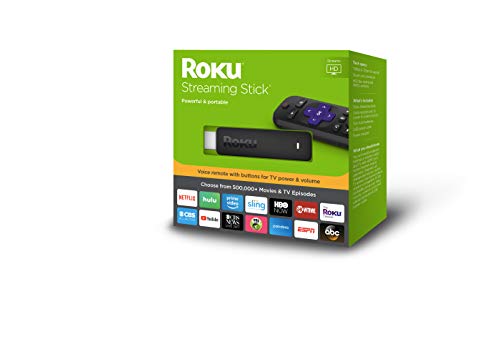
- Powerful and portable streaming stick
- Voice remote with buttons for TV power and volume; Compatible with voice-enabled devices featuring
- 500,000+ movies and TV episodes, with voice search across 1,000+ top channels. Plus, catch hit movies, popular shows and more with no subscription or fees on The Roku Channel
- Tons of streaming services available. From movies and series on Netflix, Prime Video, HBO NOW and SHOWTIME to cable alternatives like Sling TV or YouTube TV to live sports and news on CBS News, ABC News and ESPN
- Free Roku mobile app for private listening, voice search and more. TV Compatibility- HD TVs - Up to 1080p (1920 x 1080) with up-scaling from 720p.4K UHD TVs - Up to 2160p at 60fps (3840 × 2160) with up-scaling from 720p and 1080p. TV must have an HDMI input that supports HDCP 2.2.4K UHD HDR TVs - Supports HDR10. TV must have an HDMI input that supports HDCP 2.2
Description
Powerful. Portable. Enhanced voice remote. The Roku Streaming Stick gives you smooth streaming with channels that launch in a snap. Easily hide it behind your TV or move it around the house, you can even take it to a friend’s. No more juggling remotes, our new voice remote lets you easily control your TV with buttons for TV Power and volume. Use your voice to search across top channels by actor, show and more. Enjoy 500, 000 Plus blockbusters, award-winning original Series, kids’ shows, live network TV, and more
It does what it is supposed to do and is stealthy without any wires.
Cons: you need a few extras:
1 - HDMI extender (free from roku but must be ordered)
2 - Usb/mini connector to power the stick (only needed if you don’t want to use a traditional plug)
I bought the usb power cord advertised with this product. It is 5 inches long according to the specs. This is a tight fit. Try to get something that is 7 inches.
***REMOTE ISSUES***
If you have issues with your remote, order the HDMI extender (free of charge).
My remote worked perfectly for a week and then it became useless. It was a horrible experience.
I then had to use the iphone app and the roku stick worked perfectly. That was great because I knew only the remote had issues.
I called roku and they sent me a new remote but while talking to them I found a link requesting the HDMI extender (yes...I was talking and surfing the web).
The extender gives about 3 inches of space from the HDMI input. This was enough for my remote that I had previously thought was broken to work just fine. I haven’t even opened the new remote from its packaging.
It does; however, look weird if you take a peek behind the TV.
I recently replaced my Roku 2 XD in my bedroom as the hardware just could not keep pace with all the software updates. Sure, it still worked, but barely. In other words it was painful to continue to use. We don't subscribe to cable and instead use an OTA outdoor antenna along with streaming for our entertainment. The Roku has been a great platform for our streaming content.
When I was looking to replace my second generation Roku I considered the new Roku Express. I decided to go to this stick instead for about 20 bucks more as it had a quad core processor, a better remote and worked on WIFI AC/5GHZ networks. In other words, it was more future proof.
First, this thing is fast. I have two other Roku 3's and this stick is faster. The install was easy, but I wish you didn't have to enter all of your pass codes again. What a pain! It would be nice if Roku figured out how to synchronize all your passcodes from a single account.
The stick plugs directly into your TV's HDMI port and gets its power from a standard 5V USB port. My older Plasma TV didn't have one so you simply plug in the power adapter, (which is included) into a wall socket and then plug the USB cable, (also included) into the micro USB port on the stick.
Something I really like about this remote is it configures itself to adjust your TV's volume and turn the TV on and off. Very nice! It also has a voice search function. Roku also provides an App for either your Apple or Android smart phone to take over for remote activities. The remote that comes with the stick does not let you plug headphones into the remote like on the Roku 3 and other, newer models, but you can use your smartphone for this instead. BTW, the smartphone app works really well and can even let you display pictures from your phone directly on your TV. There are two interfaces to choose from. One works just like the Roku remote and the other lets you slide your finger across your smartphone screen for faster navigation.
My TV is an older 480P model and I have no intentions of buying a 4K TV anytime soon. However, you can spend another 20 bucks to get the plus version of this stick which will stream 4K content if you have a newer TV.
I did connect my stick to my WIFI 5GHZ AC network and it streams just fine with a strong signal from across the house. One other thing to mention is the Roku remote manages the Roku TV application via WIFI, so no need to point your remote directly at your TV. However, it uses infrared to control the volume and on/off of the TV.
I'm really impressed with the functionality and speed of this stick and highly recommend it for the money.
*edit It does have YouTube TV now. I originally gave it a 4. Still going strong and definitely recommended! I bought my family one
The only thing keeping me from giving this 5 stars right now is that it does not support YouTube TV. It does have Youtube, but not Youtube TV for streaming. I didn't know this before I bought it and it was a letdown, but I did read that it should be coming to Roku very soon. I saw that it supported Youtube, so I just assumed it supported Youtube TV as well. Other than that this thing is pretty amazing. I had a first gen Chromecast which had been giving me problems for a while, so it was down to this or the Amazon Firestick for me. I chose this over the Firestick because Amazon obviously does not work with google which I use frequently.
Streaming is very smooth. I was a little worried for the first 10 or 15 seconds I started streaming a movie because the quality was very bad, but then it went to HD quality. I was surprised at how good the quality was. I guess it just takes a little time to buffer. The only other negative is that I can't control the volume on my receiver and the remote doesn't turn the TV power off, but I may just have to play with it some more.
I have had DirecTV for years, and I have finally decided to 'cut the cord' after they announced another price hike this month. What other way to try and keep customers from ditching cable, than to increase prices even more! I've already been paying over $150 per month for cable. I don't know why it took me this long, but I wish i had done it sooner. I pretty much just watch my local sports teams, the news, and a handful of shows. I've only tried Youtube TV, which I really like, but since they don't support it at this time I'll give Hulu and Sling a try. Highly recommended
Holy cow this thing is amazing. I've been in the technology industry for over 20 years. I've built streaming servers, setup video conferencing and streamed media into my home for years now. I thought this little thing would buffer and skip and freeze time and time again. I have a ton of channels installed on it, my kids use it a lot, I use it all of the time and the little thing just works flawlessly 24/7.
Additionally I'm blind and I wanted to find something accessible where I could watch all of my Netflix, Hulu, Xfinity, Amazon Video and the lot. 99.99999% of the options out there don't do all of my providers or are only partially accessible. With this little Roku I can easily browse my media options, make a selection and enjoy all kinds of movies and music. Also, as a side note, if you or anyone you know is blind or visually impaired Netflix and the rest offer audio description for many shows and movies. Check it out on the website for the provider.
This is my second Roku Streaming Stick. I am using my first one almost daily and decided I would like on in my office too. This is of course a newer version and has the TV sound volume right on the Roku remote control. No need to switch between remotes! It also has a voice command search with makes it much easier than typing out a title one letter at a time.
Super easy to install, everything you need comes in the box. And even easier to set up. Excellent way to bring thousands of programs to your TV at a very affordable price. And as always speedy shipping with Amazon.

0 comments:
Post a Comment