


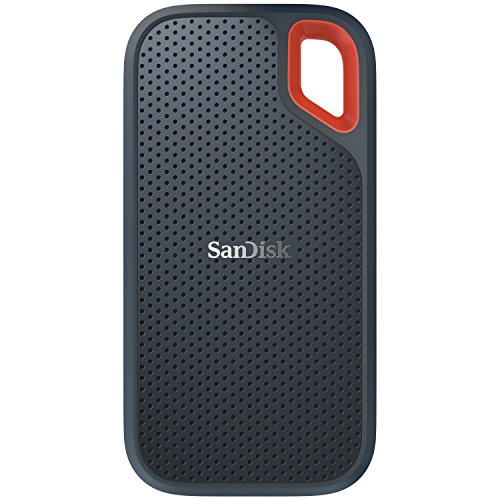
In short, I needed an SSD to back up my MacBook Pro. In the past, I used a spinning hard drive for backup using SuperDuper software and the process was painfully slow. Often, for about 500GB of data, the backup and restore took up to an hour.
With an internal SSD on my MacBook Pro it made perfect sense that the destination backup should also go on an SSD drive where transfer speeds would significantly increase. One more thing to consider: spinning hards drives have a much higher failure rate than SSD drives. I can't begin to tell you how many spinning backup drives I have purchased in the past that have ultimately failed.
SSD is the future and the fact that prices have dramatically decreased on these drives gives no-one an excuse for not buying them.
I did a lot of research on various SSD drives before selecting this SanDisk 1TB drive. My first choice was a Samsung in a colorized metal case. The reviews, however, led me to believe that there were some major issues with the Samsung drives as they included embedded software that was difficult to remove. This is not something anyone wants when buying an SSD drive.
Reading the reviews on this SanDisk Extreme, it was easy to see that this would fit perfectly for my needs. The reviews across the board were very positive. No embedded software. This particular SSD has been rated as one of the very fastest USB drives available on the market as of this date.
Upon arrival, I was astonished at how small this drive actually is. I mean, it's absolutely tiny. You can fit it into your jeans pocket and you would not feel it. We really have come a long way in external SSD drive portability.
I am not particularly happy with the covering on this drive. It's a dust magnet. The second I placed it on my table it had already collected airborne dog hair. However, on the plus side, this thing is so rugged that you can drop it from just about any height and it won't break. So, I guess that is more important than anything else.
It was nice to see that the drive includes a USB-C cord with USB-A adapter. The cord also securely fits the drive without any wiggle. The only thing negative I have to say about the cord is that it's too short.
I am including in my photos the result of a recent backup of my MacBook Pro via SuperDuper software. You can see that about 425GB of data was backed up in 30 minutes time. With a spinning drive, that would have taken 2-3 times longer. This drive is really super fast!
This drive does come formatted for Windows. If you buy it for your Mac, you need to go to DISK UTILITY (in your applications folder), select the SanDisk drive, then click on ERASE. You will want to format the drive in OSX Extended Journaled. The format takes seconds to do. You are then ready to transfer data to the drive.
By far, this is the best SSD drive I have ever owned. Do not hesitate to consider this above any other.
When I purchased this it came in ExFAT format and I tried to copy one of my 16GB folders, which contains 750,827 Files, and 20,483 Folders. The drive could not copy this entire 16GB folder onto the 500GB drive. After reading a little bit about ExFAT and smaller files, I reformatted to NTFS, which took all of two seconds to do. I was then able to copy all my files (130GB) onto the Sandisk 500GB drive without any problems. In fact, this thing FLIES! I love it and hope that it lasts for years.
Super fast and super portable. Using the 1TB version, I'm getting an average 470 MB/s write and 515 MB/s read with a 2016 MacBook Pro over USB-C. The drive weighs absolutely nothing. The hole in the top is perfect for a carabiner to fit through and hang from a tab in my backpack.
2 gripes:
1. I wish the USB-C to USB adapter was permanently tethered to the cable, and that the cable had a way to clip to the drive.
2. Good-luck ever getting the warranty registered on this thing. The San-Disk warranty registration page is AWFUL. I tried to register it for almost an hour in a few different browsers and it kept telling me S/N doesn't match product. I bought it directly from Amazon as the seller or I'd worry that it was a knock-off. They make great products, but their website UX leaves a TON to be desired. Ended up reading on-line about several other people having this same issue with the site.
2/7/19 UPDATE:
Still love this thing - In fact, I also got the 2TB version. It is fantastic for dumping video footage on a shoot or other fast transfers. I always buy a few cheap 4 or 5 TB WD or Hitachi portable drives (currently in the $120 or less range) for redundant back-ups when I have 10x as much time available to back-up at leisure. No matter what - if it is data I need to keep, I always have redundant backups. (EVERYTHING can fail - or get lost - or stolen...) This drive, however, wins for convenience, speed and portability. Usually about every month I erase and replace about 750GB worth of data on this and about 1.3TB on the 2TB version. They have both performed reliably and been a huge time saver when I'm working on the road an under time crunches.
Pros: EXTREMELY fast and very small ... It blows away all my other external drives ...
Cons: Very expensive and this SSD runs hot while running large file transfers ...
The drive itself is amazing. It's tiny, light, and fast as hell, truly living up to the promised 550 MB/s.
That said, if you plan to use this drive for anything other than movies, music, and pictures, you need to format it before using it. This is especially true if you plan to use the drive to back up your phone or computer. Out of the box, the drive is formatted with exFAT and an allocation size of 1 MB. That means that any file less than 1 MB takes up 1 MB of space. 1 MB may not seem like much on a 250 GB-2 TB drive, but with the myriad of small files that show up on backups taking up 1,000x more space than normal, it adds up. See the attached pictures for a small text file taking up 2,700x more space than it actually is and a 177 GB backup taking up an extra 73 GB on the drive.
I mention this because it's an easy fix. According to the command line, the sector size on the drive is 512 bytes, meaning there is no reason to have an allocation size that large. All you need to do is format the drive as exFAT and select a smaller allocation size than 1 MB. Microsoft recommends 128 KB, but you could go as small as 4 KB or as large as 256 KB and still be far more efficient than the factory 1 MB allocation size.

Feature Product
- High-speed transfers with up to 550MB/s read speeds let you move hi-res photos and videos fast (Based on internal testing; performance may be lower depending on drive capacity, host device, OS and application.)
- Ruggedized, water- and dust-resistant (IP55-rated) (IEC 60529 IP55: Tested to withstand water flow (30 kPa) at 3 min.; limited dust contact does not interfere with operation. Must be clean and dry before use.)
- Shock-resistant solid state core for greater durability (Shock-resistant (up to 1500G) and vibration-resistant (5g RMS, 10-2000 HZ), Non-Operating Temperature(from -20°C to 70°C), operating temperature (from 0°C to 45°C))
- Compact and pocket-sized. Compatible with PC & Mac computers - no driver needed. Compatible with Windows 10, Windows 8, Windows 7, Windows Vista and Mac OS 10.4+
- For PC and Mac users
- Built by SanDisk, a technology leader and pioneer of the modern day SSD, to deliver superior performance
- 3-year limited manufacturer warranty
Description
The ruggedized SanDisk Extreme Portable SSD delivers high-speed transfers with up to 550MB/s read speeds.** This makes it perfect for saving and editing hi-res photos and videos. With an IP55 rating, it also stands up to rain, splashes, spills and dust.(1) | *1GB = 1,000,000,000 bytes; 1TB=1,000,000,000,000 bytes. Actual user storage less. | **Based on internal testing; performance may be lower depending on drive capacity, host device, OS and application. 1MB=1,000,000 bytes. | (1) IEC 60529 IP55: Tested to withstand water flow (30 kPa) at 3 min.; limited dust contact does not interfere with operation. Must be clean and dry before use. | (2) Up to 2M (6.5’) on a concrete floor | (4) Shock-resistant (up to 1500G) and vibration-resistant (5g RMS, 10-2000 HZ), Non-Operating Temperature (from -20 degrees Celsius to +70 degrees Celsius), Operating Temperature (from 0 degrees Celsius to +45 degrees Celsius) | (5) Password protection uses 128-bit AES encryption and is supported by Windows 10, Windows 8.1, Windows 7 and macOS High Sierra, Sierra or Mac OS X El Capitan
Storage Temperature: -4ºF to 158ºF (-20ºC to 70ºC)This unit is very fast and it is a high quality and reliable product. I was not able to register the product on the website. The serial number was not recognized. I may call SanDisk to know why.
This is a great little portable SSD. I’ve almost exclusively used Sandisk flash drives for the past 15 or so years with few issues. It is amazing how much the price per GB has become and while I was somewhat interested in this drive when I first saw it, the $300-$450 asking price for the TB was a bit too much to get be to buy one. When I saw it on the prime day sale for $200 I knew I wanted to pick it up.
It’s very small in size and as you can see by my picture it is about 5x the size of a regular Sandisk flash drive. It is very basic and I don’t think I see any lights come on but it has one USB C port and it comes with a short male USB C to male USB C cable with a USB C to USB 3.0 adapter.
I didn’t buy this specifically for speed but using the USB C to USB 3.0 on a computer with USB 3.0 has been about as fast as expected for both read and write speeds. I won’t likely be doing a speed test but if you’re interested you can find them online and just know that it will be speedy and much faster than the old HDD or USB 2.0 drives.
I bought this in part to back up my photos of my baby and even with the RAW photos I should have more than enough room for years to come. I don’t know that I prefer this to a flash drive because the capacity is already comparable and you get a much smaller package. Also in a few years they will likely have larger capacity flash drives with comparable speeds and a similar if not better price point. I am a fan of Sandisk and am impressed with this little drive. The current price is $250 which would probably deter me still but if you can find one for $200 I think that’s a great deal and can recommend it.
I cannot believe you can get such a perfect drive with so much memory packed into such a tiny package that works so well for such a low price. Sorry for the run-on sentence, but this little hard drive blows me away. Using it with a Macbook Pro. For Apple users only: when you get it, get rid of the pre-loaded software. This is very easy to do even if you are a complete novice. Go to Disk Utility and Erase. Name it whatever you want. Format as Mac OS Extended (Journaled), Scheme GUID Partition Map. That's it! You now have the most versatile solid-state portable external drive out there. One note: it does get quite warm if you transfer a lot of data over extended periods, but that hasn't affected its performance for me in the slightest. Lightning fast, even with USB 2.0.
So far so good - Actually, really great. Flawless, speedy performance in a tiny package - It's smaller than I expected. The industrial design of this item is wonderful - stylish, tactile, grippable - big kudos to the design team. I've had problems with the connector on other SanDisk flash drives before, but this one works flawlessly.
Absolutely blazing fast - exactly what I needed. I am very glad that the USB "C" cable comes with an adapter to USB 3 input though - I had thought that I had a "C' port on my laptop, but oops, no I don't. I acquired a couple of "C" to "3" cables for my most used backup sites (not expensive)
Perfectly portable and it is very robust. Yes, I've already dropped it, but with no consequence - it replaces a supposedly "ruggedized" sata drive that I dropped, and still managed to kill (thank goodness for paranoid triple-redundancy)! 😱
I use this drive to transfer medium-term backups of my latest photos from SD and CF cards to cloud and hard drive backups on laptop or tablet. Easily a 5* product.

0 comments:
Post a Comment