


For those complaining that it doesn't output sound, you are wrong. You didnt follow the instructions ETA Prime gave you. You don't jack it into the Raspberry Pi, that isn't how HDMI works. You run the line out of the controller to an external amp for sound.
I used this to modify my 1up Arcade, and then sold the arcade for a nice profit.
The device worked wonderfully.
The monitor is Model # M170ETN01 1.
If you are using this monitor with this adapter, it will work great. The power supply on the 1up will fit into this adapter. Hint, the red wiresm go on your left side with this adapter and the 1up M170ETN01 1.
The white ribbon wires will stay in the same place (these connect to the board with the buttons)
You can ditch the other part as it is not needed with the 1up Arcade.
Please check the model number of your monitor to assure compatibility. Not all monitors in the 1up have the same model number. I included a picture with the monitor (model number clearly seen) and the set up I used. Note the power plug, in the picture, is not in place.
Shipped and arrived very quickly. Works perfectly out of the box. Just follow directions on ETA Prime video for Arcade1up.
I wanted to offer my experience with the buzzing / no audio some people mentioned. I had the same issue. The problem is not with the LCD driver. It's a configuration setting in the Pi. I had to add a line to my /boot/config.txt file to force the audio to the HDMI output. If you search online for "retropie no hdmi audio" you'll find the answer. There are 3 lines I had to uncomment or add in the file to get the HDMI working. Apparently, the Pi doesn't recognize this HDMI board right off and has to be forced to output HDMI video and audio in the config.txt
For the audio I had to add the following line:
# May not be needed for all HDMI devices
hdmi_force_edid_audio=1
That got my audio working perfectly.
Also, be sure to use the audio jack on the far right of the board.
For those who are on the fence on taking the risk with this product, be assured that it works with the Arcade1Up M170ETN01.1 monitor display model that comes with the SFII cab although the description does not have that model. I, like the rest of the you, did a ton of research and had conflicting results. I completed my mod today and was very pleased with the outcome.
Yes, you are welcome!!!
I got this to convert the input for my arcade 1up to connect a raspberry pi. I just followed someone's instructions on YouTube and works as it should. I didn't even need to buy a power supply since my arcade 1up has a power supply that is compatible with it! I set aside 1 part that wasn't really needed in my build. Works great and decent price. Highly recommend for people that want to mod their arcade 1up machine to play raspberry pi.

Feature Product
- Operation Voltage 9~16V DC Worked Great For Arcade1UP Monitor To Use The Raspberry Pi
- M170EG01 M170EG02 M170EN01 M170EN04 M170EN05 M170EN06 LM170E03 LTM170EX
- LTM170EU LTM170EH LTM170E5 LTM170E6 LTM170E8 HSD170ME13
- LM190E02 LM190E03 LM190E08 M190E5 G190EG01 M190EG02 M190EG03 M190EN01 HSD190MEN4 HSD190ME11 HSD190ME12 HSD190ME13 LTM190EX LTM190E1 LTM190E2 LTM190E3 LTM190E4
- 12V 3A DC power adapter required and sold separately Came With The Necessary Screw And Nut To Properly Ground The Board.
Description
Fit For:
17inch 1280*1024:
M170EG01 M170EG02 M170EN01 M170EN04 M170EN05 M170EN06 LM170E03 LTM170EX
LTM170EU LTM170EH LTM170E5 LTM170E6 LTM170E8 HSD170ME13
19inch 1280*1024:
LM190E02 LM190E03 LM190E08 M190E5 G190EG01 M190EG02 M190EG03 M190EN01 HSD190MEN4
HSD190ME11 HSD190ME12 HSD190ME13 LTM190EX LTM190E1 LTM190E2 LTM190E3 LTM190E4
Package content:
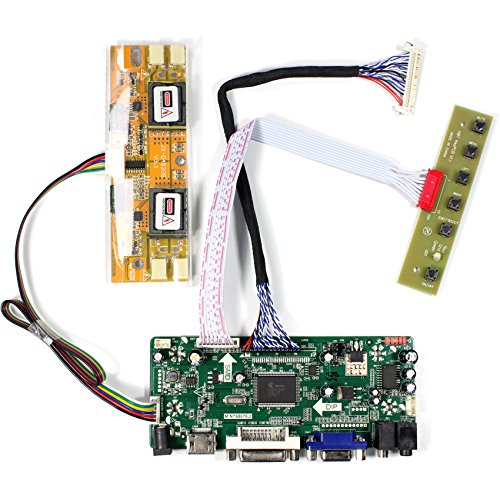
1× HDMI+DVI+VGA+Audio lcd controller board
1× FIX-30Pin LVDS Cable
1× 4CCFL inverter board
1× Keyboard with Wire
1× Screw And Nut To Properly Ground The Board.
Note:
1.Power Supply is NOT included
2.If you dont know how to connect the Screen,please feel free to contact us
Very easy plug and play install. Since I had LED lighting, I didn't use the high voltage florescent power supply that came with the controller but the connections were the same to the LED power supply and the new combination worked 100%
I purchased this controller board to complete a gaming cabinet using a Raspberry Pi in a 1UpArcade cabinet. The board worked flawlessly and was extremely simple to setup. I would absolutely purchase this again.
This worked great with my street fighter 2 arcade 1up cabinet. Only downside is that I needed a grounding screw that didn't come with the kit so just be aware you will need to have your own grounding screw.
Plug and Play with Arcade1up and Raspberry PI! Not sure what the satellite board is for, but just discard it and plug the small.cable from the monitor into where it was plugged into.
Worked great to put a Raspberry Pi in an Arcade 1UP cabinet. Been going strong for a couple months now with no issues. Plug and play.

0 comments:
Post a Comment